JWT Explained: How JSON Web Token Authentication Works
Every secure web application must answer two questions on each request: authentication ("Who are you?") and authorization ("What are you allowed to do?").
A JSON Web Token (JWT) is one of the most popular ways to carry the answers to those questions from the client to the server. In this tutorial you will learn what a JWT is, how it is built, how it is checked, and how to create and validate JWTs in Java and Spring Boot 3, with simple examples.
1. Why Token-Based Authentication?
Traditional web applications use session-based authentication. After login, the server creates a session, stores it in memory or a database, and gives the browser a session ID cookie. On every request, the server looks up that session to find the user.
This works well for one server, but becomes harder as an application grows:
- Every server must be able to find every session, so sessions must be shared or kept "sticky" to one server.
- Millions of users mean millions of stored sessions.
- Each request may need an extra lookup in a session store or database.
- Mobile apps and other services do not handle browser cookies as naturally as websites do.
Token-based authentication takes a different approach. After login, the server gives the client a signed token that already contains the user's details. The client sends it with each request, and any server can check it on its own, with no shared session store. JWT is the most widely used format for such tokens.
2. What Is JWT?
A JWT (JSON Web Token) is a compact, URL-safe string that carries a small JSON object between two parties. It is defined by the open standard RFC 7519.
The JSON inside a JWT holds claims, which are statements such as "the user is riya", "she has the USER role", and "this token expires at 10:15". The token is digitally signed, so the server can detect if anyone changes even a single character.
JWTs are mainly used to:
- Authenticate users after login, without server-side sessions.
- Authorize access to APIs, based on the roles or scopes inside the token.
- Exchange information safely between services that trust the same signing key.
3. Key Features of JWT
| Feature | What It Means |
|---|---|
| Compact | A short string that fits easily in an HTTP header or URL. |
| Self-contained | Carries the user's ID, roles and expiry time inside the token itself. |
| Tamper-proof | A digital signature shows whether the content was changed. |
| Stateless | The server does not have to store a session for each user. |
| JSON-based | Easy to create and read in almost every programming language. |
| Fast to verify | Checking a signature is usually quicker than a database lookup. |
| Works across services | Any microservice with the right key can verify the same token. |
4. Structure of a JWT
A JWT has three parts, separated by dots:
Header.Payload.SignatureEach part is Base64URL encoded, which turns it into text that is safe to put in URLs and headers. A real token looks like this (split over three lines to make the parts easy to see):
eyJhbGciOiJIUzI1NiIsInR5cCI6IkpXVCJ9.
eyJzdWIiOiJyaXlhIiwibmFtZSI6IlJpeWEgU2hhcm1hIiwicm9sZXMiOlsiVVNFUiJdLCJpc3MiOiJqYXZhYnl0ZWNoaWUtZGVtbyIsImlhdCI6MTc2NzIyNTYwMCwiZXhwIjoxNzY3MjI2NTAwfQ.
ds-J2QIlVHzUy3LvBInnBZz7TwPoyNr8Fd8FvfIGecY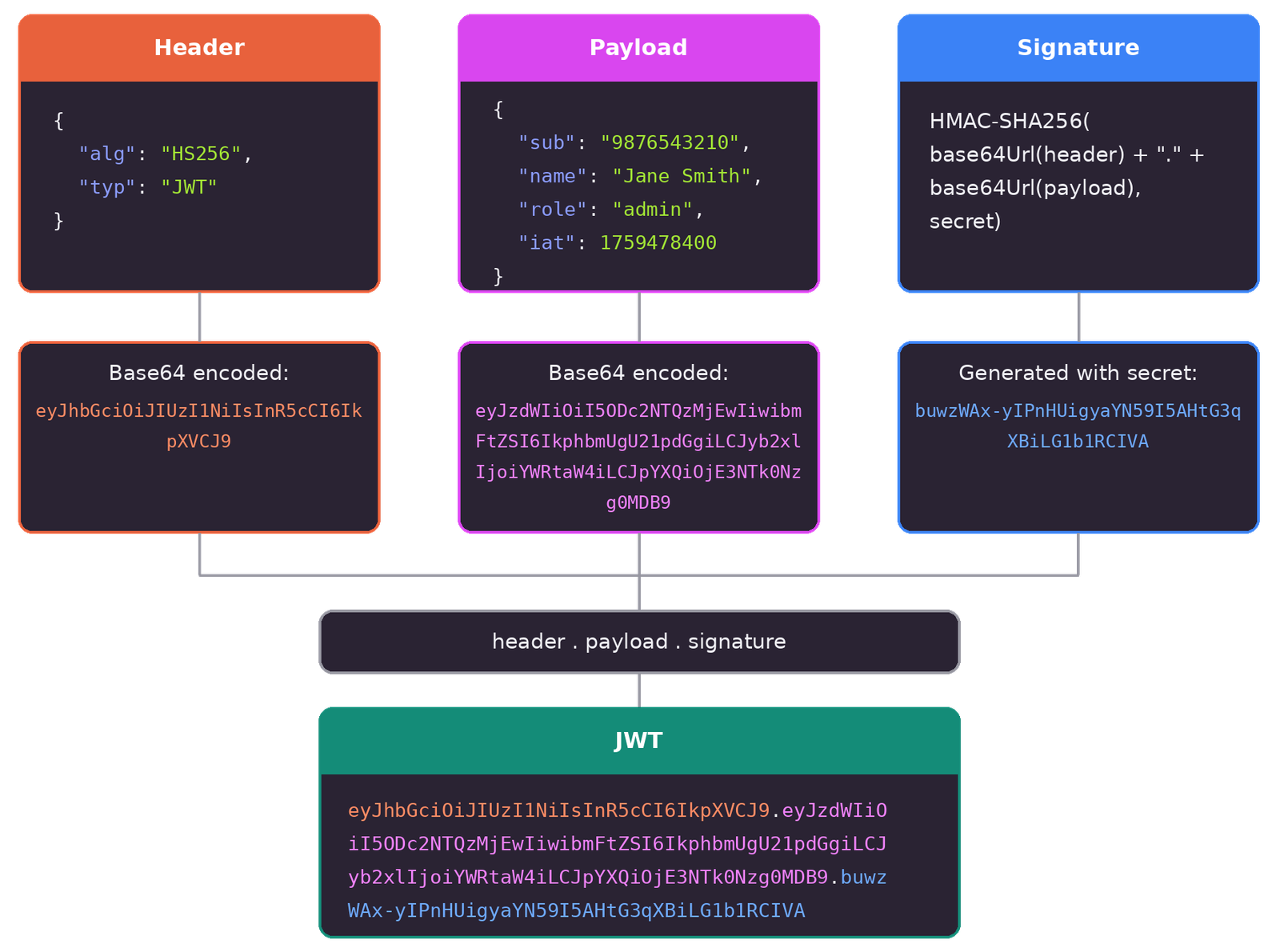
4.1 Header
The header says what kind of token this is and which algorithm was used to sign it:
{
  "alg": "HS256",
  "typ": "JWT"
}
4.2 Payload
The payload holds the claims: information about the user and the token itself.
{
  "sub": "riya",
  "name": "Riya Sharma",
  "roles": ["USER"],
  "iss": "javabytechie-demo",
  "iat": 1767225600,
  "exp": 1767226500
}
The times are in seconds since 1 January 1970 (UTC). Here, iat is 1 January 2026 at 00:00 UTC, and exp is 15 minutes later.
4.3 Signature
The signature proves that the token was created by a trusted server and has not been changed. For the HS256 algorithm it is calculated like this:
signature = HMAC-SHA256(
    base64UrlEncode(header) + "." + base64UrlEncode(payload),
    secretKey
)
If an attacker changes the payload, for example from "USER" to "ADMIN", the signature no longer matches and the server rejects the token. The attacker cannot create a new valid signature without the secret key.
5. Common JWT Claims
The JWT standard defines a set of registered claims with short, three-letter names. They are all optional, but you should use the ones that fit your needs:
| Claim | Name | Meaning |
|---|---|---|
iss | Issuer | Who created the token |
sub | Subject | Who the token is about, usually the user ID |
aud | Audience | Which application or API the token is meant for |
exp | Expiration Time | After this time the token must be rejected |
nbf | Not Before | Before this time the token must be rejected |
iat | Issued At | When the token was created |
jti | JWT ID | A unique ID for this token, useful for blocking or tracking it |
You can also add your own custom claims, such as roles, name or tenantId. Keep them small and never put secrets in them.
6. How the Signature Works
JWTs can be signed in two main ways:
| HS256 (Symmetric) | RS256 / ES256 (Asymmetric) | |
|---|---|---|
| Keys | One shared secret key | A private key and a public key |
| Who signs | Anyone with the secret | Only the holder of the private key |
| Who verifies | Anyone with the same secret | Anyone with the public key |
| Best for | One application that both creates and checks tokens | Many services, or tokens from an external identity provider |
| Risk | Every verifier could also create tokens | Verifiers cannot create tokens |
A simple rule: use HS256 when a single application issues and checks its own tokens. Use RS256 or ES256 when many services must verify tokens, so that only one place can ever create them.
7. How JWT Authentication Works
Here is the complete journey of a JWT, from login to expiry:
- User login: the user enters a username and password, and the client sends them to the server over HTTPS.
- Token creation: the server checks the credentials. If they are correct, it creates a JWT with claims such as the user ID, roles and expiry time, signs it, and returns it.
- Token storage: the client keeps the token, for example in memory or in a secure cookie (see section 13).
- Token sent with requests: for each protected request, the client adds the token to the HTTP header:
Authorization: Bearer <token>. - Token verification: the server checks the signature, the expiry time and other claims such as the issuer. It does not need to look anything up in a database.
- Server response: if the token is valid and the user has permission, the server returns the data. If the token is invalid or expired, it returns
401 Unauthorized. If the user lacks permission, it returns403 Forbidden. - Token expiry: when the token expires, the client uses a refresh token to get a new one, or asks the user to log in again.
8. Encoded, Not Encrypted
This is the most important thing to remember about JWTs: Base64URL encoding is not encryption. Anyone who gets the token can read the header and payload. The signature only stops people from changing the content, not from reading it.
You can see this for yourself with a few lines of plain Java:
import java.nio.charset.StandardCharsets;
import java.util.Base64;

public class JwtDecoderDemo {

    public static void main(String[] args) {
        String token = "eyJhbGciOiJIUzI1NiIsInR5cCI6IkpXVCJ9."
                + "eyJzdWIiOiJyaXlhIiwibmFtZSI6IlJpeWEgU2hhcm1hIiwicm9sZXMiOlsiVVNFUiJdLCJpc3MiOiJqYXZhYnl0ZWNoaWUtZGVtbyIsImlhdCI6MTc2NzIyNTYwMCwiZXhwIjoxNzY3MjI2NTAwfQ."
                + "ds-J2QIlVHzUy3LvBInnBZz7TwPoyNr8Fd8FvfIGecY";

        String[] parts = token.split("\\.");
        Base64.Decoder decoder = Base64.getUrlDecoder();

        String header = new String(decoder.decode(parts[0]), StandardCharsets.UTF_8);
        String payload = new String(decoder.decode(parts[1]), StandardCharsets.UTF_8);

        System.out.println("Header : " + header);
        System.out.println("Payload: " + payload);
    }
}Header : {"alg":"HS256","typ":"JWT"}
Payload: {"sub":"riya","name":"Riya Sharma","roles":["USER"],"iss":"javabytechie-demo","iat":1767225600,"exp":1767226500}So never put passwords, card numbers or other secrets in a JWT. If the content itself must be hidden, use an encrypted token (JWE) instead, or keep the sensitive data on the server.
9. Creating and Validating JWTs in Java
Writing signature code by hand is risky, so use a well-tested library. JJWT is a popular choice for plain Java. Add these three dependencies:
<dependency>
    <groupId>io.jsonwebtoken</groupId>
    <artifactId>jjwt-api</artifactId>
    <version>0.12.6</version>
</dependency>
<dependency>
    <groupId>io.jsonwebtoken</groupId>
    <artifactId>jjwt-impl</artifactId>
    <version>0.12.6</version>
    <scope>runtime</scope>
</dependency>
<dependency>
    <groupId>io.jsonwebtoken</groupId>
    <artifactId>jjwt-jackson</artifactId>
    <version>0.12.6</version>
    <scope>runtime</scope>
</dependency>
The class below creates a token and then validates it. Validation checks the signature, the expiry time and the issuer in one call:
import io.jsonwebtoken.Claims;
import io.jsonwebtoken.ExpiredJwtException;
import io.jsonwebtoken.JwtException;
import io.jsonwebtoken.Jwts;

import javax.crypto.SecretKey;
import java.time.Instant;
import java.time.temporal.ChronoUnit;
import java.util.Date;
import java.util.List;

public class JwtExample {

    private static final String ISSUER = "javabytechie-demo";

    // Creates a random 256-bit key. In a real app, load the key from a secure place instead.
    private static final SecretKey KEY = Jwts.SIG.HS256.key().build();

    public static String createToken(String username, List<String> roles) {
        Instant now = Instant.now();

        return Jwts.builder()
                .issuer(ISSUER)
                .subject(username)
                .claim("roles", roles)
                .issuedAt(Date.from(now))
                .expiration(Date.from(now.plus(15, ChronoUnit.MINUTES)))
                .signWith(KEY)
                .compact();
    }

    public static Claims validateToken(String token) {
        return Jwts.parser()
                .verifyWith(KEY)
                .requireIssuer(ISSUER)
                .build()
                .parseSignedClaims(token)
                .getPayload();
    }

    public static void main(String[] args) {
        String token = createToken("riya", List.of("USER"));
        System.out.println("Token: " + token);

        try {
            Claims claims = validateToken(token);
            System.out.println("User : " + claims.getSubject());
            System.out.println("Roles: " + claims.get("roles"));
            System.out.println("Expires at: " + claims.getExpiration());
        } catch (ExpiredJwtException e) {
            System.out.println("Token has expired");
        } catch (JwtException e) {
            System.out.println("Invalid token: " + e.getMessage());
        }
    }
}
If the token was changed, signed with a different key, issued by someone else or has expired, validateToken throws an exception, and you must reject the request.
10. JWT Authentication in Spring Boot
Spring Security already has full JWT support built in, through the OAuth2 Resource Server module. You do not need to write your own filter. In this example, one Spring Boot application will:
- Check the username and password at
/api/auth/loginand return a signed JWT. - Accept that JWT on every other endpoint and turn its
rolesclaim into Spring Security roles.
10.1 Dependencies and Secret Key
<dependency>
    <groupId>org.springframework.boot</groupId>
    <artifactId>spring-boot-starter-web</artifactId>
</dependency>
<dependency>
    <groupId>org.springframework.boot</groupId>
    <artifactId>spring-boot-starter-security</artifactId>
</dependency>
<dependency>
    <groupId>org.springframework.boot</groupId>
    <artifactId>spring-boot-starter-oauth2-resource-server</artifactId>
</dependency>
Create a strong random secret of at least 32 bytes and pass it in through an environment variable:
export JWT_SECRET=$(openssl rand -base64 32)jwt.secret=${JWT_SECRET}
jwt.issuer=javabytechie-demo
jwt.expiry-minutes=1510.2 Security Configuration
This class creates the JWT encoder and decoder, defines which URLs are open, and maps the roles claim to ROLE_ authorities:
package com.javabytechie.jwtdemo.config;

import com.nimbusds.jose.jwk.source.ImmutableSecret;
import org.springframework.beans.factory.annotation.Value;
import org.springframework.context.annotation.Bean;
import org.springframework.context.annotation.Configuration;
import org.springframework.security.authentication.AuthenticationManager;
import org.springframework.security.config.annotation.authentication.configuration.AuthenticationConfiguration;
import org.springframework.security.config.annotation.web.builders.HttpSecurity;
import org.springframework.security.config.annotation.web.configuration.EnableWebSecurity;
import org.springframework.security.config.http.SessionCreationPolicy;
import org.springframework.security.core.userdetails.User;
import org.springframework.security.core.userdetails.UserDetailsService;
import org.springframework.security.crypto.bcrypt.BCryptPasswordEncoder;
import org.springframework.security.crypto.password.PasswordEncoder;
import org.springframework.security.oauth2.jose.jws.MacAlgorithm;
import org.springframework.security.oauth2.jwt.JwtDecoder;
import org.springframework.security.oauth2.jwt.JwtEncoder;
import org.springframework.security.oauth2.jwt.JwtValidators;
import org.springframework.security.oauth2.jwt.NimbusJwtDecoder;
import org.springframework.security.oauth2.jwt.NimbusJwtEncoder;
import org.springframework.security.oauth2.server.resource.authentication.JwtAuthenticationConverter;
import org.springframework.security.oauth2.server.resource.authentication.JwtGrantedAuthoritiesConverter;
import org.springframework.security.provisioning.InMemoryUserDetailsManager;
import org.springframework.security.web.SecurityFilterChain;

import javax.crypto.SecretKey;
import javax.crypto.spec.SecretKeySpec;
import java.util.Base64;

@Configuration
@EnableWebSecurity
public class SecurityConfig {

    @Value("${jwt.secret}")
    private String secret;

    @Value("${jwt.issuer}")
    private String issuer;

    @Bean
    public SecurityFilterChain securityFilterChain(HttpSecurity http) throws Exception {
        http
            // No cookies or sessions are used, so CSRF protection is not needed for this API
            .csrf(csrf -> csrf.disable())
            .sessionManagement(session -> session
                .sessionCreationPolicy(SessionCreationPolicy.STATELESS))
            .authorizeHttpRequests(auth -> auth
                .requestMatchers("/api/auth/login").permitAll()
                .requestMatchers("/api/admin/**").hasRole("ADMIN")
                .anyRequest().authenticated()
            )
            .oauth2ResourceServer(oauth2 -> oauth2
                .jwt(jwt -> jwt.jwtAuthenticationConverter(jwtAuthenticationConverter())));

        return http.build();
    }

    @Bean
    public SecretKey jwtSecretKey() {
        byte[] keyBytes = Base64.getDecoder().decode(secret);
        return new SecretKeySpec(keyBytes, "HmacSHA256");
    }

    @Bean
    public JwtEncoder jwtEncoder(SecretKey jwtSecretKey) {
        return new NimbusJwtEncoder(new ImmutableSecret<>(jwtSecretKey));
    }

    @Bean
    public JwtDecoder jwtDecoder(SecretKey jwtSecretKey) {
        NimbusJwtDecoder decoder = NimbusJwtDecoder.withSecretKey(jwtSecretKey)
                .macAlgorithm(MacAlgorithm.HS256)
                .build();
        // Checks the expiry time and the issuer of every token
        decoder.setJwtValidator(JwtValidators.createDefaultWithIssuer(issuer));
        return decoder;
    }

    private JwtAuthenticationConverter jwtAuthenticationConverter() {
        JwtGrantedAuthoritiesConverter rolesConverter = new JwtGrantedAuthoritiesConverter();
        rolesConverter.setAuthoritiesClaimName("roles");
        rolesConverter.setAuthorityPrefix("ROLE_");

        JwtAuthenticationConverter converter = new JwtAuthenticationConverter();
        converter.setJwtGrantedAuthoritiesConverter(rolesConverter);
        return converter;
    }

    @Bean
    public AuthenticationManager authenticationManager(AuthenticationConfiguration config) throws Exception {
        return config.getAuthenticationManager();
    }

    @Bean
    public UserDetailsService userDetailsService(PasswordEncoder encoder) {
        return new InMemoryUserDetailsManager(
            User.withUsername("riya").password(encoder.encode("riya123")).roles("USER").build(),
            User.withUsername("admin").password(encoder.encode("admin123")).roles("USER", "ADMIN").build()
        );
    }

    @Bean
    public PasswordEncoder passwordEncoder() {
        return new BCryptPasswordEncoder();
    }
}
10.3 Token Service
The token service builds the claims and signs them with the secret key:
package com.javabytechie.jwtdemo.service;

import org.springframework.beans.factory.annotation.Value;
import org.springframework.security.core.Authentication;
import org.springframework.security.core.GrantedAuthority;
import org.springframework.security.oauth2.jose.jws.MacAlgorithm;
import org.springframework.security.oauth2.jwt.JwsHeader;
import org.springframework.security.oauth2.jwt.JwtClaimsSet;
import org.springframework.security.oauth2.jwt.JwtEncoder;
import org.springframework.security.oauth2.jwt.JwtEncoderParameters;
import org.springframework.stereotype.Service;

import java.time.Instant;
import java.time.temporal.ChronoUnit;
import java.util.List;

@Service
public class TokenService {

    private final JwtEncoder jwtEncoder;
    private final String issuer;
    private final long expiryMinutes;

    public TokenService(JwtEncoder jwtEncoder,
                        @Value("${jwt.issuer}") String issuer,
                        @Value("${jwt.expiry-minutes}") long expiryMinutes) {
        this.jwtEncoder = jwtEncoder;
        this.issuer = issuer;
        this.expiryMinutes = expiryMinutes;
    }

    public String generateToken(Authentication authentication) {
        Instant now = Instant.now();

        // "ROLE_ADMIN" becomes "ADMIN" inside the token
        List<String> roles = authentication.getAuthorities().stream()
                .map(GrantedAuthority::getAuthority)
                .map(authority -> authority.replace("ROLE_", ""))
                .toList();

        JwtClaimsSet claims = JwtClaimsSet.builder()
                .issuer(issuer)
                .subject(authentication.getName())
                .issuedAt(now)
                .expiresAt(now.plus(expiryMinutes, ChronoUnit.MINUTES))
                .claim("roles", roles)
                .build();

        JwsHeader header = JwsHeader.with(MacAlgorithm.HS256).build();

        return jwtEncoder.encode(JwtEncoderParameters.from(header, claims)).getTokenValue();
    }

    public long getExpirySeconds() {
        return expiryMinutes * 60;
    }
}
10.4 Login and Protected Endpoints
package com.javabytechie.jwtdemo.controller;

import com.javabytechie.jwtdemo.service.TokenService;
import org.springframework.security.authentication.AuthenticationManager;
import org.springframework.security.authentication.UsernamePasswordAuthenticationToken;
import org.springframework.security.core.Authentication;
import org.springframework.web.bind.annotation.PostMapping;
import org.springframework.web.bind.annotation.RequestBody;
import org.springframework.web.bind.annotation.RequestMapping;
import org.springframework.web.bind.annotation.RestController;

@RestController
@RequestMapping("/api/auth")
public class AuthController {

    private final AuthenticationManager authenticationManager;
    private final TokenService tokenService;

    public AuthController(AuthenticationManager authenticationManager, TokenService tokenService) {
        this.authenticationManager = authenticationManager;
        this.tokenService = tokenService;
    }

    @PostMapping("/login")
    public TokenResponse login(@RequestBody LoginRequest request) {
        // Throws an exception (and returns 401) if the username or password is wrong
        Authentication authentication = authenticationManager.authenticate(
                UsernamePasswordAuthenticationToken.unauthenticated(request.username(), request.password()));

        String token = tokenService.generateToken(authentication);
        return new TokenResponse(token, "Bearer", tokenService.getExpirySeconds());
    }

    public record LoginRequest(String username, String password) {
    }

    public record TokenResponse(String accessToken, String tokenType, long expiresIn) {
    }
}package com.javabytechie.jwtdemo.controller;
import org.springframework.security.core.annotation.AuthenticationPrincipal;
import org.springframework.security.oauth2.jwt.Jwt;
import org.springframework.web.bind.annotation.GetMapping;
import org.springframework.web.bind.annotation.RequestMapping;
import org.springframework.web.bind.annotation.RestController;
import java.util.Map;
@RestController
@RequestMapping("/api")
public class ProfileController {
// Any logged-in user
@GetMapping("/profile")
public Map<String, Object> profile(@AuthenticationPrincipal Jwt jwt) {
return Map.of(
"username", jwt.getSubject(),
"roles", jwt.getClaimAsStringList("roles"),
"expiresAt", jwt.getExpiresAt()
);
}
// Only users with the ADMIN role
@GetMapping("/admin/reports")
public Map<String, String> reports() {
return Map.of("report", "Monthly sales report");
}
}11. Testing with curl
Start the application and log in to get a token:
curl -X POST http://localhost:8080/api/auth/login \
     -H "Content-Type: application/json" \
-d '{"username": "riya", "password": "riya123"}'{
"accessToken": "eyJhbGciOiJIUzI1NiJ9.eyJpc3MiOiJqYXZhYnl0ZWNoaWUtZGVtbyIs...",
"tokenType": "Bearer",
"expiresIn": 900
}Use the token to call protected endpoints:
TOKEN="paste-the-accessToken-here"

# 200 OK: any logged-in user can see their profile
curl -H "Authorization: Bearer $TOKEN" http://localhost:8080/api/profile

# 403 Forbidden: riya does not have the ADMIN role
curl -H "Authorization: Bearer $TOKEN" http://localhost:8080/api/admin/reports

# 401 Unauthorized: no token, or an expired or changed token
curl http://localhost:8080/api/profile
12. Access Tokens and Refresh Tokens
Short-lived tokens are safer, but nobody wants to log in every 15 minutes. That is why many systems use two tokens:
| Access Token (JWT) | Refresh Token | |
|---|---|---|
| Used for | Calling APIs | Getting a new access token |
| Lifetime | Short (for example 5 to 15 minutes) | Long (for example days) |
| Sent to | Every protected API | Only the login or token endpoint |
| Stored on the server? | No | Usually yes, so it can be revoked |
When the access token expires, the client sends the refresh token to the server and receives a fresh access token. If a user logs out or an account is blocked, the server deletes the refresh token, and access ends as soon as the current access token expires. For extra safety, issue a new refresh token each time one is used (called refresh token rotation).
13. Where to Store a JWT
| Storage | Risk | Advice |
|---|---|---|
| localStorage / sessionStorage | Any script on the page can read it, so an XSS bug can steal the token | Avoid for sensitive apps |
| JavaScript memory | Lost on page refresh, but hard to steal | Good for short-lived access tokens |
| HttpOnly, Secure, SameSite cookie | Scripts cannot read it; needs CSRF protection | A good choice for browser apps |
| Mobile secure storage | Protected by the operating system | Use Keychain (iOS) or Keystore (Android) |
14. JWT vs Session Authentication
| Session | JWT | |
|---|---|---|
| Where user data lives | On the server | Inside the token |
| What the client holds | A random session ID | The signed token |
| Scaling to many servers | Needs a shared session store | Any server with the key can verify |
| Logout or revoke | Easy: delete the session | Harder: the token stays valid until it expires |
| Best for | Traditional server-rendered websites | APIs, mobile apps and microservices |
Neither option is always better. Many browser-based websites are still simpler and safer with sessions, while APIs and distributed systems benefit most from JWTs.
15. Advantages and Disadvantages
15.1 Advantages
- No server-side session storage is needed.
- Works across many servers and microservices.
- Fast to verify without a database lookup.
- Works with web, mobile and service-to-service calls.
- Based on an open standard with libraries for every language.
15.2 Disadvantages
- Hard to revoke: a stolen token works until it expires, unless you keep a block list.
- Readable content: the payload is only encoded, so it must not hold secrets.
- Stale data: if a user's role changes, old tokens still carry the old role until they expire.
- Larger than a session ID: sending many claims on every request adds overhead.
16. Best Practices
- Always use HTTPS so tokens cannot be read on the network.
- Keep access tokens short-lived, for example 5 to 15 minutes.
- Validate everything: signature,
exp,issand, when used,aud. - Allow only the algorithms you expect, and never accept
alg: none. - Use a strong secret (at least 256 bits for HS256) and keep it out of source code.
- Prefer RS256 or ES256 when many services verify tokens.
- Keep the payload small and free of sensitive data.
- Use refresh tokens with rotation, and store them so they can be revoked.
- Use a trusted library instead of writing your own signing or parsing code.
17. Common Mistakes to Avoid
- Decoding without verifying. Reading the payload without checking the signature means trusting anything a user sends.
- Putting passwords or personal data in the payload. Anyone with the token can read it.
- Very long expiry times, such as 30 days for an access token.
- Hard-coding the secret key in the code or committing it to Git.
- Using a short, guessable secret like
"secret", which can be cracked quickly. - Sending tokens in URLs. URLs end up in logs and browser history; use the
Authorizationheader. - Expecting logout to cancel a JWT automatically. Deleting it on the client does not make it invalid on the server.
18. Conclusion
A JWT is a compact, signed token that carries a user's identity and permissions from the client to the server. Its three parts, the header, payload and signature, make it easy to read and impossible to change without being noticed. Because servers can verify JWTs on their own, they fit naturally into APIs, mobile apps and microservices.
Use JWTs wisely: keep them short-lived, never store secrets in them, always verify the signature and claims, and let a trusted library or Spring Security's built-in support do the hard work.
Frequently Asked Questions (FAQ)
Q1. What is a JWT in simple words?
A JWT is a small, signed piece of text that a server gives to a user after login. It contains details such as the user's ID, roles and expiry time. The user sends it back with each request, and the server checks the signature to trust those details.
Q2. Is a JWT encrypted?
No. A normal JWT is signed, not encrypted. Its header and payload are only Base64URL encoded, so anyone can decode and read them. The signature only prevents changes.
If you need to hide the content, use JWE (JSON Web Encryption), or keep sensitive data on the server.
Q3. What is the difference between JWT and session authentication?
With sessions, the server stores the user's login state and the client only holds a session ID. With JWT, the login state is inside the signed token, so the server does not need to store anything.
Sessions are easier to revoke. JWTs are easier to scale across many servers.
Q4. What are claims in a JWT?
Claims are the key-value pairs in the payload. Registered claims have standard names such as sub (user), exp (expiry) and iss (issuer). Custom claims are your own, such as roles or tenantId.
Q5. How long should a JWT be valid?
Access tokens should be short-lived, usually 5 to 15 minutes, and rarely more than an hour. Pair them with a longer-lived refresh token so users do not have to log in again and again.
Q6. What is the difference between HS256 and RS256?
HS256 uses one shared secret key to both sign and verify. RS256 signs with a private key and verifies with a public key.
Use HS256 when one application handles everything. Use RS256 (or ES256) when several services must verify tokens but only one should be able to create them.
Q7. Where should I store a JWT in a web browser?
The safest common options are an HttpOnly, Secure, SameSite cookie or JavaScript memory. Avoid localStorage for sensitive apps, because any script on the page, including injected ones, can read it.
Q8. How do I log out a user or revoke a JWT?
A JWT stays valid until it expires, even if the client deletes it. Common solutions:
- Keep access tokens short-lived.
- Delete the user's refresh token on the server at logout.
- Keep a block list of revoked token IDs (
jti) until they expire.
Q9. What is a refresh token?
A refresh token is a long-lived token used only to get a new access token when the old one expires. It is sent only to the token endpoint, never to normal APIs, and it is usually stored on the server so it can be revoked.
Q10. Can a user change the data inside a JWT?
They can change the text, but the server will notice. Any change makes the signature invalid, and the server rejects the token. Creating a new valid signature requires the secret or private key, which the user does not have.
Q11. What happens when a JWT expires in Spring Boot?
Spring Security checks the exp claim on every request. If the token has expired, the request is rejected with 401 Unauthorized and a WWW-Authenticate header that explains the error. The client should then refresh the token or ask the user to log in again.
Q12. What does "Bearer" mean in the Authorization header?
"Bearer" means "whoever holds this token can use it", just like a cinema ticket. That is why tokens must be kept secret and only sent over HTTPS:
Authorization: Bearer eyJhbGciOiJIUzI1NiJ9...Q13. Is JWT the same as OAuth 2.0?
No. JWT is a token format. OAuth 2.0 is a framework for giving apps limited access to user data. OAuth 2.0 often uses JWTs as access tokens, but it can use other formats too, and JWTs can be used without OAuth.
Q14. What is the "alg: none" attack?
The JWT standard allows an "unsecured" token with "alg": "none" and no signature. Some old libraries accepted such tokens, so attackers could remove the signature and change the payload freely.
Modern libraries reject this by default. Always configure the exact algorithm you expect, as the Spring example does with MacAlgorithm.HS256.
Q15. What should I put inside a JWT?
Only what the server needs on every request: the user ID (sub), roles or scopes, issuer and expiry. Keep it small, because the token is sent with every request.
Never include passwords, card numbers, secret keys or sensitive personal data.
Q16. How can I read the contents of a JWT in Java?
Split the token at the dots and Base64URL-decode the first two parts:
String[] parts = token.split("\\.");
String payload = new String(Base64.getUrlDecoder().decode(parts[1]), StandardCharsets.UTF_8);
System.out.println(payload);
This only reads the token. To trust it, you must also verify the signature with a library such as JJWT or Spring Security.
Q17. How does Spring Boot validate a JWT?
With spring-boot-starter-oauth2-resource-server, a JwtDecoder checks each token's signature and time claims, plus any extra validators you add, such as the issuer. For tokens from an identity provider, one property is enough:
spring.security.oauth2.resourceserver.jwt.issuer-uri=https://auth.example.comFor tokens you sign yourself, define a JwtDecoder bean with your key, as shown in section 10.
Q18. Can JWTs be used in microservices?
Yes, and this is one of their best uses. An authentication service or identity provider signs the token with a private key. Every microservice verifies it with the public key, without calling a central database. Each service then applies its own authorization rules based on the token's roles or scopes.
Q19. What is the jti claim used for?
jti (JWT ID) gives each token a unique ID. It is useful for:
- Blocking a specific token before it expires, by adding its
jtito a block list. - Preventing the same token from being used twice in one-time actions.
- Tracking tokens in audit logs.
Q20. What is the difference between JWT, JWS and JWE?
- JWT is the general format for sending claims as JSON.
- JWS (JSON Web Signature) is a signed JWT. Its content can be read, but not changed. Most JWTs you see are JWS.
- JWE (JSON Web Encryption) is an encrypted JWT. Its content is hidden from anyone without the key.
Q21. A user was promoted to ADMIN, but the API still blocks them from admin pages. Why?
The user's current JWT was created before the change, so it still carries "roles": ["USER"]. The server trusts what is inside the token until it expires.
How to handle it:
- Ask the user to log in again, or force a token refresh so a new token with the new role is issued.
- Keep access tokens short-lived (5 to 15 minutes) so role changes take effect quickly.
- For very sensitive actions, load the user's current roles from the database instead of relying only on the token.
The same delay applies when a role is removed, which is an even stronger reason to keep tokens short-lived.
Q22. You find out that a user's JWT was stolen. What should you do?
Act in this order:
- Revoke the user's refresh tokens on the server, so the attacker cannot get new access tokens.
- Block the stolen access token by adding its
jtito a block list until itsexptime (see Q27). - If the signing key itself may have leaked, rotate the key. This makes every existing token invalid, so all users must log in again.
- Find how the token leaked (for example an XSS bug, logs, or tokens in URLs) and fix the cause.
Short expiry times limit the damage in the first place: a stolen 10-minute token is far less harmful than a stolen 30-day token.
Q23. How do you rotate the signing key without logging out every user?
Give each key an ID and support two keys at the same time for a short period:
- Add a new key with a new key ID. The issuer writes this ID into each token's header as
"kid". - Start signing new tokens with the new key.
- Keep verifying with both keys, choosing the right one by the token's
kid. - Once the longest-lived old token has expired, remove the old key.
With RS256 or ES256, the issuer usually publishes its public keys as a JWKS (JSON Web Key Set) at a URL. Spring Security reads that URL and picks the right key by kid automatically, so rotation needs no change in your APIs.
Q24. Tokens work on one server but fail on another with "expired" or "not yet valid". What is wrong?
This is usually clock skew: the servers' clocks are not in sync. A token issued by a server whose clock is ahead looks "not yet valid" to a server whose clock is behind, and the opposite happens near the expiry time.
Fix it in two ways:
- Keep all server clocks in sync with NTP (Network Time Protocol).
- Allow a small tolerance when checking times. Spring Security allows 60 seconds by default, and you can change it:
OAuth2TokenValidator<Jwt> validator = new DelegatingOAuth2TokenValidator<>(
        new JwtTimestampValidator(Duration.ofSeconds(30)),
        new JwtIssuerValidator("javabytechie-demo"));

decoder.setJwtValidator(validator);
Q25. Service A receives a user's JWT and calls Service B. Should it just forward the same token?
It depends on what Service B needs to know:
- B must act for the user (for example, "show this user's orders"): forwarding the token works, but B should check that the token's
aud(audience) includes B. A token meant only for A should not be accepted by B. For stricter setups, A can swap the user's token for a new one meant for B, using OAuth 2.0 Token Exchange. - B only needs to trust Service A (for example, a background sync): A should use its own token, obtained with the OAuth 2.0 Client Credentials grant.
Never let a service accept any valid-looking token without checking who it was issued for.
Q26. Requests start failing with "431 Request Header Fields Too Large". How is the JWT involved?
The token has become too big. This often happens when every permission, group or tenant is added as a claim. Web servers and proxies limit header size (often around 8 KB), and a large JWT on every request can exceed it.
To fix it:
- Keep only essential claims: user ID, a few roles, issuer and expiry.
- Replace long permission lists with a short role name, and look up detailed permissions on the server.
- Remove display data such as addresses or profile details. Fetch them from an API when needed.
Q27. How can you make "logout" end a JWT immediately in Spring Boot?
Give every token a unique ID (jti), and on logout store that ID in a fast store such as Redis until the token would have expired. Then add a validator that rejects blocked IDs.
First, add an ID when creating the token in TokenService:
.id(UUID.randomUUID().toString())Then create the validator:
@Component
public class RevokedTokenValidator implements OAuth2TokenValidator<Jwt> {

    private final StringRedisTemplate redis;

    public RevokedTokenValidator(StringRedisTemplate redis) {
        this.redis = redis;
    }

    @Override
    public OAuth2TokenValidatorResult validate(Jwt jwt) {
        if (jwt.getId() != null && Boolean.TRUE.equals(redis.hasKey("revoked:" + jwt.getId()))) {
            OAuth2Error error = new OAuth2Error("invalid_token", "Token has been revoked", null);
            return OAuth2TokenValidatorResult.failure(error);
        }
        return OAuth2TokenValidatorResult.success();
    }

    // Call this from your logout endpoint
    public void revoke(Jwt jwt) {
        Duration timeLeft = Duration.between(Instant.now(), jwt.getExpiresAt());
        if (!timeLeft.isNegative()) {
            redis.opsForValue().set("revoked:" + jwt.getId(), "1", timeLeft);
        }
    }
}
Finally, add it to the decoder next to the standard checks:
decoder.setJwtValidator(new DelegatingOAuth2TokenValidator<>(
        JwtValidators.createDefaultWithIssuer(issuer),
        revokedTokenValidator));
The block list stays small because each entry deletes itself when the token would have expired anyway. The trade-off is one quick Redis lookup per request.
Q28. A mobile app must keep users signed in for 30 days, but access tokens last only 15 minutes. How do you design it?
Use a refresh token with rotation:
- At login, issue a 15-minute access token and a 30-day refresh token.
- Store both in the phone's secure storage (Keychain on iOS, Keystore on Android).
- When the access token expires, the app sends the refresh token and receives a new access token and a new refresh token. The old refresh token is marked as used.
- If an already-used refresh token is ever presented again, someone may have copied it. Revoke the whole token family and ask the user to log in again.
The user stays signed in for weeks, while any single stolen access token is useful for only a few minutes.
Q29. Your React or Angular app keeps JWTs in localStorage, and a security review flags it. What is the safer design?
The concern is XSS: if any malicious script runs on the page, it can read localStorage and send the token to an attacker.
A safer design is the Backend for Frontend (BFF) pattern:
- A small server-side app handles login and keeps the tokens on the server.
- The browser receives only a session cookie marked
HttpOnly,SecureandSameSite, which scripts cannot read. - The BFF adds the access token when it forwards requests to your APIs.
- Because cookies are sent automatically, the BFF must also have CSRF protection.
If a BFF is not possible, keep the access token only in JavaScript memory, keep it short-lived, and follow strict XSS prevention practices.
Q30. Spring Boot returns 401 even though the token looks valid. How do you debug it?
Start with the response itself. Spring Security explains the reason in the WWW-Authenticate header:
curl -i -H "Authorization: Bearer $TOKEN" http://localhost:8080/api/profileHTTP/1.1 401
WWW-Authenticate: Bearer error="invalid_token", error_description="An error occurred while attempting to decode the Jwt: Jwt expired at 2026-01-01T00:15:00Z"For more detail, turn on security logging while testing:
logging.level.org.springframework.security=DEBUGThen check the most common causes:
- Expired token or clock skew between servers (see Q24).
- Issuer mismatch: the
issclaim differs from the configured issuer, even by a trailing slash. - Wrong key: for example, the secret was used as plain text in one place and Base64-decoded in another.
- Algorithm mismatch: the token uses HS512 but the decoder expects HS256.
- Header format: the header must be exactly
Authorization: Bearer <token>, with no quotes or extra spaces.
Remember that a 403 is different: the token is valid, but the user lacks the required role.