AVL tree is a height-balanced binary search tree. A binary tree is said to be balanced if, the difference between the heights of left and right subtrees of every node in the tree is either -1, 0 or +1. In an AVL tree, every node maintains an extra information known as balance factor.
The AVL tree was introduced in the year 1962 by G.M. Adelson-Velsky and E.M. Landis.
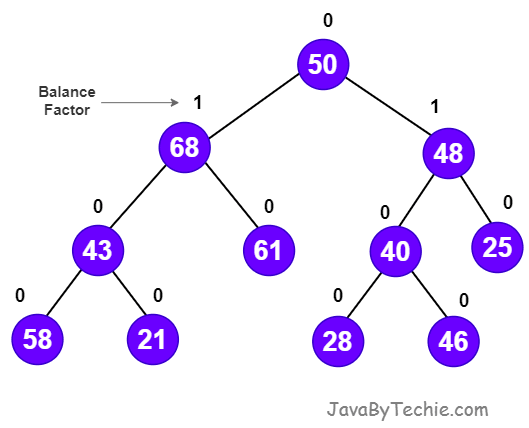
An AVL tree is a balanced binary search tree. In an AVL tree, balance factor of every node is either -1, 0 or +1.
Balance factor of a node is the difference between the heights of the left and right subtrees of that node. The balance factor of a node is calculated either height of left subtree - height of right subtree (OR) height of right subtree - height of left subtree.
Balance factor = heightOfLeftSubtree - heightOfRightSubtree
AVL Trees Rotations
In AVL trees, after performing an insertion or deletion operation, if the tree is not balanced, rotations are used to maintain the balance of the tree. There are four types of rotations: left rotation, right rotation, left-right rotation, and right-left rotation.
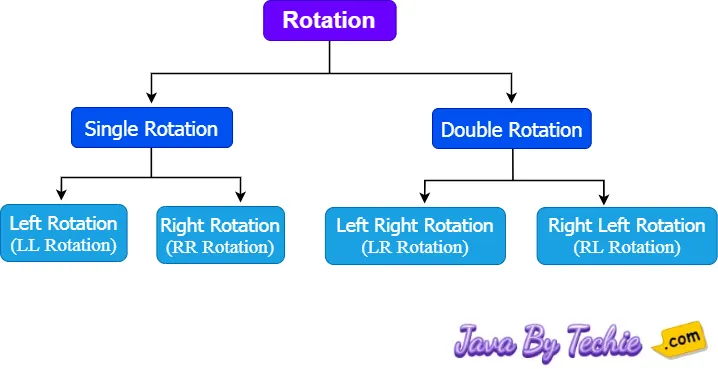
In AVL Trees, Left and Right rotations required single rotation whereas Left-Right and Right-Left rotation required double rotations.
Left Rotation (LL Rotation)
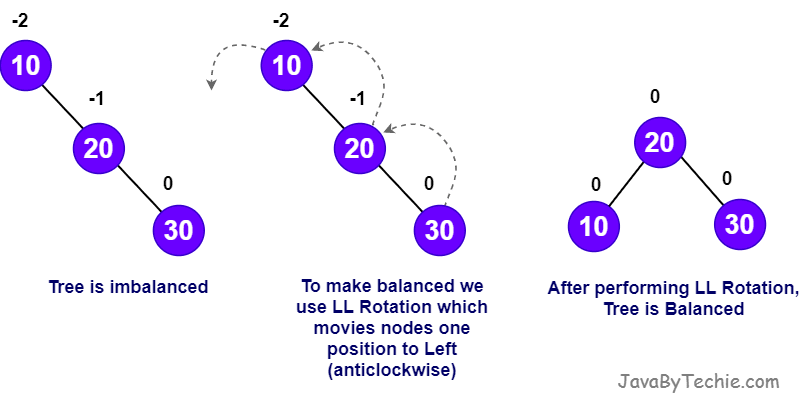
In the Left Rotation, every node moves one position to left from the current position of the tree. Let us consider the following insertion operation in AVL Tree.
Insert values: 10, 20, 30
Right Rotation (RR Rotation)
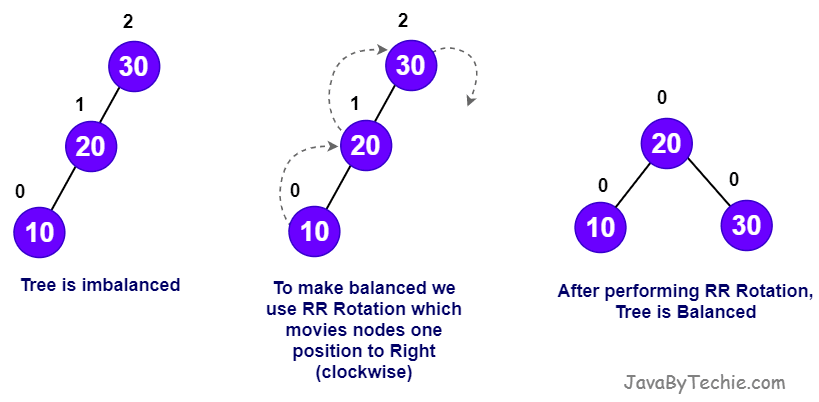
In the Right Rotation, every node moves one position to right from the current position. Let us consider the following insertion operation in AVL Tree.
Insert values: 30, 20, 10
Left Right Rotation (LR Rotation)
The Left-Right (LR) rotation required two rotations: a left rotation followed by a right rotation. That means first, every node moves one position to the left and one position to the right from the current position. Let us consider the following insertion operation in the AVL Tree.
Right Left Rotation (RL Rotation)
The Left-Right (LR) rotation required two rotations: a left rotation followed by a right rotation. That means first, every node moves one position to the left and one position to the right from the current position. Let us consider the following insertion operation in the AVL Tree.
Operations on an AVL Trees
There are the following operations that can be performed on the AVL trees.
- Search
- Insertion
- Deletion
Search Operation in AVL Tree
In an AVL tree, the search operation is performed with O(log n) time complexity. The search operation in the AVL tree is similar to the search operation in a Binary search tree. We use the following steps to search an element in AVL tree...
- Step 1 - Read the search element from the user.
- Step 2 - Compare the search element with the value of root node in the tree.
- Step 3 - If both are matched, then display "Given node is found!!!" and terminate the function
- Step 4 - If both are not matched, then check whether search element is smaller or larger than that node value.
- Step 5 - If search element is smaller, then continue the search process in left subtree.
- Step 6 - If search element is larger, then continue the search process in right subtree.
- Step 7 - Repeat the same until we find the exact element or until the search element is compared with the leaf node.
- Step 8 - If we reach to the node having the value equal to the search value, then display "Element is found" and terminate the function.
- Step 9 - If we reach to the leaf node and if it is also not matched with the search element, then display "Element is not found" and terminate the function.
Insertion Operation in AVL Tree
In an AVL tree, the insertion operation is performed with O(log n) time complexity. In AVL Tree, a new node is always inserted as a leaf node. The insertion operation is performed as follows...
- Step 1 - Insert the new element into the tree using Binary Search Tree insertion logic.
- Step 2 - After insertion, check the Balance Factor of every node.
- Step 3 - If the Balance Factor of every node is 0 or 1 or -1 then go for next operation.
- Step 4 - If the Balance Factor of any node is other than 0 or 1 or -1 then that tree is said to be imbalanced. In this case, perform suitable Rotation to make it balanced and go for next operation.
Deletion Operation in AVL Tree
The deletion operation in AVL Tree is similar to deletion operation in BST. But after every deletion operation, we need to check with the Balance Factor condition. If the tree is balanced after deletion go for next operation otherwise perform suitable rotation to make the tree Balanced.
Implementation of AVL Tree in Java
// Create a Node class
class Node {
  int item, height;
  Node left, right;

  Node(int data) {
    item = data;
    height = 1;
  }
}

// AVL tree implementation in Java
class AVLTree {
  Node root;

  int height(Node node) {
    return (node == null) ? 0 : node.height;
  }

  int max(int a, int b) {
    return (a > b) ? a : b;
  }

  Node rightRotate(Node y) {
    Node x = y.left;
    Node T2 = x.right;
    x.right = y;
    y.left = T2;
    y.height = max(height(y.left), height(y.right)) + 1;
    x.height = max(height(x.left), height(x.right)) + 1;
    return x;
  }

  Node leftRotate(Node x) {
    Node y = x.right;
    Node T2 = y.left;
    y.left = x;
    x.right = T2;
    x.height = max(height(x.left), height(x.right)) + 1;
    y.height = max(height(y.left), height(y.right)) + 1;
    return y;
  }

  // Get balance factor of a node
  int getBalanceFactor(Node node) {
    return (node == null ? 0 : (height(node.left) - height(node.right)));
  }

  // Method to insert a node a AVL tree
  Node insertNode(Node node, int item) {

    // Find the position and insert the node
    if (node == null)
      return (new Node(item));
    if (item < node.item)
      node.left = insertNode(node.left, item);
    else if (item > node.item)
      node.right = insertNode(node.right, item);
    else
      return node;

    // Update the balance factor of each node and balance the AVL tree
    node.height = 1 + max(height(node.left), height(node.right));
    int balanceFactor = getBalanceFactor(node);
    if (balanceFactor > 1) {
      if (item < node.left.item) {
        return rightRotate(node);
      } else if (item > node.left.item) {
        node.left = leftRotate(node.left);
        return rightRotate(node);
      }
    }
    if (balanceFactor < -1) {
      if (item > node.right.item) {
        return leftRotate(node);
      } else if (item < node.right.item) {
        node.right = rightRotate(node.right);
        return leftRotate(node);
      }
    }
    return node;
  }

  Node nodeWithMimumValue(Node node) {
    Node current = node;
    while (current.left != null)
      current = current.left;
    return current;
  }

  // Method to delete a node a AVL tree
  Node deleteNode(Node root, int item) {
    // Find the node to be deleted and remove it
    if (root == null)
      return root;

    if (item < root.item)
      root.left = deleteNode(root.left, item);
    else if (item > root.item)
      root.right = deleteNode(root.right, item);
    else {
      if ((root.left == null) || (root.right == null)) {
        Node temp = null;
        if (temp == root.left)
          temp = root.right;
        else
          temp = root.left;
        if (temp == null) {
          temp = root;
          root = null;
        } else
          root = temp;
      } else {
        Node temp = nodeWithMimumValue(root.right);
        root.item = temp.item;
        root.right = deleteNode(root.right, temp.item);
      }
    }

    if (root == null)
      return root;

    // To balance the AVL tree, update the balance factor of each node
    root.height = max(height(root.left), height(root.right)) + 1;
    int balanceFactor = getBalanceFactor(root);

    if (balanceFactor > 1) {
      if (getBalanceFactor(root.left) >= 0) {
        return rightRotate(root);
      } else {
        root.left = leftRotate(root.left);
        return rightRotate(root);
      }
    }

    if (balanceFactor < -1) {
      if (getBalanceFactor(root.right) <= 0) {
        return leftRotate(root);
      } else {
        root.right = rightRotate(root.right);
        return leftRotate(root);
      }
    }
    return root;
  }

  static void preOrder(Node node) {
    if (node != null) {
      System.out.print(node.item + " ");
      preOrder(node.left);
      preOrder(node.right);
    }
  }

  // Method to print elements of an AVL Tree
  static void printAVLTree(Node currPtr, String indent, boolean last) {
    if (currPtr != null) {
      System.out.print(indent);
      if (last) {
        System.out.print("R----");
        indent += "   ";
      } else {
        System.out.print("L----");
        indent += "|  ";
      }
      System.out.println(currPtr.item);
      printAVLTree(currPtr.left, indent, false);
      printAVLTree(currPtr.right, indent, true);
    }
  }

  public static void main(String[] args) {
    // Create an AVL Tree
    AVLTree tree = new AVLTree();

    // Insert nodes in an AVL Tree
    tree.root = tree.insertNode(tree.root, 45);
    tree.root = tree.insertNode(tree.root, 15);
    tree.root = tree.insertNode(tree.root, 78);
    tree.root = tree.insertNode(tree.root, 11);
    tree.root = tree.insertNode(tree.root, 26);
    tree.root = tree.insertNode(tree.root, 30);
    tree.root = tree.insertNode(tree.root, 55);
    tree.root = tree.insertNode(tree.root, 11);

    // Print AVL Tree after adding nodes
    System.out.println("AVL Tree:");
    printAVLTree(tree.root, "", true);

    // Delete node (26) in AVL Tree
    tree.root = tree.deleteNode(tree.root, 26);

    System.out.println("\nAVL Tree, After Deletion of element 26: ");
    printAVLTree(tree.root, "", true);
  }
}AVL Tree:
R----26
L----15
| L----11
R----45
L----30
R----78
L----55
AVL Tree, After Deletion of element 26:
R----30
L----15
| L----11
R----55
L----45
R----78Applications of AVL Trees
- Database Indexing: Used in databases to keep data organized for efficient searches.
- Real-Time Systems: Used for applications requiring predictable performance.
- File Systems: Used to maintain hierarchical structures in file systems.
- Memory Management: Used to manage free memory blocks efficiently.
- Network Routers: Used in network routers for routing table management.
- Compiler Design: Used in compiler design for symbol table management.
- Gaming: Used in gaming to manage game state data.
Advantages of AVL Trees
- Self-Balancing: After insertion and deletion operations, AVL trees automatically adjust their structure to maintain balance.
- Efficient Operations: All operations such as insert, delete, and search have a time complexity of O(log n).
- Predictable Performance: The strict balancing ensures consistent performance, making AVL trees suitable for real-time applications such as database indexes, operating systems, file systems, etc.
- Efficient Lookups: Faster lookups compared to unbalanced BSTs or Red-Black Trees due to stricter balancing.
Disadvantages of AVL Trees
- Complex Implementation: The need to maintain balance through rotations makes AVL trees more complex to implement compared to standard BSTs.
- Overhead of Balancing: Frequent rotations during insertions and deletions can introduce additional overhead, making AVL trees slower than Red-Black Trees for write-heavy workloads.
- Memory Overhead: Each node must store its balance factor (height difference), which increases memory usage.
- Slower Insertions/Deletions: While AVL trees provide faster lookups, they are slower than Red-Black Trees for insertions and deletions due to stricter balancing.
When to Use AVL Trees in Applications
AVL trees can be used in the following scenarios:
- Use AVL trees for large datasets that require efficient search, delete, and insert operations.
- Use AVL trees for applications that require real-time updates, such as stock market applications, etc.
- Use AVL trees for applications that require frequent updates.
- Use AVL trees for applications that require the data to be sorted, as AVL trees maintain sorted data.
- Use AVL trees for applications that require guaranteed O(log n) performance for all operations.
When to Avoid AVL Trees in Applications
AVL trees can be avoided in the following scenarios:
- Not suitable for small dataset applications, due to the overhead of maintaining balance.
- Not suitable for static dataset applications.
- If the application performs frequent insertions and deletions operations, avoid AVL trees because they require frequent rotations to maintain balance, which can introduce significant overhead.
- If the application has memory constraints, avoid AVL trees because they require additional memory to store balance factors for each node of the AVL tree.
- If the application requires simple implementation, avoid AVL trees because their implementation and maintenance are complex because of balancing and rotations.
- If the application does not require ordered data, AVL Trees is not suitable as it maintains elements in sorted order
Alternatives of AVL Trees in Data Structure
| Scenario | Use alternative Data Structure |
|---|---|
| Frequent insertions/deletions operations | Red-Black Trees |
| Faster insertions/deletions operations | Red-Black Trees |
| Small datasets | Arrays, Linked Lists |
| Memory constraints | Unbalanced BSTs, Arrays |
| Lookup-heavy workloads | Hash Tables |
| Real-time systems | B-Trees, Red-Black Trees |
| Required simple implementation | Unbalanced BSTs, Arrays |
| Not required ordered data | Hash tables |
Difference between AVL Tree and Red-Black
| Feature | AVL Tree | Red-Black Tree |
|---|---|---|
| Balanced | More balanced | Less balanced |
| Insertion/Deletion | Slower (more rotations required) | Faster (fewer rotations required) |
| Searching | Efficient search operations | Less efficient |
| Node color | No colored node | Node will be either red or black color |
| Balance factor | All the nodes contain a balance factor (-1, 0, 1) | No balance factor for each node |
| Processing time | Takes more | Takes less |