In graph data structure, the process of storing a graph in the memory of a computer is referred to as a graph representation.
A graph in a data structure can be represented in many ways. The two most common and popular ways to represent a graph are:
Adjacency Matrix
Adjacency List
In this tutorial, we will learn all about Adjacency Matrix in details with example in Java.
What is an Adjacency Matrix in a Graph?
An adjacency matrix represents a graph using a 2D array. A 2D array is a tabular format that consists of rows and columns. Each cell in the matrix indicates whether an edge exists between two vertices. If there is a connection between two vertices, the cell contains a value (usually 1 for unweighted graphs or the weight of the edge for weighted graphs); otherwise, it contains 0.
Consider a graph with n numbers of vertices. Create a 2D matrix adjMatrix[n][n] having dimension n x n.
- If there is an edge from vertex i to j, set adjMatrix[i][j] to 1.
- If there is no edge connecting vertex i to j, set adjMatrix[i][j] to 0.
Adjacency Matrix Representation of Undirected Graph
A undirected graph is given below, which has 4 vertices (A, B, C, D), and the edges are: (A-B), (A-C), (B-D), and (C-D).
In the adjacency matrix table, both rows and columns are representing the nodes. If two nodes are connected to each other, we store the value 1 in the cell where the row and column both are meeting; otherwise, we store value 0 in that cell, which means there is no connection between the two nodes.
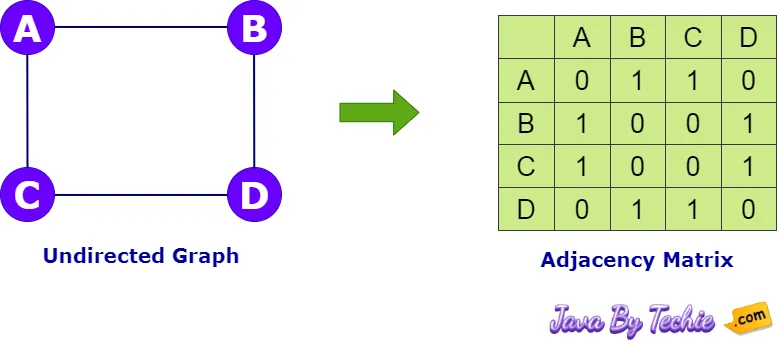
Adjacency Matrix Example
// A Java program to implement adjacency matrix of undirected graph
public class AdjacencyMatrix {
  // Method to add edge
  void addEdge(int[][] matrix, int i, int j) {
    matrix[i][j] = 1;
    matrix[j][i] = 1;
  }

  // Method to print matrix
  void printMatrix(int[][] matrix) {
    for (int[] row : matrix) {
      for (int value : row) {
        System.out.print(value + " ");
      }
      System.out.println(); // Line break
    }
  }

  public static void main(String[] args) {
    AdjacencyMatrix adjMatrix = new AdjacencyMatrix();
        int V = 4;   // total vertices are 4
        int[][] matrix = new int[V][V];   // all values are initialized as 0

    // Adding edges one by one into the matrix
    adjMatrix.addEdge(matrix, 0, 1);
    adjMatrix.addEdge(matrix, 0, 2);
    adjMatrix.addEdge(matrix, 1, 2);
    adjMatrix.addEdge(matrix, 2, 3);

    System.out.println("Adjacency Matrix Elements:");
    adjMatrix.printMatrix(matrix);
  }
}Adjacency Matrix Elements: 0 1 1 0 1 0 1 0 1 1 0 1 0 0 1 0
Advantages of Adjacency Matrix
- Simplicity: Adjacency Matrix concept is straightforward and it's easy-to-understand and implement.
- Visual Representation: It provides a clear visual representation of a graph.
- Well-suited for Matrix Operations: Certain graph algorithms can be efficiently implemented using matrix operations, such as finding the transitive closure of a graph.
- Suitable for Dense Graphs: When the graph is dense (meaning it has a large number of edges), the space complexity of an adjacency matrix can be more efficient than an adjacency list.
- Uniform Representation: Suitable for directed, undirected, weighted, and unweighted graphs.
Disadvantages of Adjacency Matrix
- Space inefficient for Sparse Graphs
- Costly Insertions and Deletions of a vertex
- Slow Traversals
- Less Flexibility
Applications of Graph Adjacency Matrix
- Social Network Analysis
- Geographical Mapping
- Data Mining
- Routing Algorithms
- Artificial Intelligence (AI)
- Compilers
- Circuit Design
- Image Processing
- Recommendation Systems
- Biological Networks
- Transportation Networks
- Telecommunication Networks
- Gaming Applications Development