A search algorithm is a procedure used to find a specific element within a collection of elements, such as an array, list, tree, graph, or database. The goal of a search algorithm is to determine whether a specific element exists in the data structure and, if so, to find its position or retrieve it.
Search algorithms are fundamental in computer science and are used in a wide range of applications, including data retrieval, artificial intelligence, optimization, and more.
In this tutorial, we are going to exlore how to search for a specific element within a collection of elements using a binary search algorithm in Java.
What is a Binary Search Algorithm?
The binary search algorithm is a technique for searching a specific element within a sorted list of elements. It uses the divide-and-conquer approach to rapidly find the specific element by repeatedly dividing the search space in half.
If the specific element is less than the middle element, it can't be in the right half of the data structure, so discard it and focus on the left half. Conversely, if the target element is greater, discard the left half and focus on the right half and continue this process of dividing and searching until we either find the target element or reach an empty sub-array, indicating the element is not present.
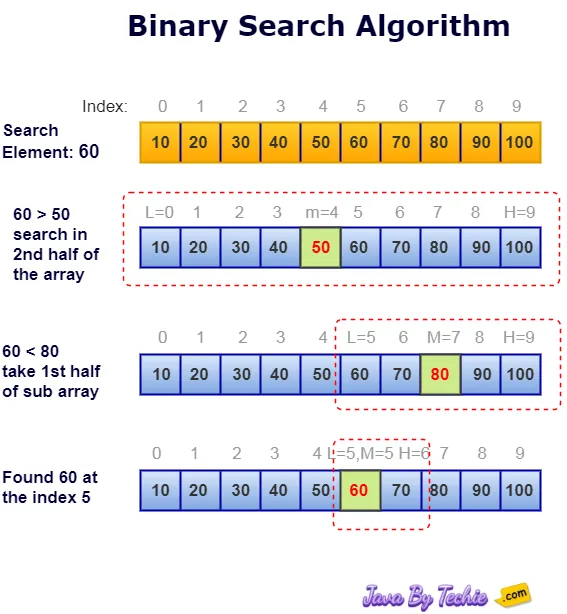
The binary search algorithm is powerful and efficient. It is achieving a time complexity of O(log n), where n is the total number of elements in the list. It is significantly faster than linear search (O(n)).
Binary search is implemented using following steps
- Step 1 - Read the search or target element from the user or an input.
- Step 2 - Find the middle element in the sorted list.
- Step 3 - Compare the search element with the middle element in the sorted list.
- Step 4 - If both are matched, then target element is found and terminate the function.
- Step 5 - If both are not matched, then check whether the search element is smaller or larger than the middle element.
- Step 6 - If the search element is smaller than middle element, repeat the steps 2, 3, 4 and 5 for the left sublist of the middle element.
- Step 7 - If the search element is larger than middle element, repeat the steps 2, 3, 4 and 5 for the right sublist of the middle element.
- Step 8 - Repeat the same process until we find the search element in the list or until sublist contains only one element.
- Step 9 - If the search element does not find, then display message "Element is not found in the list" and terminate the function.
Binary Search Implementation in Java
There are the following ways to implement binary search in Java:
- Iterative Implementation
- Recursive Implementation
- Using Arrays.binarySearch()
- Using Collections.binarySearch()
1. Iterative Implementation
Here is an example of a binary search using the iterative approach in Java.
class BinarySearchExample {
  // Returns index of key if it is present in array, else return -1
  static int binarySearch(int arr[], int min, int max, int key) {
    while (min <= max) {
      int mid = (min + max) / 2;

      // If the element is present at the middle itself
      if (arr[mid] == key) {
        return mid;

        // If element is smaller than mid, then
        // it can only be present in left subarray
        // so we decrease our max pointer to mid - 1
      } else if (arr[mid] > key) {
        max = mid - 1;

        // Else the element can only be present in right subarray
        // so we increase our min pointer to mid + 1
      } else {
        min = mid + 1;
      }
    }

    // Return -1, if element is not present in array
    return -1;
  }

  // Driver method to test above
  public static void main(String args[]) {
    int array[] = { 10, 20, 30, 40, 50, 60, 70, 80 };
    int max = array.length;
    int min = 0;

    // 1st Scenario, If key is present in the array
    int key = 40;
    int result = binarySearch(array, min, max - 1, key);

    if (result == -1)
      System.out.println("Element " + key + " is not present in array");
    else
      System.out.println("Element " + key + " is present at index "+ result);

    // 2nd Scenario, If key is not available in the array
    key = 250;
    result = binarySearch(array, min, max - 1, key);

    if (result == -1)
      System.out.println("Element " + key + " is not present in array");
    else
      System.out.println("Element " + key + " is present at index "+ result);
  }
}Element 40 is present at the index 3 Element 250 is not present in array
2. Recursive Implementation
Here is an example of a binary search using the recursive approach in Java.class BinarySearchExample {
// Returns index of key if it is present in array, else return -1
static int recursiveBinarySearch(int array[], int min, int max, int key) {
if (max >= min) {
int mid = min + (max - min) / 2;
// If the element is present at the middle itself
if (array[mid] == key)
return mid;
// If element is smaller than mid, then
// it can only be present in left subarray
if (array[mid] > key)
return recursiveBinarySearch(array, min, mid - 1, key);
// Else the element can only be present in right subarray
return recursiveBinarySearch(array, mid + 1, max, key);
}
// Return -1, if element is not present in array
return -1;
}
public static void main(String args[]) {
int array[] = { 10, 20, 30, 40, 50, 60, 70, 80 };
int max = array.length;
int min = 0;
// 1st Scenario, If key is present in the array
int key = 40;
int result = recursiveBinarySearch(array, min, max - 1, key);
if (result == -1)
System.out.println("Element " + key + " is not present in array");
else
System.out.println("Element " + key + " is present at index "+ result);
// 2nd Scenario, If key is not available in the array
key = 250;
result = recursiveBinarySearch(array, min, max - 1, key);
if (result == -1)
System.out.println("Element " + key + " is not present in array");
else
System.out.println("Element " + key + " is present at index "+ result);
}
}Element 40 is present at the index 3 Element 250 is not present in array
3. Using Arrays.binarySearch()
In Java, the java.util.Arrays.binarySearch() method is a utility provided to perform a binary search on the sorted arrays. It is a very simple and highly efficient way to search for an element.
Here is an example of a binary search using the Arrays.binarySearch() method.
import java.util.Arrays;

public class BinarySearchExample {

  public static void main(String[] args) {
    // Create an integer type array
    int array[] = { 50, 80, 10, 40, 60, 30, 70, 20 };

    // Sort the array before doing binary search
    // using sort() method of java.util.Arrays class
    Arrays.sort(array);

    // 1st Scenario, If key is available in the array
    // Setting the key which is exist in the array
    int key = 60;
    int result = Arrays.binarySearch(array, key);

    if (result >= 0)
      System.out.println("The key: " + key + " found at index = " + result);
    else
      System.out.println("The key: " + key + " is not found in the array");

    // 2nd Scenario, If key is not available in the array
    // Setting the different key which is not exist in the array
    key = 100;
    result = Arrays.binarySearch(array, key);
    if (result >= 0)
      System.out.println("The key: " + key + " found at index = " + result);
    else
      System.out.println("The key: " + key + " is not found in the array");
  }
}The key: 60 found at the index = 5 The key: 100 is not found in the array
Time complexity: The time complexity of Arrays.binarySearch() is O(log n), where n is the size of the array.
4. Using Collections.binarySearch()
Java has provided another utility method to search an element from the sorted list of elements that is java.util.Collections.binarySearch(). This utility method is similar to Arrays.binarySearch() but is works with List implementations such ArrayList, LinkedList, etc.
Here is an example of a binary search using the Collections.binarySearch() method.
import java.util.ArrayList;
import java.util.Collections;
import java.util.List;

public class BinarySearchExample {

  public static void main(String[] args) {
    // Creating an ArrayList of integer type
    List<Integer> list = new ArrayList<>();

    // Adding values in the list
    list.add(10);
    list.add(20);
    list.add(30);
    list.add(40);
    list.add(50);

    // 1st Scenario, If key is available in the list
    // Setting the key which is exist in the list
    int key = 30;

    // Searches the specified list for the specified object using
    // the binary search algorithm
    int result = Collections.binarySearch(list, key);

    if (result >= 0)
      System.out.println("The key: " + key + " found at index = " + result);
    else
      System.out.println("The key: " + key + " is not found in the list");

    // 2nd Scenario, If key is not available in the list
    // Setting the different key which is not exist in the list
    key = 90;
    result = Collections.binarySearch(list, key);

    if (result >= 0)
      System.out.println("The key: " + key + " found at index = " + result);
    else
      System.out.println("The key: " + key + " is not found in the list");
  }
}The key: 30 found at the index = 2 The key: 90 is not found in the list
Time complexity: The time complexity of Arrays.binarySearch() is O(log n), where n is the size of the list.
Advantages of the Binary Search Algorithm
- Binary search is the most efficient algorithm for searching an element in sorted arrays or lists.
- The time complexity of binary search is O(log n), making it significantly faster.
- Its implementation is relatively simpler and straightforward.
- It uses the divide-and-conquer approach to rapidly find the specific element by repeatedly dividing the search space in half.
Disadvantages of the Binary Search Algorithm
- Binary search can only be implemented over a sorted collection of elements (arrays/lists).
- Not suitable for small data sets.
- Not suitable for linked lists.