A Tree is a hierarchical data structure that consists of nodes connected by edges. Each node contains a data and may have zero or more child nodes. In this tutorial, we are going to explore about another type of tree called a Binary Tree in details with examples, types, operations, applications, and their advantages and disadvantages.
What is a Binary Tree?
A Binary Tree is a fundamental data structure in computer science that organizes data hierarchically. In Binary tree, each node can have maximum two child nodes, referred to as the left child and the right child. The topmost node is called the root and the bottom-most nodes are called leaves.
Binary trees are widely used due to their simplicity and efficiency in various applications such as data storage and retrieval, expression evaluation, network routing etc. and can also be used to implement various algorithms such as searching, sorting, and graph algorithms.
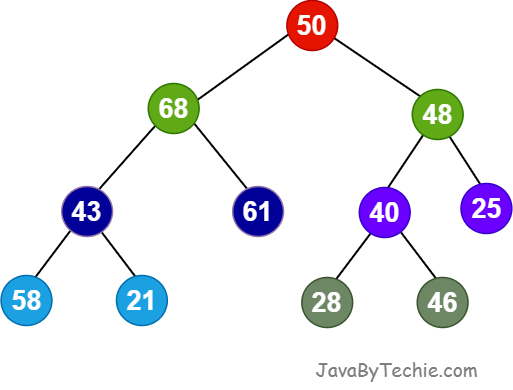
In a Binary Tree, every node has three parts:
- Data
- Reference of left child node
- Reference of right child node
Binary Tree Terminologies
- Node: In a tree, Node is an entity that contains keys and pointer (reference) to its child.
- Edge: In a tree, connecting links of any two nodes are known as edges. All nodes in a tree connected by edges.
- Root Node: In a tree, a Root Node is a first node or top most node of the tree. Every tree must have a root node and root node does not have a parent node. There will be only one root in a tree.
- Parent Node: In a tree, the node that is a node's predecessor is called a Parent node. A parent node has a branch from it to any other node.
- Child Node: In a tree, the descendant node of any node is called a child node.
- Leaf Node: In a tree, A node which does not have any child node is called a leaf node. A leaf node is the bottom-most node of the tree.
- Internal Node: In a tree, the node that has at least one child node is called an Internal Node. Nodes other than leaf nodes in a tree are Internal Nodes. Internal nodes are also known as 'Non-Terminal' nodes.
- Depth of a Node: In a tree, the total number of children of a node is called a Degree of that node. The highest degree of a node among all the nodes in a tree is called a Degree of Tree.
- Height of a Node: In the tree, the total number of edges from a leaf node to a particular node in the longest path is called the height of that node.
- Level of a Node: In a tree, the root node is said to be at level 0, and the children of the root node at level 1 and, the children of the nodes at level 1, will be at level 2 and so on.
- Path: In a tree, the sequence of Nodes and Edges from one node to another node is called as PATH between that two Nodes. Length of a Path is total number of nodes in that path.
- Subtree: In a tree, a subtree will be formed on every single parent node by each child node.
Binary Tree Representation
Syntax to create a Node of Binary Tree in Java
class Node {
  int data;
  Node left, right;

  // constructor
  public Node(int item) {
      data = item;
      left = right = null;
  }
}
Types of Binary Tree
Binary Trees are following types:
- Full Binary Tree
- Perfect Binary Tree
- Complete Binary Tree
- Degenerate or Pathological Tree
- Skewed Binary Tree
- Balanced Binary Tree
Apart from the above, there are also some very important types of Binary Tree:
- Binary Search Tree
- AVL Tree
- Red Black Tree
- B Tree
- B+ Tree
Operations On Binary Tree in Data Structure
We can perform the following types of opearations on a binary tree data structure:
- Insertion
- Deletion
- Searching
- Traversing
1. Insertion
Insertion in a binary tree means adding a new node in such a way that the tree maintains its properties.
Example of Insert Operation in Binary Tree
import java.util.LinkedList;
import java.util.Queue;

class Node {
  int data;
  Node left, right;

  Node(int d) {
    data = d;
    left = right = null;
  }
}

class BinaryTreeInsertOperation {
  // Method to insert a new node in the binary tree
  static Node insertNode(Node root, int key) {
    if (root == null)
      return new Node(key);

    // Create a queue for level order traversal
    Queue<Node> queue = new LinkedList<>();
    queue.add(root);

    while (!queue.isEmpty()) {
      Node temp = queue.poll();

      // If left child is empty, insert the new node here
      if (temp.left == null) {
        temp.left = new Node(key);
        break;
      } else {
        queue.add(temp.left);
      }

      // If right child is empty, insert the new node here
      if (temp.right == null) {
        temp.right = new Node(key);
        break;
      } else {
        queue.add(temp.right);
      }
    }
    return root;
  }

  // Method to inorder traversal
  static void inorderTraversal(Node root) {
    if (root == null)
      return;
    inorderTraversal(root.left);
    System.out.print(root.data + " ");
    inorderTraversal(root.right);
  }

  public static void main(String[] args) {
    Node root = new Node(70);
    root.left = new Node(30);
    root.right = new Node(40);
    root.left.left = new Node(50);

    System.out.print("Binary tree before insertion: ");
    inorderTraversal(root);
    System.out.println();

    int new_element = 60;
    root = insertNode(root, new_element);

    System.out.print("Binary tree after insertion: ");
    inorderTraversal(root);
    System.out.println();
  }
}Binary tree before insertion: 50 30 70 40 Binary tree after insertion: 50 30 60 70 40
2. Deletion
Example of Delete Operation in Binary Tree
import java.util.LinkedList;
import java.util.Queue;

class Node {
  int data;
  Node left, right;

  Node(int key) {
    data = key;
    left = right = null;
  }
}

class BinaryTreeDeleteOperation {
  // Method to delete a node from the binary tree
  static Node deleteNode(Node root, int val) {
    if (root == null)
      return null;

    // Use a queue to perform BFS
    Queue<Node> queue = new LinkedList<>();
    queue.add(root);
    Node target = null;

    // Find the target node
    while (!queue.isEmpty()) {
      Node currentNode = queue.poll();

      if (currentNode.data == val) {
        target = currentNode;
        break;
      }
      if (currentNode.left != null)
        queue.add(currentNode.left);
      if (currentNode.right != null)
        queue.add(currentNode.right);
    }
    if (target == null)
      return root;

    // Find the deepest rightmost node and its parent
    Node lastNode = null;
    Node lastParent = null;
    Queue<Node> queue1 = new LinkedList<>();
    Queue<Node> parentQueue = new LinkedList<>();
    queue1.add(root);
    parentQueue.add(null);

    while (!queue1.isEmpty()) {
      Node currentNode = queue1.poll();
      Node parentNode = parentQueue.poll();

      lastNode = currentNode;
      lastParent = parentNode;

      if (currentNode.left != null) {
        queue1.add(currentNode.left);
        parentQueue.add(currentNode);
      }
      if (currentNode.right != null) {
        queue1.add(currentNode.right);
        parentQueue.add(currentNode);
      }
    }

    // Replace target's value with the last node's value
    target.data = lastNode.data;

    // Removing the last node
    if (lastParent != null) {
      if (lastParent.left == lastNode)
        lastParent.left = null;
      else
        lastParent.right = null;
    } else {
      return null;
    }
    return root;
  }

  // In-order traversal
  static void inorderTraversal(Node root) {
    if (root == null)
      return;
    inorderTraversal(root.left);
    System.out.print(root.data + " ");
    inorderTraversal(root.right);
  }

  public static void main(String[] args) {
    Node root = new Node(20);
    root.left = new Node(30);
    root.right = new Node(40);
    root.left.left = new Node(50);
    root.left.right = new Node(60);

    System.out.print("Binary Tree before deletion operation: ");
    inorderTraversal(root);
    System.out.println();

    int deleteNode = 30;
    root = deleteNode(root, deleteNode);

    System.out.print("Binary Tree after deleting " + deleteNode + " : ");
    inorderTraversal(root);
    System.out.println();
  }
}Binary Tree before deletion operation: 50 30 60 20 40 Binary Tree after deleting 30 : 50 60 20 40
3. Searching
Example of Search Operation in Binary Tree
class Node {
  int data;
  Node left, right;

  Node(int key) {
    data = key;
    left = right = null;
  }
}

public class BinaryTreeSearchOperation {
  // Using DFS traversal method, searching a node in a binary tree
  static boolean searchDFS(Node root, int value) {
    // Return false if the tree is empty or we've reached a leaf node
    if (root == null)
      return false;

    // Return true if searching data is available in the binary tree
    if (root.data == value)
      return true;

    // Recursively search in the left and right subtrees
    boolean left_res = searchDFS(root.left, value);
    boolean right_res = searchDFS(root.right, value);

    return left_res || right_res;
  }

  public static void main(String[] args) {
    Node root = new Node(20);
    root.left = new Node(30);
    root.right = new Node(40);
    root.left.left = new Node(50);
    root.left.right = new Node(60);

    int search_data = 40; // Available in the Binary Tree
    if (searchDFS(root, search_data))
      System.out.println(search_data + " is found in the binary tree");
    else
      System.out.println(search_data + " is not found in the binary tree");

    search_data = 70; // Not Available in the Binary Tree
    if (searchDFS(root, search_data))
      System.out.println(search_data + " is found in the binary tree");
    else
      System.out.println(search_data + " is not found in the binary tree");
  }
}40 is found in the binary tree 70 is not found in the binary tree
4. Traversing
Tree traversals are methods used to visit and process all the nodes in a binary tree data structure in a specific order. Tree Traversal algorithms can be categories mainly in two part, DFS and BFS:
- Depth-First Search (DFS) Algorithms
- Breadth-First Search (BFS) Algorithms
Example of Search Operation in Binary Tree
import java.util.LinkedList;
import java.util.Queue;

class Node {
  int data;
  Node left, right;

  Node(int key) {
    data = key;
    left = right = null;
  }
}

class BinaryTreeTraversal {
  // In-order DFS Traversal (Left -> Root -> Right)
  static void inOrderDFS(Node node) {
    if (node == null)
      return;
    inOrderDFS(node.left);
    System.out.print(node.data + " ");
    inOrderDFS(node.right);
  }

  // Pre-order DFS Traversal (Root -> Left -> Right)
  static void preOrderDFS(Node node) {
    if (node == null)
      return;
    System.out.print(node.data + " ");
    preOrderDFS(node.left);
    preOrderDFS(node.right);
  }

  // Post-order DFS Traversal (Left -> Right -> Root)
  static void postOrderDFS(Node node) {
    if (node == null)
      return;
    postOrderDFS(node.left);
    postOrderDFS(node.right);
    System.out.print(node.data + " ");
  }

  // BFS: Level order traversal
  static void levelOrderBFS(Node root) {
    if (root == null)
      return;
    Queue<Node> queue = new LinkedList<>();
    queue.add(root);

    while (!queue.isEmpty()) {
      Node node = queue.poll();
      System.out.print(node.data + " ");
      if (node.left != null)
        queue.add(node.left);
      if (node.right != null)
        queue.add(node.right);
    }
  }

  public static void main(String[] args) {
    Node root = new Node(20);
    root.left = new Node(30);
    root.right = new Node(40);
    root.left.left = new Node(50);

    System.out.print("In-order DFS Traversal: ");
    inOrderDFS(root);
    System.out.print("\nPre-order DFS Traversal: ");
    preOrderDFS(root);
    System.out.print("\nPost-order DFS Traversal: ");
    postOrderDFS(root);
    System.out.print("\nLevel order BFS Traversal: ");
    levelOrderBFS(root);
  }
}In-order DFS Traversal: 50 30 20 40 Pre-order DFS Traversal: 20 30 50 40 Post-order DFS Traversal: 50 30 40 20 Level order BFS Traversal: 20 30 40 50
Time and Space Complexity of Binary Tree
| Operations | Time Complexity | Space Complexity |
|---|---|---|
| Insertion | O(n) | O(n) |
| Deletion | O(n) | O(n) |
| Searching | O(n) | O(n) |
| Traversal (In-order, Pre-order, Post-order) | O(n) | O(h) |
Here, n represent number of node and h represent the height of the tree.
Advantages of Binary Trees
- Efficient Searching
- Hierarchical Organization/Representation
- Flexible Structure
- Efficient Insertion and Deletion Operations
- Dynamic Size
- Memory Efficiency
- Supports Advanced Structures
- Traversal Flexibility
Disadvantages of Binary Trees
- Memory Overhead
- Complexity of Balancing
- Limited to Two Children
- Complex Implementation
- Limited Degree