Classes and Objects in Java – Explained with Examples
Classes and objects are the foundation of Java. A class is a blueprint that describes what data something has and what it can do. An object is a real thing built from that blueprint, with its own values. Every Java program you write is made of classes, and almost everything it works with at runtime is an object.
This tutorial explains how to write a class, create objects, use references, and choose between instance and static members, with runnable examples.
1. What Are Classes and Objects?
Think of a house plan and the houses built from it. The plan (class) says every house has rooms, a door and a colour. Each house (object) is real, has its own address and colour, and can be changed without affecting the others.
| Class | Object |
|---|---|
| A blueprint or template | An instance built from the blueprint |
Declared once with the class keyword | Created many times with new |
| Exists in the source code and as loaded metadata | Exists in heap memory while the program runs |
Example: Car | Examples: a red Tata, a white Honda |
Every object has:
- State: the values of its fields (colour, speed).
- Behaviour: what its methods do (accelerate, brake).
- Identity: it is a distinct object, even if another object has the same values.
2. Anatomy of a Class
[access modifier] class ClassName [extends Parent] [implements Interfaces] {
    // fields (variables): the data
    // constructors: how objects are initialised
    // methods: the behaviour
    // nested classes, initializer blocks (optional)
}
By convention, class names use PascalCase (BankAccount), and a public class must be saved in a file with the same name (BankAccount.java).
3. Creating a Class and Objects
Here a Car class defines fields, a constructor and methods. Two objects are created from it, and each keeps its own speed:
public class Car {
    // Fields (state)
    String brand;
    String color;
    int speed;

    // Constructor: runs when an object is created
    Car(String brand, String color) {
        this.brand = brand;
        this.color = color;
        this.speed = 0;
    }

    // Methods (behaviour)
    void accelerate(int amount) { speed += amount; }
    void brake() { speed = 0; }
    String describe() { return color + " " + brand + " at " + speed + " km/h"; }

    public static void main(String[] args) {
        Car car1 = new Car("Tata", "red");      // object 1
        Car car2 = new Car("Honda", "white");   // object 2

        car1.accelerate(60);
        car2.accelerate(40);
        car2.accelerate(30);

        System.out.println(car1.describe());
        System.out.println(car2.describe());

        car1.brake();
        System.out.println(car1.describe());
    }
}red Tata at 60 km/h white Honda at 70 km/h red Tata at 0 km/h
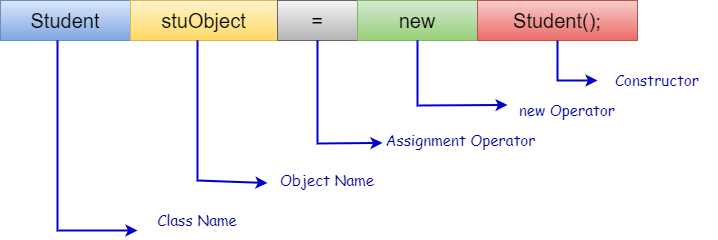
4. What Happens When You Write new?
The statement Car car1 = new Car("Tata", "red"); does several things:
- Declaration:
Car car1creates a reference variable that can point to aCar. - Allocation:
newreserves memory for a new object on the heap and sets all fields to default values (null,0,false). - Initialisation: the constructor runs and sets the fields.
- Assignment: the reference to the new object is stored in
car1.
The variable does not contain the object itself; it holds a reference (like an address) to the object.
5. Reference Variables
Because variables hold references, copying a variable copies the reference, not the object. Two variables can then point to the same object:
public class References {
    static class Box { int value; Box(int v) { value = v; } }

    public static void main(String[] args) {
        Box a = new Box(10);
        Box b = a;                 // b refers to the SAME object as a
        b.value = 99;
        System.out.println("a.value = " + a.value);

        Box c = new Box(99);       // a different object with the same data
        System.out.println("a == b: " + (a == b));
        System.out.println("a == c: " + (a == c));

        Box d = null;              // refers to no object
        try {
            System.out.println(d.value);
        } catch (NullPointerException e) {
            System.out.println("d is null: NullPointerException");
        }
    }
}a.value = 99 a == b: true a == c: false d is null: NullPointerException
==on objects checks whether two references point to the same object.- To compare contents, a class overrides
equals()(records do this automatically). - A reference set to
nullpoints to nothing; using it throwsNullPointerException.
6. Fields, Methods and Constructors
| Member | Purpose | Example |
|---|---|---|
| Field (instance variable) | Stores an object's state | String color; |
| Method | Defines behaviour | void brake() { speed = 0; } |
| Constructor | Initialises a new object; same name as the class, no return type | Car(String brand, String color) { ... } |
| Static field/method | Belongs to the class, shared by all objects | static int created; |
The keyword this refers to the current object. It is used to tell a field (this.brand) apart from a parameter with the same name (brand). See Constructors in Java and Methods in Java for details.
7. Instance Members vs Static Members
Instance fields exist once per object; static fields exist once per class. Here a static counter tracks how many objects were created, while each object keeps its own id:
public class StaticVsInstance {
    static int created = 0;        // one copy shared by the whole class
    final int id;                  // one copy per object

    StaticVsInstance() {
        created++;
        id = created;
    }

    public static void main(String[] args) {
        StaticVsInstance x = new StaticVsInstance();
        StaticVsInstance y = new StaticVsInstance();
        StaticVsInstance z = new StaticVsInstance();
        System.out.println("x.id=" + x.id + ", y.id=" + y.id + ", z.id=" + z.id);
        System.out.println("Objects created: " + StaticVsInstance.created);
    }
}x.id=1, y.id=2, z.id=3 Objects created: 3
Static methods can be called without creating an object (Math.max(3, 5)), but they cannot use instance fields directly, because there is no "current object". Learn more in static keyword in Java.
8. Ways to Create Objects
The new keyword is by far the most common, but there are other ways:
import java.util.List;

public class CreateObjects {
    static class Point implements Cloneable {
        final int x, y;
        Point(int x, int y) { this.x = x; this.y = y; }
        static Point origin() { return new Point(0, 0); }          // factory method
        @Override public Point clone() {
            try { return (Point) super.clone(); } catch (CloneNotSupportedException e) { throw new AssertionError(e); }
        }
        @Override public String toString() { return "(" + x + ", " + y + ")"; }
    }

    public static void main(String[] args) throws Exception {
        Point p1 = new Point(3, 4);                                   // 1. new keyword
        Point p2 = Point.origin();                                    // 2. factory method
        Point p3 = p1.clone();                                        // 3. clone()
        Point p4 = Point.class.getDeclaredConstructor(int.class, int.class)
                              .newInstance(7, 8);                     // 4. reflection
        System.out.println(List.of(p1, p2, p3, p4));
        System.out.println("p3 is a copy, not the same object: " + (p1 != p3));
    }
}[(3, 4), (0, 0), (3, 4), (7, 8)] p3 is a copy, not the same object: true
| Way | When it is used |
|---|---|
new | Everyday object creation. |
| Static factory method | Named creation, caching or returning subtypes, e.g. List.of(), LocalDate.now(). |
clone() | Copying an existing object (copy constructors are usually preferred). |
| Reflection | Frameworks that create objects of classes known only at runtime. |
| Deserialization | Rebuilding objects from bytes, JSON or XML. |
9. Records: Classes for Plain Data
Many classes simply hold data. Since Java 16, a record declares such a class in one line, generating the constructor, accessor methods, equals(), hashCode() and toString():
public class RecordDemo {
    // A record: constructor, accessors, equals, hashCode and toString are generated
    record Book(String title, String author, int pages) { }

    public static void main(String[] args) {
        Book b1 = new Book("Clean Code", "Robert C. Martin", 464);
        Book b2 = new Book("Clean Code", "Robert C. Martin", 464);

        System.out.println(b1);
        System.out.println("title(): " + b1.title());
        System.out.println("b1.equals(b2): " + b1.equals(b2));
    }
}Book[title=Clean Code, author=Robert C. Martin, pages=464] title(): Clean Code b1.equals(b2): true
Records are shallowly immutable: each component is stored in a private final field that cannot be reassigned after creation. If a component refers to a mutable object, such as an ArrayList, that object can still change, so copy it in the constructor (for example with List.copyOf()) when you need full immutability.
10. Anonymous Objects
If you need an object only once, you can create it without storing the reference, for example new Car("Kia", "blue").describe();. The object becomes eligible for garbage collection right after the statement finishes.
11. Object Lifetime and Garbage Collection
An object lives on the heap as long as some reference can reach it. When no references remain, for example after car1 = null; or when a local variable goes out of scope, the garbage collector may reclaim its memory. You never delete objects manually in Java. See Garbage Collection in Java.
12. Java Version Improvements and Java 25 Updates
The basics of classes and objects have not changed since Java 1.0, but recent releases make classes shorter to write and safer to construct:
| Feature | Java version | Status in Java 25 | What it changes |
|---|---|---|---|
| Records | Java 16 | Standard | One-line declarations for data classes. |
| Record patterns | Java 21 | Standard | Take a record apart directly in instanceof and switch. |
| Flexible constructor bodies | Java 25 | Standard | Statements such as argument checks can run before super(...) or this(...). |
Compact source files and instance main methods | Java 25 | Standard | A small program can be written without an explicit class declaration; the compiler declares the class for you. |
Flexible Constructor Bodies (Java 25)
Before Java 25, the call to super(...) had to be the first statement of a constructor, so a subclass could not check or prepare its arguments first. Java 25 allows statements before that call. They may validate arguments, compute values and assign the new object's fields, but they cannot read those fields or call its instance methods, because the object is not fully constructed yet.
class Vehicle {
    private final String plate;

    Vehicle(String plate) {
        this.plate = plate;
    }

    String plate() {
        return plate;
    }
}

class ElectricCar extends Vehicle {
    private final int rangeKm;

    ElectricCar(String plate, int rangeKm) {
        // Java 25: statements can run before super(...)
        if (rangeKm <= 0) {
            throw new IllegalArgumentException("Range must be positive: " + rangeKm);
        }
        String cleanPlate = plate.trim().toUpperCase();
        super(cleanPlate);           // the superclass constructor still runs first on the object
        this.rangeKm = rangeKm;
    }

    String describe() {
        return plate() + " (" + rangeKm + " km)";
    }
}

public class FlexibleConstructor {
    public static void main(String[] args) {
        ElectricCar car = new ElectricCar(" ka01ev2025 ", 450);
        System.out.println(car.describe());

        try {
            new ElectricCar("MH12EV0001", 0);
        } catch (IllegalArgumentException e) {
            System.out.println("Rejected: " + e.getMessage());
        }
    }
}KA01EV2025 (450 km) Rejected: Range must be positive: 0
Here an invalid range is rejected before the Vehicle constructor runs, and the plate is cleaned up before it is passed to super(). On Java 21 the same code fails with flexible constructors is not supported in -source 21.
13. Best Practices
- Give each class one clear responsibility.
- Make fields
privateand expose behaviour through methods (encapsulation). - Use constructors to put objects into a valid state immediately.
- Prefer immutable objects (final fields, records) when possible.
- Override
equals(),hashCode()andtoString()for value-like classes. - Use meaningful names: nouns for classes, verbs for methods.
14. Summary
- A class is a blueprint with fields, constructors and methods; an object is an instance created with
new. - Variables hold references to objects;
==compares references,equals()compares content. - Instance members belong to each object; static members belong to the class.
- Objects can also be created by factory methods, cloning, reflection and deserialization.
- Records offer a compact way to write shallowly immutable data classes.
Related Tutorials
15. Official Java Documentation References
- Java Language Specification (Java SE 25), Chapter 8: Classes
- JLS §8.8.7: Constructor Body
- JLS §8.10: Record Classes
- JLS §12.5: Creation of New Class Instances
- java.lang.Object (Java SE 25 API)
- java.lang.Record (Java SE 25 API)
- JEP 513: Flexible Constructor Bodies
- JEP 395: Records
- dev.java: Classes and Objects