Data Types in Java – Primitive and Reference Types
A data type tells Java what kind of value a variable can hold and what you can do with it: whole numbers, decimals, characters, true/false values, or references to objects. Because Java is statically typed, every variable has a type that is fixed when you compile, and the compiler checks that you use it correctly.
Java has two families of types: the eight primitive types, which hold simple values directly, and reference types, which point to objects. This tutorial covers both, along with literals, conversions and common pitfalls.
1. Two Kinds of Data Types
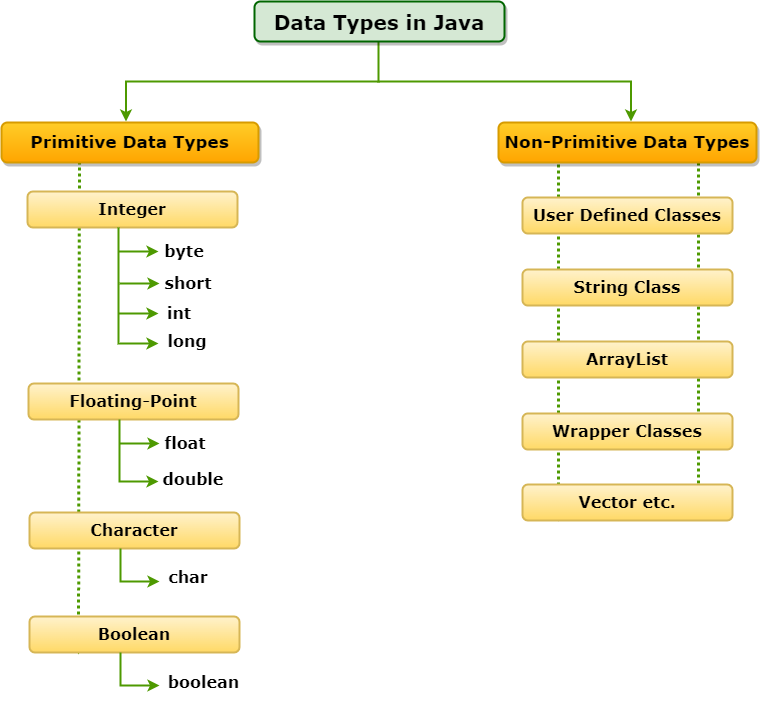
| Primitive types | Reference types |
|---|---|
8 built-in types: byte, short, int, long, float, double, char, boolean | Classes, interfaces, arrays, enums, records |
| Hold the value itself | Hold a reference to an object on the heap |
| Names start with a lowercase letter | Names usually start with an uppercase letter (String) |
Cannot be null | Can be null |
| No methods | Have methods ("hi".length()) |
| Fixed size | Size depends on the object |
2. The Eight Primitive Types
| Type | Size | Holds | Default | Example |
|---|---|---|---|---|
byte | 8 bits | Whole numbers −128 to 127 | 0 | byte age = 25; |
short | 16 bits | Whole numbers −32,768 to 32,767 | 0 | short year = 2026; |
int | 32 bits | Whole numbers about ±2.1 billion | 0 | int population = 1_400_000; |
long | 64 bits | Whole numbers about ±9.2 × 10¹⁸ | 0L | long views = 9_000_000_000L; |
float | 32 bits | Decimals, about 7 significant digits | 0.0f | float rating = 4.5f; |
double | 64 bits | Decimals, about 15–16 significant digits | 0.0 | double pi = 3.14159; |
char | 16 bits | One UTF-16 character, 0 to 65,535 | '\u0000' | char grade = 'A'; |
boolean | JVM-dependent | true or false | false | boolean active = true; |
The exact limits come from constants in the wrapper classes:
public class PrimitiveRanges {
    public static void main(String[] args) {
        System.out.printf("%-8s %-7s %-22s %s%n", "type", "bits", "min", "max");
        System.out.printf("%-8s %-7d %-22d %d%n", "byte", Byte.SIZE, Byte.MIN_VALUE, Byte.MAX_VALUE);
        System.out.printf("%-8s %-7d %-22d %d%n", "short", Short.SIZE, Short.MIN_VALUE, Short.MAX_VALUE);
        System.out.printf("%-8s %-7d %-22d %d%n", "int", Integer.SIZE, Integer.MIN_VALUE, Integer.MAX_VALUE);
        System.out.printf("%-8s %-7d %-22d %d%n", "long", Long.SIZE, Long.MIN_VALUE, Long.MAX_VALUE);
        System.out.printf("%-8s %-7d %-22s %s%n", "float", Float.SIZE, Float.MIN_VALUE, Float.MAX_VALUE);
        System.out.printf("%-8s %-7d %-22s %s%n", "double", Double.SIZE, Double.MIN_VALUE, Double.MAX_VALUE);
        System.out.printf("%-8s %-7d %-22d %d%n", "char", Character.SIZE, (int) Character.MIN_VALUE, (int) Character.MAX_VALUE);
        System.out.printf("%-8s %-7s %-22s %s%n", "boolean", "-", false, true);
    }
}type bits min max byte 8 -128 127 short 16 -32768 32767 int 32 -2147483648 2147483647 long 64 -9223372036854775808 9223372036854775807 float 32 1.4E-45 3.4028235E38 double 64 4.9E-324 1.7976931348623157E308 char 16 0 65535 boolean - false true
Note that Float.MIN_VALUE and Double.MIN_VALUE are the smallest positive values, not the most negative ones. The most negative double is -Double.MAX_VALUE.
3. Choosing the Right Primitive Type
intis the default for whole numbers (counters, indexes, quantities).longfor values that can exceed about 2 billion: timestamps in milliseconds, file sizes, IDs.doubleis the default for decimals (measurements, scientific values).byteandshortmainly for large arrays or binary data where memory matters.floatmainly for graphics or large arrays where precision is less important.- Never use
floatordoublefor money; useBigDecimalor an integer number of cents.
4. Default Values
Fields of a class get default values automatically. Local variables do not: they must be assigned before use, or the program does not compile.
public class DefaultValues {
    // Fields get default values automatically
    static byte b; static short s; static int i; static long l;
    static float f; static double d; static char c; static boolean flag;
    static String text;

    public static void main(String[] args) {
        System.out.println("byte=" + b + " short=" + s + " int=" + i + " long=" + l);
        System.out.println("float=" + f + " double=" + d);
        System.out.println("char=" + (int) c + " (the \\u0000 character)  boolean=" + flag);
        System.out.println("String (reference)=" + text);

        int local;
        // System.out.println(local);   // compile error: variable local might not have been initialized
    }
}byte=0 short=0 int=0 long=0 float=0.0 double=0.0 char=0 (the \u0000 character) boolean=false String (reference)=null
5. Literals
A literal is a value written directly in the code. Java supports several notations:
public class Literals {
    public static void main(String[] args) {
        int million = 1_000_000;          // underscores for readability
        int hex = 0xFF;                   // hexadecimal
        int binary = 0b1010;              // binary
        int octal = 017;                  // octal (leading 0)
        long big = 9_000_000_000L;        // L suffix: long
        float price = 19.99f;             // f suffix: float
        double pi = 3.14159;              // decimal literals are double by default
        double sci = 6.02e23;             // scientific notation
        char letter = 'A';
        char rupee = '₹';            // Unicode escape
        boolean done = true;

        System.out.println(million + " " + hex + " " + binary + " " + octal);
        System.out.println(big + " " + price + " " + pi + " " + sci);
        System.out.println(letter + " " + rupee + " " + done);
    }
}1000000 255 10 15 9000000000 19.99 3.14159 6.02E23 A ₹ true
- Whole-number literals are
intby default; addLforlong. - Decimal literals are
doubleby default; addfforfloat. - Underscores (
1_000_000) are ignored by the compiler and make large numbers readable. - Character literals use single quotes; string literals use double quotes.
6. Reference Types
Everything that is not a primitive is a reference type:
- Classes:
String,LocalDate, your own classes. - Interfaces:
List,Runnable. - Arrays:
int[],String[][]; even arrays of primitives are objects. - Enums and records.
A reference variable stores the location of an object, not the object itself. Its default value is null. String is the most used reference type; although it has literal syntax ("hello"), it is a class, not a primitive.
7. Type Conversion and Casting
Widening conversions (to a larger type) happen automatically. Narrowing conversions (to a smaller type) need an explicit cast and can lose information:
public class TypeConversion {
    public static void main(String[] args) {
        // Widening (automatic): small type -> bigger type
        int count = 42;
        long bigCount = count;
        double asDouble = count;
        System.out.println("widening:  " + bigCount + ", " + asDouble);

        // Narrowing (explicit cast): bigger type -> smaller type, may lose data
        double price = 99.99;
        int whole = (int) price;              // fraction is dropped, not rounded
        System.out.println("narrowing: " + whole + ", rounded: " + Math.round(price));

        int large = 300;
        byte small = (byte) large;            // 300 does not fit in a byte: wraps around
        System.out.println("(byte) 300 = " + small);

        // Integer overflow wraps silently
        int max = Integer.MAX_VALUE;
        System.out.println("MAX + 1 = " + (max + 1));
        System.out.println("addExact: " + safeAdd(max, 1));

        // Integer division
        System.out.println("7 / 2 = " + (7 / 2) + ", 7 / 2.0 = " + (7 / 2.0));

        // char is a number too
        char c = 'A';
        System.out.println("'A' + 1 = " + (c + 1) + ", (char) ('A' + 1) = " + (char) (c + 1));
    }

    static String safeAdd(int a, int b) {
        try { return String.valueOf(Math.addExact(a, b)); }
        catch (ArithmeticException e) { return "ArithmeticException: " + e.getMessage(); }
    }
}widening: 42, 42.0
narrowing: 99, rounded: 100
(byte) 300 = 44
MAX + 1 = -2147483648
addExact: ArithmeticException: integer overflow
7 / 2 = 3, 7 / 2.0 = 3.5
'A' + 1 = 66, (char) ('A' + 1) = B
- Widening order:
byte → short → int → long → float → double, andchar → int. - Casting a decimal to an integer truncates the fraction; use
Math.round()to round. - Integer overflow wraps around silently. Use
Math.addExact()and friends to detect it, orlong/BigIntegerfor bigger values. - Dividing two integers gives an integer; make one operand a
doubleto get a decimal result. - In expressions,
byte,shortandcharare promoted toint.
8. Wrapper Classes and Autoboxing
Each primitive has a wrapper class: Byte, Short, Integer, Long, Float, Double, Character and Boolean. Collections can only store objects, so Java converts automatically between primitives and wrappers (autoboxing and unboxing).
import java.math.BigDecimal;
import java.util.ArrayList;
import java.util.List;

public class WrapperTypes {
    public static void main(String[] args) {
        List<Integer> numbers = new ArrayList<>();
        numbers.add(5);                       // autoboxing: int -> Integer
        int first = numbers.get(0);           // unboxing: Integer -> int
        System.out.println("first = " + first);

        int parsed = Integer.parseInt("123"); // String -> int
        String back = String.valueOf(456);    // int -> String
        System.out.println(parsed + 1 + " and " + back + "1");

        Integer a = 127, b = 127, x = 1000, y = 1000;
        System.out.println("127 == 127: " + (a == b) + ", 1000 == 1000: " + (x == y) + ", equals: " + x.equals(y));

        // Floating-point is approximate; use BigDecimal for money
        System.out.println("0.1 + 0.2 = " + (0.1 + 0.2));
        System.out.println("BigDecimal: " + new BigDecimal("0.1").add(new BigDecimal("0.2")));
    }
}first = 5 124 and 4561 127 == 127: true, 1000 == 1000: false, equals: true 0.1 + 0.2 = 0.30000000000000004 BigDecimal: 0.3
- Compare wrapper objects with
equals(), not==. Small values (−128 to 127) are cached, so==works for them by accident but fails for larger values. - Unboxing a
nullwrapper throwsNullPointerException. 0.1 + 0.2is not exactly0.3in binary floating point;BigDecimalgives exact decimal results.
More in Wrapper Classes in Java.
9. Local Variable Type Inference with var
Since Java 10, you can write var for local variables and let the compiler infer the type from the initial value. The variable is still statically typed:
import java.util.HashMap;

public class VarDemo {
    public static void main(String[] args) {
        var count = 10;                       // inferred as int
        var name = "Java";                    // inferred as String
        var scores = new HashMap<String, Integer>();
        scores.put(name, count);

        // The type is still fixed at compile time:
        // count = "ten";                     // compile error
        System.out.println(scores + " -> count is an int: " + ((Object) count instanceof Integer));
    }
}{Java=10} -> count is an int: true
var works only for local variables with an initializer (and in for loops and lambda parameters), not for fields, method parameters or return types.
10. Primitives vs References in Memory
A local int variable holds its value directly in the method's stack frame. A local String variable holds a reference in the stack frame, while the string object lives on the heap. That is why copying an int copies the value, but copying an object reference makes two variables share one object. See Classes and Objects.
11. Common Mistakes
- Writing
long big = 9000000000;withoutL: compile error, the literal is too large for anint. - Writing
float f = 1.5;: compile error,1.5is adouble; write1.5f. - Expecting
5 / 2to be2.5. - Using
doublefor currency. - Comparing
Integerobjects with==. - Ignoring overflow in calculations such as
intmilliseconds or large products.
12. Summary
- Java has 8 primitive types with fixed sizes and default values, and reference types for objects.
intanddoubleare the default choices; uselongfor large numbers andBigDecimalfor money.- Widening is automatic; narrowing needs a cast and can lose data or overflow.
- Wrapper classes let primitives be used as objects through autoboxing.
varinfers local variable types without making Java dynamically typed.
Related Tutorials
Reference: Java Language Specification, Chapter 4: Types, Values, and Variables
Frequently Asked Questions (FAQ)
Q1. How many data types are there in Java?
Java has eight primitive data types (byte, short, int, long, float, double, char, boolean) plus an unlimited number of reference types: every class, interface, array, enum and record.
Q2. What is the difference between primitive and reference types?
Primitive variables hold the value itself, cannot be null and have no methods. Reference variables hold a reference to an object on the heap, can be null, and give access to the object's methods.
Q3. Is String a primitive data type?
No. String is a class in java.lang, so it is a reference type. It has special support (literals and + concatenation), which makes it feel primitive.
Q4. What is the size of int and long in Java?
int is always 32 bits and long is always 64 bits, on every platform. This fixed size is part of what makes Java programs portable.
Q5. What is the size of boolean in Java?
The language does not define it; it is JVM-dependent. HotSpot typically uses one byte for a boolean field and one byte per element in a boolean[] array.
Q6. Why is char 16 bits in Java?
Java was designed for Unicode from the start. A char holds one UTF-16 code unit. Characters outside the Basic Multilingual Plane, such as many emoji, need two char values (a surrogate pair).
Q7. What is the difference between float and double?
float is 32 bits with about 7 significant digits; double is 64 bits with about 15–16. double is the default for decimal literals and is usually preferred.
Q8. Why should I not use double for money?
Binary floating-point cannot represent many decimal fractions exactly, so 0.1 + 0.2 gives 0.30000000000000004. Use BigDecimal (created from strings) or store amounts as integer cents.
Q9. What are the default values of data types?
For fields: 0 for numeric types, '\u0000' for char, false for boolean, and null for references. Local variables have no default and must be assigned.
Q10. What happens when an int overflows?
It wraps around without an error: Integer.MAX_VALUE + 1 becomes Integer.MIN_VALUE. Use Math.addExact(), Math.multiplyExact() and similar methods to get an exception instead.
Q11. What is type casting in Java?
Converting a value from one type to another. Widening casts (for example int to long) are automatic; narrowing casts (for example double to int) must be written explicitly as (int) value and may lose data.
Q12. What is autoboxing?
The automatic conversion of a primitive to its wrapper object, such as int to Integer, when an object is needed. The reverse conversion is called unboxing.
Q13. Why does Integer 127 == 127 return true but 1000 == 1000 return false?
Autoboxing uses Integer.valueOf(), which caches objects for values from −128 to 127. Both 127s are the same cached object; each 1000 is a new object. Always compare wrapper values with equals().
Q14. Does Java have unsigned data types?
No, except char, which is an unsigned 16-bit type. Methods such as Integer.toUnsignedString() and Integer.compareUnsigned() support unsigned arithmetic when needed.
Q15. What does var do in Java?
var lets the compiler infer a local variable's type from its initializer. The variable still has a fixed static type; var just saves you from writing it.
Q16. Why do I get an error for float f = 3.14?
Decimal literals are double by default, and assigning a double to a float is a narrowing conversion. Write 3.14f or cast with (float) 3.14.
Q17. Why does 5 / 2 give 2 in Java?
Both operands are int, so Java performs integer division and drops the remainder. Write 5 / 2.0 or cast one operand to double to get 2.5.
Q18. Can a primitive variable be null?
No. Only reference types can be null. If you need "no value" for a number, use a wrapper type such as Integer or an OptionalInt.
Q19. Which data type should I use for very large numbers?
long for integers up to about 9.2 × 10¹⁸; BigInteger for arbitrarily large integers; BigDecimal for exact or very precise decimals.
Q20. Are arrays primitive or reference types?
Reference types. Even an int[] is an object on the heap; the variable holds a reference to it, and its elements are primitives stored inside the array object.