Encapsulation in Java – Data Hiding with Examples
Encapsulation is the OOP principle of bundling data with the methods that operate on it and hiding that data from outside code. Fields are made private, and the class exposes a small set of public methods that read or change them while enforcing the rules. The object becomes responsible for keeping itself valid.
This tutorial shows what goes wrong without encapsulation, how to encapsulate a class properly with validation, how to avoid leaking mutable internals, and how records make simple encapsulated classes easy to write.
1. What Is Encapsulation?
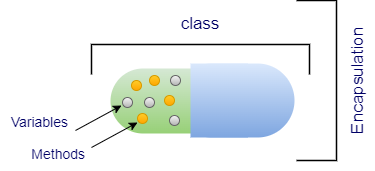
Think of a capsule: its contents are sealed inside, and you interact only with the outside. In Java, encapsulation is achieved by:
- declaring fields
privateso that only the class itself can access them; - providing public methods (including getters and setters where needed) that read and change the state;
- putting validation and business rules inside those methods.
Encapsulation is often called data hiding, although strictly speaking data hiding (using private) is the mechanism and encapsulation is the broader design idea.
2. The Problem Without Encapsulation
public class WithoutEncapsulation {
    static class Account {
        public String owner;
        public double balance;     // anyone can write anything
    }

    public static void main(String[] args) {
        Account acc = new Account();
        acc.owner = "";            // invalid owner
        acc.balance = -50_000;     // invalid balance, no checks possible
        System.out.println("Owner: '" + acc.owner + "', balance: " + acc.balance);
    }
}Owner: '', balance: -50000.0
With public fields, the class cannot protect itself. Every piece of code that uses Account must remember the rules, and one mistake anywhere produces invalid data.
3. Encapsulating a Class
public class EncapsulatedAccount {
    static class Account {
        private final String owner;     // hidden, and fixed after creation
        private double balance;         // hidden; changed only through methods

        Account(String owner, double opening) {
            if (owner == null || owner.isBlank()) throw new IllegalArgumentException("owner is required");
            if (opening < 0) throw new IllegalArgumentException("opening balance cannot be negative");
            this.owner = owner;
            this.balance = opening;
        }

        public String getOwner()   { return owner; }      // read-only property
        public double getBalance() { return balance; }

        public void deposit(double amount) {
            if (amount <= 0) throw new IllegalArgumentException("deposit must be positive");
            balance += amount;
        }

        public void withdraw(double amount) {
            if (amount <= 0) throw new IllegalArgumentException("withdrawal must be positive");
            if (amount > balance) throw new IllegalStateException("insufficient funds");
            balance -= amount;
        }
    }

    public static void main(String[] args) {
        Account acc = new Account("Asha", 1_000);
        acc.deposit(500);
        acc.withdraw(300);
        System.out.println(acc.getOwner() + " has " + acc.getBalance());

        try { acc.withdraw(5_000); }
        catch (IllegalStateException e) { System.out.println("Rejected: " + e.getMessage()); }
        try { acc.deposit(-10); }
        catch (IllegalArgumentException e) { System.out.println("Rejected: " + e.getMessage()); }
        // acc.balance = 1_000_000;   // compile error: balance has private access
        System.out.println("Balance still " + acc.getBalance());
    }
}Asha has 1200.0 Rejected: insufficient funds Rejected: deposit must be positive Balance still 1200.0
- The constructor guarantees every
Accountstarts in a valid state. - There is no
setBalance(): the balance changes only through meaningful operations,depositandwithdraw, which enforce the rules. ownerisfinalwith only a getter, so it is read-only.
4. Getters and Setters
By convention, a property name is read with getName() (or isActive() for booleans) and written with setName(...). Frameworks such as Spring, Hibernate and Jackson rely on these JavaBeans naming conventions.
| Provide | Result |
|---|---|
| Getter and setter | Read-write property (setter should validate) |
| Getter only | Read-only property |
| Setter only | Write-only property (rare; e.g. a password) |
| Neither | Fully internal state |
Do not generate a getter and setter for every field automatically. A public setter without checks is barely better than a public field. Prefer methods that express behaviour (withdraw, activate, rename).
5. Changing Internals Without Breaking Callers
Because callers depend only on public methods, you can change the internal representation freely:
public class ChangeInternals {
    // Version 2 stores the temperature in Kelvin internally.
    // The public API (Celsius getters/setters) did not change, so no caller breaks.
    static class Thermostat {
        private double kelvin = 293.15;

        public double getCelsius() { return kelvin - 273.15; }
        public void setCelsius(double celsius) {
            if (celsius < -273.15) throw new IllegalArgumentException("below absolute zero");
            kelvin = celsius + 273.15;
        }
        public double getFahrenheit() { return getCelsius() * 9 / 5 + 32; }   // new feature, free
    }

    public static void main(String[] args) {
        Thermostat t = new Thermostat();
        t.setCelsius(25);
        System.out.printf("%.1f C = %.1f F%n", t.getCelsius(), t.getFahrenheit());
    }
}25.0 C = 77.0 F
The thermostat now stores Kelvin, yet every caller still works with Celsius, and adding Fahrenheit support took one method.
6. Do Not Leak Mutable Internals
A private field is not truly hidden if a getter returns the mutable object itself. Copy mutable data on the way in and on the way out:
import java.util.ArrayList;
import java.util.List;

public class DefensiveCopy {
    static class Team {
        private final List<String> members;

        Team(List<String> members) {
            this.members = new ArrayList<>(members);       // copy in
        }
        public List<String> getMembers() {
            return List.copyOf(members);                    // read-only copy out
        }
        public void addMember(String name) {
            if (members.size() >= 3) throw new IllegalStateException("team is full");
            members.add(name);
        }
    }

    static class LeakyTeam {
        private final List<String> members = new ArrayList<>();
        public List<String> getMembers() { return members; } // leaks internal list!
    }

    public static void main(String[] args) {
        LeakyTeam leaky = new LeakyTeam();
        leaky.getMembers().add("Intruder");                  // bypasses any rules
        System.out.println("Leaky team: " + leaky.getMembers());

        List<String> input = new ArrayList<>(List.of("Asha", "Ravi"));
        Team team = new Team(input);
        input.add("Sneaky");                                 // does not affect team
        team.addMember("Meera");
        System.out.println("Team: " + team.getMembers());
        try {
            team.getMembers().add("Intruder");
        } catch (UnsupportedOperationException e) {
            System.out.println("Cannot modify the returned list: " + e.getClass().getSimpleName());
        }
    }
}Leaky team: [Intruder] Team: [Asha, Ravi, Meera] Cannot modify the returned list: UnsupportedOperationException
The same applies to arrays, Date objects and any other mutable types. Immutable types such as String, LocalDate and records of immutable values can be shared safely.
7. Records: Encapsulation with Less Code
For classes that just carry data, a record (Java 16+) generates private final fields, accessors, equals, hashCode and toString. A compact constructor adds validation:
public class RecordEncapsulation {
    // Records: private final fields, accessors, equals/hashCode/toString generated
    record Email(String value) {
        Email {                                   // compact constructor validates input
            if (value == null || !value.matches("[^@\\s]+@[^@\\s]+\\.[a-z]{2,}"))
                throw new IllegalArgumentException("invalid email: " + value);
            value = value.toLowerCase();
        }
    }

    public static void main(String[] args) {
        Email e = new Email("Asha@JavaByTechie.com");
        System.out.println(e.value());
        System.out.println(e);
        try { new Email("not-an-email"); }
        catch (IllegalArgumentException ex) { System.out.println(ex.getMessage()); }
    }
}asha@javabytechie.com Email[value=asha@javabytechie.com] invalid email: not-an-email
8. Levels of Encapsulation
Access modifiers control encapsulation at several levels:
- Class level:
privatemembers are visible only inside the class. - Package level: members with no modifier are visible only within the package, useful for helper classes.
- Module level: since Java 9, a module exports only selected packages; everything else is hidden from other modules.
9. Encapsulation vs Abstraction
| Aspect | Encapsulation | Abstraction |
|---|---|---|
| Focus | Protecting an object's data and invariants | Hiding implementation complexity behind a simple contract |
| Question it answers | Who may access or change this state? | What does this object do, regardless of how? |
| Java tools | Access modifiers, getters/setters, immutability | Interfaces, abstract classes |
| Level | Implementation level | Design level |
10. Benefits
- Data integrity: objects cannot be put into invalid states.
- Flexibility: internals can change without affecting callers.
- Maintainability: rules live in one place instead of being repeated.
- Security and thread-safety: controlled access makes it easier to add checks, logging or synchronization.
- Testability: a small public API is easier to test.
11. Summary
- Encapsulation bundles data with behaviour and hides data behind
private. - Expose meaningful methods that validate input instead of raw setters.
- Make fields
finaland omit setters for read-only or immutable classes. - Copy mutable objects on the way in and out so internals cannot leak.
- Records give concise, encapsulated data classes.
Related Tutorials
Frequently Asked Questions (FAQ)
Q1. What is encapsulation in Java?
Bundling data and the methods that operate on it into a class, while hiding the data with private access and exposing controlled public methods.
Q2. How is encapsulation achieved in Java?
By declaring fields private and providing public methods, such as getters, setters and behaviour methods, that validate and control access.
Q3. Is encapsulation the same as data hiding?
They are closely related. Data hiding (private fields) is the main technique; encapsulation is the broader idea of keeping data and behaviour together behind an interface.
Q4. Why are getters and setters used?
To control how fields are read and changed, allowing validation, read-only properties, computed values and later changes to the internal representation.
Q5. Is a class with public getters and setters for every field encapsulated?
Only weakly. If setters accept any value, the class still cannot protect its invariants. Real encapsulation exposes meaningful operations and validates input.
Q6. What is a read-only class?
A class whose fields can be read through getters but not changed, typically using private final fields and no setters.
Q7. What is a write-only class?
A class with setters but no getters for some fields, used rarely, for example to accept a password that should never be read back.
Q8. What is the difference between encapsulation and abstraction?
Encapsulation protects an object's data and controls access to it. Abstraction hides implementation complexity and exposes only what an object does.
Q9. What are the benefits of encapsulation?
Data integrity, flexibility to change internals, easier maintenance, better security and thread-safety control, and simpler testing.
Q10. What is a defensive copy?
A copy of a mutable object made when it enters or leaves a class, so outside code cannot change the class's internal state through a shared reference.
Q11. Can encapsulation be broken?
Yes, by returning references to mutable internal objects, or through reflection with setAccessible(true). The module system restricts deep reflection across modules.
Q12. Do records support encapsulation?
Yes. Record components are private final fields with public accessors, and compact constructors can validate or normalise values.
Q13. Is a POJO encapsulated?
A POJO with private fields and getters/setters is encapsulated at a basic level. Adding validation and avoiding unnecessary setters strengthens it.
Q14. What is a JavaBean?
A class following conventions: private fields, a public no-argument constructor, getters and setters named getX/setX/isX, and often Serializable.
Q15. Which access modifier is most used for encapsulation?
private, for fields and internal helper methods. Public methods form the class's interface.
Q16. Does encapsulation affect performance?
Practically not. The JIT inlines small getters and setters, so they are as fast as direct field access.
Q17. What is an example of encapsulation in the JDK?
ArrayList hides its internal array and size; you use add, get and remove, and it manages growth and bounds checks itself.
Q18. How does encapsulation help thread safety?
When all access goes through the class's methods, you can add synchronization or make the class immutable in one place, instead of relying on every caller to lock correctly.
Q19. Can a static field be encapsulated?
Yes. Make it private and access it through static methods that apply any needed rules.
Q20. What is the "tell, don't ask" principle?
Tell objects what to do (account.withdraw(100)) rather than asking for their data and making decisions outside (if (account.getBalance() >= 100) account.setBalance(...)). It keeps logic encapsulated.