Multithreading in Java – Threads, Concurrency and Thread Safety
Multithreading is the ability of a program to run several threads of execution at the same time within one process. Each thread follows its own path through the code, while all threads share the process's memory. Java has supported threads since version 1.0, and every Java program already runs at least one: the main thread.
Threads let applications use multiple CPU cores, keep user interfaces responsive and handle many requests or I/O operations at once. They also introduce new problems, such as race conditions. This tutorial gives a complete overview and links to detailed tutorials on each topic.
1. Multitasking: Processes and Threads
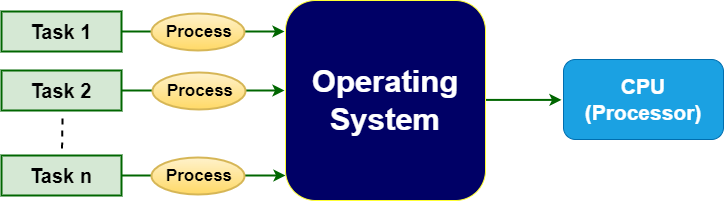
Multitasking means doing several things at once. It comes in two forms:
- Process-based multitasking: several programs run at the same time (a browser, an IDE, a music player). Each process has its own memory, so they are isolated but heavy to create and switch between.
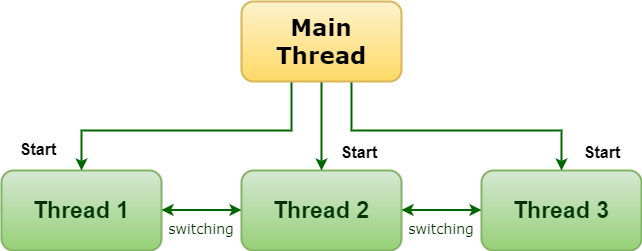
- Thread-based multitasking (multithreading): one program runs several threads. Threads share the process's heap, so they are lightweight and communicate easily, but must coordinate access to shared data.
| Aspect | Process | Thread |
|---|---|---|
| Memory | Own address space | Shares the process heap; own stack |
| Creation cost | High | Low (very low for virtual threads) |
| Communication | Inter-process communication (pipes, sockets) | Shared objects |
| Failure impact | Isolated | Can corrupt shared state |
2. Why Use Multithreading?
The biggest win comes when tasks spend time waiting, for example on network or disk I/O. Four simulated downloads of 500 ms each:
public class SequentialVsParallel {
    // Simulates a slow I/O task such as calling a web service
    static void download(String file) {
        try { Thread.sleep(500); } catch (InterruptedException e) { Thread.currentThread().interrupt(); }
    }

    public static void main(String[] args) throws InterruptedException {
        String[] files = {"a.pdf", "b.pdf", "c.pdf", "d.pdf"};

        long start = System.nanoTime();
        for (String f : files) download(f);
        long sequential = (System.nanoTime() - start) / 1_000_000;

        start = System.nanoTime();
        Thread[] workers = new Thread[files.length];
        for (int i = 0; i < files.length; i++) {
            String f = files[i];
            workers[i] = new Thread(() -> download(f));
            workers[i].start();                 // all downloads run at the same time
        }
        for (Thread t : workers) t.join();      // wait for all of them
        long parallel = (System.nanoTime() - start) / 1_000_000;

        System.out.println("Sequential: ~" + Math.round(sequential / 100.0) * 100 + " ms");
        System.out.println("4 threads:  ~" + Math.round(parallel / 100.0) * 100 + " ms");
    }
}Sequential: ~2000 ms 4 threads: ~500 ms
- Responsiveness: long work runs in the background while the UI or server keeps responding.
- Throughput: servers handle many requests at once.
- Use of multiple cores: CPU-heavy work can be split across cores.
- Simpler modelling of independent activities.
3. Creating and Starting Threads
A thread runs a Runnable task. Calling start() creates the new thread; join() waits for it to finish:
public class FirstThreads {
    public static void main(String[] args) throws InterruptedException {
        Runnable task = () -> {
            String name = Thread.currentThread().getName();
            for (int i = 1; i <= 3; i++) {
                System.out.println(name + " step " + i);
            }
        };

        Thread t1 = new Thread(task, "worker-1");
        Thread t2 = new Thread(task, "worker-2");
        t1.start();
        t2.start();
        t1.join();
        t2.join();
        System.out.println(Thread.currentThread().getName() + " thread finished last");
    }
}worker-1 step 1 worker-2 step 1 worker-1 step 2 worker-2 step 2 worker-1 step 3 worker-2 step 3 main thread finished last
The order of the worker lines changes from run to run, because the operating system schedules threads. Only the last line is guaranteed, thanks to join(). The ways to create threads (extending Thread, implementing Runnable, Callable, executors and virtual threads) are covered in How to Create a Thread.
4. Thread Life Cycle
A thread moves through the states NEW, RUNNABLE, BLOCKED, WAITING, TIMED_WAITING and TERMINATED, defined by Thread.State. See Thread Life Cycle.
5. Race Conditions and Thread Safety
When threads update shared data without coordination, updates can be lost. count++ is really read, add and write, and two threads can interleave these steps:
import java.util.concurrent.atomic.AtomicInteger;

public class RaceCondition {
    static int unsafeCount = 0;
    static int lockedCount = 0;
    static final AtomicInteger atomicCount = new AtomicInteger();
    static final Object lock = new Object();

    public static void main(String[] args) throws InterruptedException {
        Runnable task = () -> {
            for (int i = 0; i < 100_000; i++) {
                unsafeCount++;                               // race condition
                synchronized (lock) { lockedCount++; }       // mutual exclusion
                atomicCount.incrementAndGet();               // lock-free atomic
            }
        };
        Thread a = new Thread(task), b = new Thread(task);
        a.start(); b.start();
        a.join();  b.join();

        System.out.println("Expected:      200000");
        System.out.println("Unsafe:        " + unsafeCount);
        System.out.println("synchronized:  " + lockedCount);
        System.out.println("AtomicInteger: " + atomicCount.get());
    }
}Expected: 200000 Unsafe: 199995 synchronized: 200000 AtomicInteger: 200000
Tools for thread safety:
- Synchronization with
synchronizedorLockobjects (mutual exclusion). - Atomic classes such as
AtomicIntegerandLongAdder. - volatile fields for visibility of simple flags.
- Concurrent collections:
ConcurrentHashMap,CopyOnWriteArrayList,BlockingQueue. - Immutability and confinement: data that never changes, or is never shared, needs no locking.
6. Common Concurrency Problems
| Problem | What happens |
|---|---|
| Race condition | The result depends on thread timing; updates are lost or data is inconsistent |
| Visibility problem | One thread never sees another thread's write |
| Deadlock | Two threads each hold a lock the other needs; both wait forever |
| Livelock | Threads keep reacting to each other but make no progress |
| Starvation | A thread never gets CPU time or a lock |
7. Thread Pools, CompletableFuture and Virtual Threads
Creating raw threads by hand is rarely the best choice in application code. The java.util.concurrent package provides higher-level tools:
import java.util.List;
import java.util.concurrent.*;

public class ModernConcurrency {
    static int priceFrom(String shop) {
        try { Thread.sleep(300); } catch (InterruptedException e) { Thread.currentThread().interrupt(); }
        return switch (shop) { case "ShopA" -> 999; case "ShopB" -> 949; default -> 1020; };
    }

    public static void main(String[] args) throws Exception {
        List<String> shops = List.of("ShopA", "ShopB", "ShopC");

        // 1. Thread pool with Callable and Future
        try (ExecutorService pool = Executors.newFixedThreadPool(3)) {
            List<Future<Integer>> prices = pool.invokeAll(
                    shops.stream().map(s -> (Callable<Integer>) () -> priceFrom(s)).toList());
            for (int i = 0; i < shops.size(); i++)
                System.out.println("Pool:       " + shops.get(i) + " = " + prices.get(i).get());
        }

        // 2. CompletableFuture: asynchronous pipeline
        int best = shops.stream()
                .map(s -> CompletableFuture.supplyAsync(() -> priceFrom(s)))
                .toList().stream()
                .mapToInt(CompletableFuture::join)
                .min().orElseThrow();
        System.out.println("Async best: " + best);

        // 3. Virtual threads (Java 21): cheap threads, one per task
        try (ExecutorService vt = Executors.newVirtualThreadPerTaskExecutor()) {
            Future<Integer> f = vt.submit(() -> priceFrom("ShopB"));
            System.out.println("Virtual:    ShopB = " + f.get());
        }
    }
}Pool: ShopA = 999 Pool: ShopB = 949 Pool: ShopC = 1020 Async best: 949 Virtual: ShopB = 949
- Thread pools (
ExecutorService) reuse a fixed number of threads for many tasks. CallableandFuturereturn results and exceptions from tasks.CompletableFuturecomposes asynchronous steps without blocking.- Virtual threads (Java 21) are lightweight threads managed by the JVM. Millions can run at once, making simple blocking code scale for I/O-heavy servers.
8. Thread Priorities and Daemon Threads
- Priority (1–10) is a hint to the scheduler and is often ignored by the operating system.
- Daemon threads run background services and do not keep the JVM alive when all user threads have finished.
9. Best Practices
- Prefer executors,
CompletableFutureand virtual threads over manually managed threads. - Minimise shared mutable state; prefer immutable objects and thread confinement.
- Keep synchronized sections short, and always acquire multiple locks in the same order.
- Use concurrent collections instead of synchronizing ordinary collections yourself.
- Handle
InterruptedExceptionproperly: restore the interrupt flag or stop the task. - Name your threads; it makes logs and thread dumps much easier to read.
10. Summary
- Multithreading runs several threads within one process, sharing memory.
- It improves responsiveness, throughput and use of multiple cores.
- Shared mutable data leads to race conditions; use synchronization, atomics and concurrent collections.
- Use thread pools,
CompletableFutureand virtual threads for modern concurrent code.
Related Tutorials
Frequently Asked Questions (FAQ)
Q1. What is multithreading in Java?
Running multiple threads concurrently within a single Java process, so that different tasks progress at the same time while sharing memory.
Q2. What is a thread?
The smallest unit of execution scheduled by the system. Each thread has its own call stack and program counter, and shares the heap with other threads of the process.
Q3. What is the difference between multitasking and multithreading?
Multitasking runs several processes at once. Multithreading runs several threads inside one process. Multithreading is a form of multitasking.
Q4. What is the main thread?
The thread the JVM creates to run main(). Other threads are started from it or from threads it creates.
Q5. What is the difference between start() and run()?
start() creates a new thread that then calls run(). Calling run() directly just executes it in the current thread, with no concurrency.
Q6. What is a race condition?
A bug where the outcome depends on the timing of threads accessing shared data, such as two threads incrementing a counter and losing an update.
Q7. What is thread safety?
Code is thread-safe if it behaves correctly when used by several threads at the same time, without extra coordination by callers.
Q8. What is a deadlock?
A situation where threads wait forever for locks held by each other. Acquiring locks in a consistent order and using timeouts help avoid it.
Q9. What is the difference between concurrency and parallelism?
Concurrency is managing several tasks whose execution overlaps in time. Parallelism is executing them literally simultaneously on multiple cores.
Q10. What does join() do?
It makes the current thread wait until the thread it is called on finishes.
Q11. What is a thread pool?
A group of reusable worker threads that execute submitted tasks, avoiding the cost of creating a thread per task and limiting concurrency.
Q12. What are virtual threads?
Lightweight threads (Java 21+) managed by the JVM instead of the operating system. They make it practical to run a very large number of blocking tasks concurrently.
Q13. Does multithreading always make programs faster?
No. Thread creation, context switching and locking add overhead. Gains depend on available cores and on how much time tasks spend waiting.
Q14. What is the difference between synchronized and volatile?
synchronized provides mutual exclusion and visibility. volatile provides visibility for single reads and writes, but no atomicity for compound actions.
Q15. What is the difference between Runnable and Callable?
Runnable.run() returns nothing and cannot throw checked exceptions; Callable.call() returns a value and can throw them.
Q16. What is the java.util.concurrent package?
The standard library for concurrency: executors, futures, locks, atomic variables, concurrent collections and synchronizers such as CountDownLatch and Semaphore.
Q17. What is context switching?
Saving the state of one thread and restoring another's so the CPU can switch between them. Frequent switching costs performance.
Q18. How do threads communicate?
Through shared objects, coordinated with wait()/notify(), BlockingQueue, CountDownLatch, CompletableFuture and similar tools.
Q19. What is InterruptedException?
A checked exception thrown when a thread blocked in sleep, wait or join is interrupted. It signals a request to stop what it is doing.
Q20. Can two threads run the same method at the same time?
Yes. Each has its own stack and local variables; only shared fields and objects need protection.