Java Collection Framework – Overview with Examples
The Java Collections Framework is a set of interfaces and classes in java.util for storing and working with groups of objects. Instead of writing your own dynamic arrays, linked lists, hash tables and trees, you use ready-made, well-tested classes such as ArrayList, HashSet and HashMap.
It was introduced in JDK 1.2 and is used in almost every Java program. This overview explains the main interfaces, how they fit together, how to choose the right collection, and the helper tools that come with the framework.
1. What Is the Collections Framework?
A collection is an object that holds other objects, like a shopping bag holds groceries. A framework is a set of pieces designed to work together. The Collections Framework gives you three kinds of pieces:
- Interfaces such as
List,Set,QueueandMap, which describe what a collection can do. - Implementations such as
ArrayList,HashSetandHashMap, which decide how the data is stored. - Algorithms in the
Collectionsclass, such as sorting, searching and shuffling, which work on any collection.
Benefits:
- Less code: common data structures are already written.
- Better performance: the implementations are carefully tuned.
- Interoperability: any method that accepts a
Listworks with every list type. - Type safety: with generics, the compiler checks what goes into a collection.
2. The Collection Hierarchy
There are two separate root interfaces. Collection holds single elements and is the parent of List, Set and Queue. Map holds key–value pairs and does not extend Collection, but it is still part of the framework.
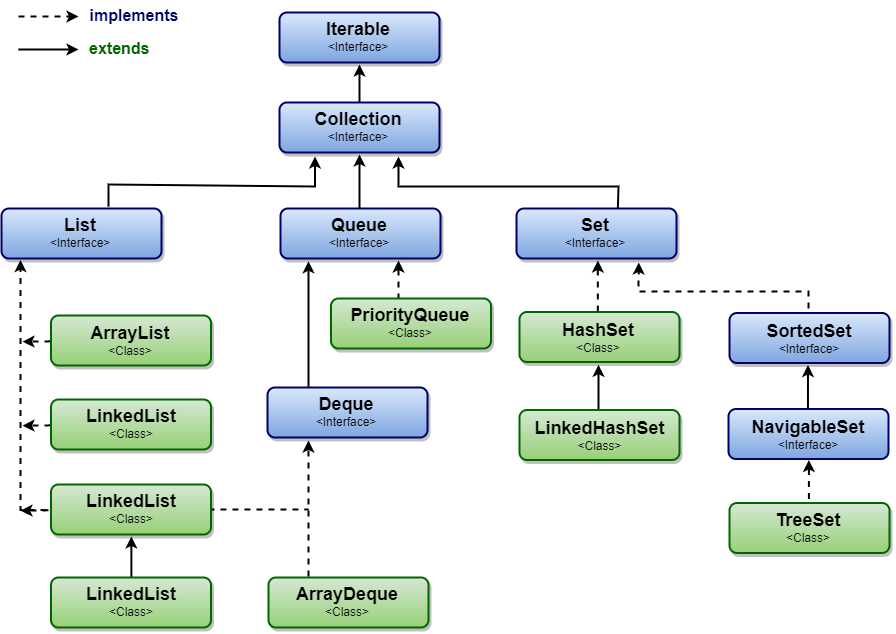

Iterable
 └─ Collection
     ├─ List       → ArrayList, LinkedList, Vector → Stack
     ├─ Set        → HashSet → LinkedHashSet
     │   └─ SortedSet → NavigableSet → TreeSet
     └─ Queue      → PriorityQueue
         └─ Deque  → ArrayDeque, LinkedList

Map               → HashMap → LinkedHashMap, Hashtable, WeakHashMap, IdentityHashMap
 └─ SortedMap → NavigableMap → TreeMap
3. The Core Interfaces
| Interface | Stores | Duplicates | Order | Main classes |
|---|---|---|---|---|
| List | Elements with indexes | Yes | Insertion order | ArrayList, LinkedList |
| Set | Unique elements | No | Depends on the class | HashSet, LinkedHashSet, TreeSet |
Queue | Elements waiting to be processed | Yes | FIFO or priority | ArrayDeque, PriorityQueue |
Deque | Elements added and removed at both ends | Yes | Insertion order | ArrayDeque, LinkedList |
| Map | Key–value pairs | Keys no, values yes | Depends on the class | HashMap, LinkedHashMap, TreeMap |
Here is each one in action:
import java.util.*;

public class CollectionsTour {
    public static void main(String[] args) {
        // List: ordered, duplicates allowed, access by index
        List<String> list = new ArrayList<>(List.of("tea", "coffee", "tea"));
        System.out.println("List:  " + list + "  get(1)=" + list.get(1));

        // Set: unique elements only
        Set<String> set = new HashSet<>(list);
        System.out.println("Set:   " + set.size() + " unique drinks");

        // Queue: first in, first out
        Queue<String> queue = new ArrayDeque<>(List.of("order-1", "order-2"));
        System.out.println("Queue: next is " + queue.poll() + ", then " + queue.peek());

        // Map: key -> value pairs (not a Collection, but part of the framework)
        Map<String, Integer> prices = new TreeMap<>(Map.of("tea", 20, "coffee", 35));
        System.out.println("Map:   " + prices + "  price of tea=" + prices.get("tea"));
    }
}List: [tea, coffee, tea] get(1)=coffee
Set: 2 unique drinks
Queue: next is order-1, then order-2
Map: {coffee=35, tea=20} price of tea=20
4. Methods Shared by Every Collection
The Collection interface defines methods that every list, set and queue has:
| Method | Description |
|---|---|
add(e), addAll(c) | Add one element or a whole collection. |
remove(o), removeAll(c), removeIf(p) | Remove one element, every element in another collection, or every match. |
retainAll(c) | Keep only the elements that are also in another collection. |
contains(o), containsAll(c) | Check whether elements are present. |
size(), isEmpty(), clear() | Count, check and empty. |
iterator(), forEach(action) | Visit every element. |
stream(), parallelStream() | Process elements with the Stream API. |
toArray(), toArray(T[]) | Copy the elements into an array. |
5. How Ordering Differs Between Classes
Choosing a class often comes down to the order you need. The same input gives different results:
import java.util.*;

public class OrderComparison {
    public static void main(String[] args) {
        List<String> input = List.of("mango", "apple", "kiwi", "banana", "apple");

        System.out.println("ArrayList:     " + new ArrayList<>(input));
        System.out.println("LinkedHashSet: " + new LinkedHashSet<>(input));
        System.out.println("TreeSet:       " + new TreeSet<>(input));

        Map<String, Integer> lengths = new LinkedHashMap<>();
        for (String s : input) lengths.put(s, s.length());
        System.out.println("LinkedHashMap: " + lengths);
        System.out.println("TreeMap:       " + new TreeMap<>(lengths));
    }
}ArrayList: [mango, apple, kiwi, banana, apple]
LinkedHashSet: [mango, apple, kiwi, banana]
TreeSet: [apple, banana, kiwi, mango]
LinkedHashMap: {mango=5, apple=5, kiwi=4, banana=6}
TreeMap: {apple=5, banana=6, kiwi=4, mango=5}
- Hash classes (
HashSet,HashMap): no guaranteed order, fastest. - Linked hash classes: insertion order, almost as fast.
- Tree classes: sorted order, a little slower (O(log n)).
6. Choosing the Right Collection
| You need to… | Use |
|---|---|
| Keep items in order and read by position | ArrayList |
| Keep only unique items, order does not matter | HashSet |
| Keep unique items in insertion order | LinkedHashSet |
| Keep unique items sorted | TreeSet |
| Look up a value by a key | HashMap |
| Keep keys in insertion order (or build an LRU cache) | LinkedHashMap |
| Keep keys sorted, or find the nearest key | TreeMap |
| Process items first in, first out, or as a stack | ArrayDeque |
| Always take the smallest (or highest-priority) item | PriorityQueue |
| Share data between threads | ConcurrentHashMap, CopyOnWriteArrayList, BlockingQueue |
7. Performance at a Glance
| Class | Add | Find / contains | Remove | Get by index |
|---|---|---|---|---|
| ArrayList | O(1)* | O(n) | O(n) | O(1) |
| LinkedList | O(1) at ends | O(n) | O(1) at ends | O(n) |
| HashSet / HashMap | O(1) | O(1) | O(1) | – |
| TreeSet / TreeMap | O(log n) | O(log n) | O(log n) | – |
| ArrayDeque | O(1)* at ends | O(n) | O(1) at ends | – |
| PriorityQueue | O(log n) | O(n) | O(log n) for the head | – |
* Amortized: usually constant, with an occasional resize. Hash-based times assume a good hashCode().
8. The Collections Utility Class
java.util.Collections (note the "s") is a class full of static helper methods. Do not confuse it with the Collection interface.
import java.util.*;

public class CollectionsUtility {
    public static void main(String[] args) {
        List<Integer> scores = new ArrayList<>(List.of(55, 90, 72, 90, 38));

        System.out.println("max:        " + Collections.max(scores));
        System.out.println("min:        " + Collections.min(scores));
        System.out.println("frequency:  " + Collections.frequency(scores, 90));

        Collections.sort(scores);
        System.out.println("sorted:     " + scores);
        System.out.println("binarySearch(72): index " + Collections.binarySearch(scores, 72));

        Collections.reverse(scores);
        System.out.println("reversed:   " + scores);

        Collections.swap(scores, 0, scores.size() - 1);
        System.out.println("swapped:    " + scores);

        System.out.println("nCopies:    " + Collections.nCopies(3, "hi"));

        List<Integer> readOnly = Collections.unmodifiableList(scores);
        try {
            readOnly.add(1);
        } catch (UnsupportedOperationException e) {
            System.out.println("readOnly.add(): UnsupportedOperationException");
        }
    }
}max: 90 min: 38 frequency: 2 sorted: [38, 55, 72, 90, 90] binarySearch(72): index 2 reversed: [90, 90, 72, 55, 38] swapped: [38, 90, 72, 55, 90] nCopies: [hi, hi, hi] readOnly.add(): UnsupportedOperationException
Other useful helpers include shuffle(), fill(), emptyList(), singletonList(), synchronizedList() and synchronizedMap(). The Arrays class offers similar helpers for arrays.
9. Generics and Type Safety
Before Java 5, collections held plain Object references, so you could put anything in and had to cast when taking things out. Generics let you declare the element type, and the compiler enforces it.
import java.util.ArrayList;
import java.util.List;

public class WhyGenerics {
    @SuppressWarnings({"rawtypes", "unchecked"})
    public static void main(String[] args) {
        // Without generics: anything can go in, errors appear at runtime
        List raw = new ArrayList();
        raw.add("hello");
        raw.add(42);                         // compiles fine
        try {
            for (Object o : raw) {
                String s = (String) o;       // fails for 42
                System.out.println(s.toUpperCase());
            }
        } catch (ClassCastException e) {
            System.out.println("Runtime error: ClassCastException");
        }

        // With generics: the compiler stops wrong types
        List<String> safe = new ArrayList<>();
        safe.add("hello");
        // safe.add(42);                     // compile error: int cannot be converted to String
        for (String s : safe) {
            System.out.println(s.toUpperCase());   // no cast needed
        }
    }
}HELLO Runtime error: ClassCastException HELLO
Collections can only hold objects. Primitive values such as int are automatically wrapped in Integer objects (autoboxing) when you add them.
10. Collections and Streams
Since Java 8, every collection can produce a Stream, which lets you filter, transform and group data in a few readable lines.
import java.util.*;
import java.util.stream.Collectors;

public class StreamsWithCollections {
    record Employee(String name, String dept, int salary) { }

    public static void main(String[] args) {
        List<Employee> staff = List.of(
                new Employee("Asha", "IT", 90000),
                new Employee("Ravi", "HR", 50000),
                new Employee("Meera", "IT", 75000),
                new Employee("John", "Sales", 60000));

        List<String> highEarners = staff.stream()
                .filter(e -> e.salary() > 60000)
                .map(Employee::name)
                .toList();
        System.out.println("Salary > 60000: " + highEarners);

        Map<String, List<String>> byDept = staff.stream()
                .collect(Collectors.groupingBy(Employee::dept, TreeMap::new,
                        Collectors.mapping(Employee::name, Collectors.toList())));
        System.out.println("By department:  " + byDept);

        int total = staff.stream().mapToInt(Employee::salary).sum();
        System.out.println("Total salary:   " + total);
    }
}Salary > 60000: [Asha, Meera]
By department: {HR=[Ravi], IT=[Asha, Meera], Sales=[John]}
Total salary: 275000
11. Ways to Iterate
- Enhanced for loop:
for (String s : list) { ... }, the simplest way to read. - Iterator: needed when you remove elements while looping.
forEach()with a lambda:list.forEach(System.out::println);- Streams: for filtering, mapping and collecting.
- Maps: loop over
map.entrySet(),keySet()orvalues(), or usemap.forEach((k, v) -> ...).
ConcurrentModificationException.12. Thread-Safe Collections
The common classes (ArrayList, HashMap, HashSet and so on) are not thread-safe. For shared data, choose from java.util.concurrent:
ConcurrentHashMap: a high-performance thread-safe map.CopyOnWriteArrayListandCopyOnWriteArraySet: for data that is read often and changed rarely.ConcurrentLinkedQueueandConcurrentLinkedDeque: non-blocking queues.ArrayBlockingQueueandLinkedBlockingQueue: queues where consumers wait for new items.Collections.synchronizedList(),synchronizedMap()and so on: wrappers that lock every method.
The legacy classes Vector, Stack and Hashtable are synchronized too, but are rarely used in new code.
13. Best Practices
- Declare variables with interface types:
List,Set,Map. - Always use generics; never use raw types.
- Override both
equals()andhashCode()in classes you put in hash-based collections. - Use immutable collections (
List.of(),Set.of(),Map.of()) for fixed data. - Return empty collections instead of
null. - Set an initial capacity when you know the size of a large
ArrayListorHashMap. - Pick the collection by the operation you do most: lookup, ordering, uniqueness or position.
14. Summary
- The Collections Framework provides interfaces, implementations and algorithms for groups of objects.
Collectionis the root ofList,SetandQueue;Mapis a separate root for key–value pairs.- Hash classes are fastest, linked hash classes keep insertion order, tree classes keep sorted order.
- The
Collectionsclass offers ready-made algorithms such as sort, max and reverse. - Use generics for type safety and
java.util.concurrentfor thread-safe collections.
Related Tutorials
- Collection Interface in Java
- List Interface in Java
- Set Interface in Java
- Map Interface in Java
- Generics in Java
Reference: Oracle: The Java Collections Framework
Frequently Asked Questions (FAQ)
Q1. What is the Collections Framework in Java?
It is a unified set of interfaces (such as List, Set, Queue and Map), implementations (such as ArrayList and HashMap) and algorithms (in the Collections class) for storing and processing groups of objects. It lives mainly in java.util and was introduced in JDK 1.2.
Q2. What is the difference between Collection and Collections?
Collection is an interface, the root of List, Set and Queue. Collections is a utility class with static methods such as sort(), max(), reverse() and unmodifiableList().
Q3. Why does Map not extend the Collection interface?
A Collection holds single elements, while a Map holds key–value pairs. Methods such as add(E e) do not make sense for a map. Instead, a map offers collection views: keySet(), values() and entrySet().
Q4. What are the main interfaces of the Collections Framework?
Collection, List, Set, SortedSet, NavigableSet, Queue, Deque, Map, SortedMap and NavigableMap. Java 21 added SequencedCollection, SequencedSet and SequencedMap.
Q5. Which collection should I use by default?
ArrayList for lists, HashMap for key–value lookups, and HashSet for unique elements. Switch to a linked or tree version only when you need insertion order or sorted order.
Q6. What is the difference between List, Set and Map?
- List: ordered, allows duplicates, access by index.
- Set: unique elements, no index.
- Map: unique keys, each mapped to one value.
Q7. Can collections store primitive types?
Not directly. Collections hold objects, so int values are stored as Integer objects through autoboxing. For very large amounts of numbers, arrays or primitive streams (IntStream) use less memory.
Q8. Which collection classes are thread-safe?
The classes in java.util.concurrent, such as ConcurrentHashMap, CopyOnWriteArrayList and the BlockingQueue implementations; the synchronized wrappers from Collections; and the legacy Vector, Stack and Hashtable. ArrayList, HashMap and HashSet are not thread-safe.
Q9. What is a fail-fast iterator?
An iterator that throws ConcurrentModificationException as soon as it notices that the collection was changed structurally by something other than the iterator itself. ArrayList, HashMap and most other java.util collections have fail-fast iterators.
Q10. What is a fail-safe (weakly consistent) iterator?
Iterators of concurrent collections such as ConcurrentHashMap and CopyOnWriteArrayList never throw ConcurrentModificationException. They work on a snapshot or tolerate changes, so they may or may not show modifications made during iteration.
Q11. Why must I override equals() and hashCode() for objects in a HashSet or HashMap?
Hash-based collections use hashCode() to find a bucket and equals() to compare objects inside it. Without overriding both, two objects with the same data are treated as different, so duplicates appear and lookups fail. Java records generate both methods automatically.
Q12. What is the difference between Comparable and Comparator?
Comparable is implemented by the class itself (compareTo()) and defines its natural order. Comparator is a separate object (compare()) that defines any other order, for example Comparator.comparing(Person::getAge). Sorted collections and sort() accept either.
Q13. What are immutable collections?
Collections that cannot be changed after creation, created with List.of(), Set.of(), Map.of() or the copyOf() methods (Java 9 and 10). Any attempt to change them throws UnsupportedOperationException. They are safe to share between threads.
Q14. What is the difference between an unmodifiable view and an immutable copy?
Collections.unmodifiableList(list) is a read-only view: you cannot change it, but changes to the original list show through. List.copyOf(list) is an independent immutable copy that never changes.
Q15. Which collections allow null?
ArrayList, LinkedList, HashSet, LinkedHashSet and HashMap (one null key) allow null. TreeSet and TreeMap keys, ArrayDeque, PriorityQueue, Hashtable, ConcurrentHashMap and the List.of()/Set.of()/Map.of() collections do not.
Q16. What is the difference between Iterator and ListIterator?
Iterator works with every collection and only moves forward (with an optional remove()). ListIterator works only with lists and can also move backward, report indexes, and replace or insert elements.
Q17. What are the legacy collection classes?
Classes from JDK 1.0, before the framework existed: Vector, Stack, Hashtable, Properties and Dictionary, plus the Enumeration interface. They were later updated to fit the framework, but modern alternatives are usually preferred.
Q18. What is the difference between Queue and Deque?
A Queue usually adds at the tail and removes from the head (FIFO). A Deque (double-ended queue) can add and remove at both ends, so it can work as a queue or a stack. ArrayDeque is the usual implementation.
Q19. How do I convert between collections?
Most collection classes have a constructor that accepts another collection:
Set<String> set = new HashSet<>(list);       // list -> set
List<String> list2 = new ArrayList<>(set);    // set -> list
List<String> keys = new ArrayList<>(map.keySet()); // map keys -> list
Q20. What were the sequenced collections added in Java 21?
Three new interfaces, SequencedCollection, SequencedSet and SequencedMap, for collections with a defined order. They add uniform methods such as getFirst(), getLast(), addFirst(), removeLast() and reversed() to lists, deques, LinkedHashSet, TreeSet, LinkedHashMap and TreeMap.