JDK vs JRE vs JVM – Differences Explained with Examples
When you start with Java you quickly meet three abbreviations: JDK, JRE and JVM. They are nested parts of the same platform. The JVM runs Java programs, the JRE is the JVM plus the libraries a program needs, and the JDK is the JRE plus the tools to write and build programs.
This tutorial explains each one, how a program travels from source code to running code, and what has changed in modern Java versions.
1. JDK, JRE and JVM in One Picture
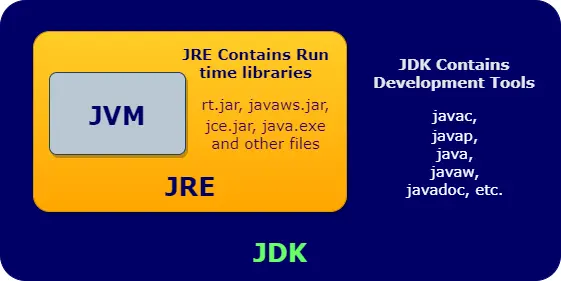
JDK  = JRE + development tools (javac, jar, javadoc, jdb, jshell, jlink ...)
JRE  = JVM + class libraries (java.lang, java.util, java.io ...) + supporting files
JVM  = the engine that loads, verifies and runs bytecode
Think of a car factory: the JVM is the engine, the JRE is the complete car you can drive, and the JDK is the whole workshop with the tools to build cars.
2. What Is the JVM?
The Java Virtual Machine is a program that executes Java bytecode. It is called "virtual" because it behaves like a computer with its own instruction set, but it is implemented in software on top of the real operating system.
The JVM is responsible for:
- Loading
.classfiles when they are first needed. - Verifying bytecode so it cannot break type or memory rules.
- Executing bytecode with an interpreter and a JIT compiler.
- Managing memory, including garbage collection.
- Providing threads, security checks and exception handling.
The JVM itself is platform-specific: there is a different JVM build for Windows, macOS and Linux on each processor type. That is what allows the same bytecode to run everywhere. The most widely used JVM is HotSpot, part of OpenJDK.
3. What Does Bytecode Look Like?
Here is a tiny program and the bytecode javac produces for it, shown with the JDK's javap -c disassembler:
public class Calculator {
    static int add(int a, int b) {
        return a + b;
    }

    public static void main(String[] args) {
        System.out.println("2 + 3 = " + add(2, 3));
    }
}2 + 3 = 5
static int add(int, int);
  Code:
     0: iload_0       // push a
     1: iload_1       // push b
     2: iadd          // add them
     3: ireturn       // return the result

public static void main(java.lang.String[]);
  Code:
     0: getstatic     #7    // Field java/lang/System.out
     3: iconst_2
     4: iconst_3
     5: invokestatic  #13   // Method add:(II)I
     8: invokedynamic #19   // build the string "2 + 3 = ..."
    13: invokevirtual #23   // Method PrintStream.println
    16: return
Bytecode is a simple stack-based language: values are pushed onto a stack, and instructions such as iadd work on the top of the stack. The JVM turns these instructions into real machine code for the processor it is running on.
4. Inside the JVM
1. Class loader subsystem
Classes are loaded on demand through a hierarchy of class loaders, then linked (verified, prepared and resolved) and initialized (static fields set and static blocks run).
public class ClassLoaderDemo {
    public static void main(String[] args) {
        // Bootstrap loader (shown as null): core classes such as String
        System.out.println("String          -> " + String.class.getClassLoader());

        // Platform loader: other Java SE modules such as java.sql
        System.out.println("java.sql.Date   -> " + java.sql.Date.class.getClassLoader().getName());

        // Application loader: your own classes from the class path
        System.out.println("ClassLoaderDemo -> " + ClassLoaderDemo.class.getClassLoader().getName());
    }
}String -> null java.sql.Date -> platform ClassLoaderDemo -> app
- Bootstrap loader (shown as
null): loads core classes such asjava.lang.String. - Platform loader: loads other Java SE modules.
- Application loader: loads your classes from the class path or module path.
2. Runtime data areas
| Area | Shared? | Holds |
|---|---|---|
| Heap | All threads | Every object and array; managed by the garbage collector. |
| Metaspace (method area) | All threads | Class metadata, method code, the constant pool. |
| Java stack | One per thread | A frame per method call with local variables and partial results. |
| PC register | One per thread | The address of the current bytecode instruction. |
| Native method stack | One per thread | Frames for native (C/C++) methods. |
3. Execution engine
- Interpreter: runs bytecode instruction by instruction, so the program starts quickly.
- JIT compiler: compiles frequently executed methods into optimised native code (HotSpot uses the C1 and C2 compilers).
- Garbage collector: reclaims memory from unreachable objects (G1 is the default; ZGC and others are available).
5. What Is the JRE?
The Java Runtime Environment is everything needed to run a Java program: the JVM plus the Java class libraries (java.lang, java.util, java.io, java.net and so on) and supporting configuration files. It does not include the compiler.
jlink.6. What Is the JDK?
The Java Development Kit is what developers install. It contains the runtime plus the tools to write, build, debug and package Java programs:
| Tool | Purpose |
|---|---|
javac | Compiles .java source files into .class bytecode. |
java | Launches the JVM to run a program. |
jar | Packages classes and resources into a JAR file. |
javadoc | Generates HTML documentation from comments. |
jshell | Interactive console for trying Java code (Java 9+). |
javap | Shows the contents and bytecode of class files. |
jdb | Command-line debugger. |
jlink | Builds a custom, minimal runtime image. |
jpackage | Creates native installers (.exe, .dmg, .deb). |
jcmd, jstack, jfr | Diagnose and profile running JVMs. |
Popular JDK distributions, all built from OpenJDK, include Eclipse Temurin, Oracle JDK, Amazon Corretto, Microsoft Build of OpenJDK, Azul Zulu and GraalVM.
7. From Source Code to Running Program
- You write
Calculator.java. - JDK:
javac Calculator.javacreatesCalculator.class. - JRE / JVM:
java Calculatorstarts the JVM. - The class loader loads
Calculatorand the library classes it uses. - The verifier checks the bytecode.
- The interpreter starts running
main; hot code is JIT-compiled. - The garbage collector cleans up unused objects while the program runs.
javac Calculator.java          # JDK tool: compile
java Calculator                # JVM: run
javap -c Calculator            # JDK tool: show bytecode
java -version                  # which JDK/JVM is installed
8. JDK vs JRE vs JVM: Comparison
| Aspect | JDK | JRE | JVM |
|---|---|---|---|
| Full form | Java Development Kit | Java Runtime Environment | Java Virtual Machine |
| Purpose | Develop and run Java programs | Run Java programs | Execute bytecode |
| Contains | JRE + development tools | JVM + class libraries | Class loader, memory areas, execution engine |
Includes compiler (javac) | Yes | No | No (contains the JIT compiler only) |
| Who needs it | Developers | Users running Java apps | Part of both |
| Platform-specific | Yes | Yes | Yes |
9. Building a Small Runtime with jlink
Instead of installing a full JDK on a server, you can create a trimmed runtime that contains only the modules your application uses:
# Which modules does my app need?
jdeps --print-module-deps app.jar

# Build a runtime with just those modules
jlink --add-modules java.base,java.sql --output my-runtime --strip-debug --no-header-files --no-man-pages

# Run the app with the custom runtime
my-runtime/bin/java -jar app.jar
This is how modern container images keep Java applications small.
10. Summary
- The JVM loads, verifies and runs bytecode, manages memory and JIT-compiles hot code.
- The JRE is the JVM plus the class libraries needed to run programs.
- The JDK is the JRE plus development tools such as
javac,jar,jshellandjlink. - All three are platform-specific; the bytecode they run is not.
- Since Java 11, you install a JDK and use
jlinkfor small runtimes.
Related Tutorials
Reference: The Java Virtual Machine Specification, Java SE 21
Frequently Asked Questions (FAQ)
Q1. What is the difference between JDK, JRE and JVM?
The JVM executes bytecode. The JRE is the JVM plus the libraries needed to run programs. The JDK is the JRE plus tools to develop programs, such as the javac compiler. JDK ⊃ JRE ⊃ JVM.
Q2. What is the JVM?
The Java Virtual Machine is a software engine that loads Java bytecode, verifies it, executes it with an interpreter and JIT compiler, and manages memory through garbage collection.
Q3. Is the JVM platform-independent?
No. Each operating system and processor needs its own JVM build. The bytecode it runs is platform-independent.
Q4. Do I need the JDK or the JRE?
To write and compile Java code, you need the JDK. To only run existing Java programs, a runtime is enough, but since Java 11 that runtime usually comes as a JDK or as a custom image built with jlink.
Q5. Can I run a Java program with only the JVM?
Not in practice. The JVM needs the core class libraries (such as java.lang.String) to run any program, which is exactly what the JRE adds.
Q6. What is bytecode?
The platform-independent instruction format that javac writes into .class files. The JVM translates it into native machine instructions at runtime.
Q7. What is the JIT compiler?
The Just-In-Time compiler is part of the JVM's execution engine. It compiles frequently executed bytecode into optimised native code while the program runs, so hot code runs much faster than when interpreted.
Q8. Is javac part of the JVM?
No. javac is a JDK tool that compiles source code to bytecode before the program runs. The JVM contains a different compiler, the JIT, which turns bytecode into machine code at runtime.
Q9. What is a class loader?
A component of the JVM that finds and loads class files into memory. Java uses a hierarchy: the bootstrap loader for core classes, the platform loader for other Java SE modules, and the application loader for your own classes.
Q10. What are the JVM memory areas?
The heap (objects), metaspace (class metadata), one Java stack and one PC register per thread, and native method stacks. The heap and metaspace are shared by all threads.
Q11. Why is there no separate JRE download anymore?
Since Java 11, Oracle and most vendors stopped shipping a standalone JRE. Applications are expected to bundle their own runtime, which jlink can build containing only the modules they need.
Q12. What is jlink?
A JDK tool (Java 9+) that creates a custom runtime image containing only the modules your application uses, producing a much smaller deployment than a full JDK.
Q13. What is the difference between OpenJDK and Oracle JDK?
OpenJDK is the open-source reference implementation. Oracle JDK is Oracle's build of the same code with Oracle's licence and support. Since Java 11 they are functionally almost identical; other free builds include Temurin, Corretto and Zulu.
Q14. What is HotSpot?
HotSpot is the JVM implementation included in OpenJDK. Its name comes from its strategy of finding "hot spots", frequently executed code, and compiling them with the JIT compiler.
Q15. What does the bytecode verifier do?
Before a class runs, the verifier checks that its bytecode is well-formed and type-safe: no stack overflows or underflows, valid jumps, correct types and no illegal casts. This protects the JVM from corrupt or malicious class files.
Q16. How do I check which Java version is installed?
Run java -version to see the runtime and javac -version to see the compiler. If javac is not found, a JDK is not installed or not on your PATH.
Q17. Can other languages run on the JVM?
Yes. Kotlin, Scala, Groovy and Clojure all compile to JVM bytecode, so they run on the same JVM and can use Java libraries.
Q18. Where are objects stored in the JVM?
Objects and arrays live on the heap. Local variables and method parameters live in stack frames; for object types, the stack holds a reference to the object on the heap.
Q19. What is the role of the garbage collector in the JVM?
It automatically finds heap objects that are no longer reachable and frees their memory. Modern collectors such as G1 and ZGC do most of this work concurrently with the application to keep pauses short.
Q20. Which JDK should I install as a beginner?
Any up-to-date OpenJDK build of the latest LTS version, for example Eclipse Temurin 21 or 25. See the environment setup tutorial for step-by-step instructions.