TreeMap in Java – Complete Guide with Examples
TreeMap is a Map that keeps its keys sorted at all times. Whatever order you insert entries in, iterating a TreeMap returns them in ascending key order, or in any order defined by a Comparator. It also finds the nearest key below or above any value and returns key ranges in O(log n) time.
TreeMap lives in java.util, has been part of the Collections Framework since JDK 1.2, and is implemented as a red-black tree. This tutorial covers sorting, custom comparators, navigation methods and practical lookups such as grade bands.
1. What Is a TreeMap?
Think of a phone book: names are always in alphabetical order, each name has one entry, and you can open it at "the first name after K". A TreeMap gives your program the same abilities.
- Keys sorted by natural order (
Comparable) or aComparator. - O(log n)
put,get,removeandcontainsKey. - Navigation:
floorKey(),ceilingEntry(),headMap(),subMap(),descendingMap()and more. - No
nullkey with natural ordering;nullvalues are allowed. - Not synchronized; iterators are fail-fast.
2. Class Hierarchy and Declaration
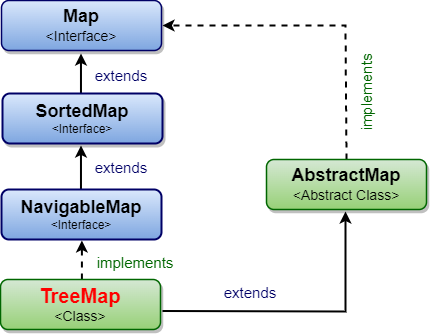
public class TreeMap<K, V> extends AbstractMap<K, V>
        implements NavigableMap<K, V>, Cloneable, java.io.Serializable
NavigableMap extends SortedMap, which extends Map (and SequencedMap since Java 21).
3. Your First TreeMap Program
import java.util.TreeMap;

public class TreeMapQuickStart {
    public static void main(String[] args) {
        TreeMap<String, Integer> population = new TreeMap<>();
        population.put("Mumbai", 21);
        population.put("Delhi", 33);
        population.put("Chennai", 12);
        population.put("Bengaluru", 14);

        System.out.println("Sorted by city: " + population);
        System.out.println("firstKey():     " + population.firstKey());
        System.out.println("lastEntry():    " + population.lastEntry());
        System.out.println("get(Delhi):     " + population.get("Delhi") + " million");
    }
}Sorted by city: {Bengaluru=14, Chennai=12, Delhi=33, Mumbai=21}
firstKey(): Bengaluru
lastEntry(): Mumbai=21
get(Delhi): 33 million
4. Constructors
| Constructor | What it does |
|---|---|
TreeMap() | Empty map sorted by the keys' natural order. |
TreeMap(Comparator<? super K> c) | Empty map sorted by the comparator. |
TreeMap(Map<? extends K, ? extends V> m) | A map with the entries of m, in natural order. |
TreeMap(SortedMap<K, ? extends V> m) | Same entries and same ordering as m. |
5. Custom Order with a Comparator
A comparator can reverse the order or change what counts as "the same key". A case-insensitive TreeMap is a handy way to store HTTP headers:
import java.util.Comparator;
import java.util.TreeMap;

public class TreeMapComparators {
    public static void main(String[] args) {
        TreeMap<Integer, String> desc = new TreeMap<>(Comparator.reverseOrder());
        desc.put(3, "bronze");
        desc.put(1, "gold");
        desc.put(2, "silver");
        System.out.println("Reverse order:    " + desc);

        TreeMap<String, String> headers = new TreeMap<>(String.CASE_INSENSITIVE_ORDER);
        headers.put("Content-Type", "text/html");
        headers.put("ACCEPT", "*/*");
        System.out.println("Case-insensitive: get(content-type) = " + headers.get("content-type"));
        System.out.println("                  get(accept)       = " + headers.get("accept"));
    }
}Reverse order: {3=bronze, 2=silver, 1=gold}
Case-insensitive: get(content-type) = text/html
get(accept) = */*
equals(). Keys that compare as 0 are the same key, so a later put() replaces the earlier value.6. Navigation Methods
Because keys are sorted, TreeMap can answer "what comes before or after X?" and "what lies between X and Y?" quickly. Here a day's events are keyed by time (as hhmm numbers):
import java.util.TreeMap;

public class TreeMapNavigation {
    public static void main(String[] args) {
        TreeMap<Integer, String> events = new TreeMap<>();
        events.put(900, "stand-up");
        events.put(1100, "design review");
        events.put(1300, "lunch");
        events.put(1600, "demo");

        System.out.println("floorKey(1200):     " + events.floorKey(1200));
        System.out.println("ceilingEntry(1200): " + events.ceilingEntry(1200));
        System.out.println("lowerKey(900):      " + events.lowerKey(900));
        System.out.println("higherEntry(1300):  " + events.higherEntry(1300));

        System.out.println("headMap(1300):      " + events.headMap(1300));          // keys < 1300
        System.out.println("tailMap(1300):      " + events.tailMap(1300));          // keys >= 1300
        System.out.println("subMap(1000, 1500): " + events.subMap(1000, 1500));
        System.out.println("descendingMap():    " + events.descendingMap());

        System.out.println("pollFirstEntry():   " + events.pollFirstEntry() + " -> " + events.keySet());
    }
}floorKey(1200): 1100
ceilingEntry(1200): 1300=lunch
lowerKey(900): null
higherEntry(1300): 1600=demo
headMap(1300): {900=stand-up, 1100=design review}
tailMap(1300): {1300=lunch, 1600=demo}
subMap(1000, 1500): {1100=design review, 1300=lunch}
descendingMap(): {1600=demo, 1300=lunch, 1100=design review, 900=stand-up}
pollFirstEntry(): 900=stand-up -> [1100, 1300, 1600]
| Method | Returns |
|---|---|
firstKey(), lastKey(), firstEntry(), lastEntry() | Smallest and largest keys or entries. |
lowerKey(k) / lowerEntry(k) | Greatest key strictly less than k. |
floorKey(k) / floorEntry(k) | Greatest key less than or equal to k. |
ceilingKey(k) / ceilingEntry(k) | Smallest key greater than or equal to k. |
higherKey(k) / higherEntry(k) | Smallest key strictly greater than k. |
headMap(to), tailMap(from), subMap(from, to) | Range views (lower bound inclusive, upper exclusive; overloads take inclusive flags). |
pollFirstEntry(), pollLastEntry() | Remove and return the smallest or largest entry. |
descendingMap(), descendingKeySet(), navigableKeySet() | Reverse-order and key views. |
All the "lookup" methods return null when no key qualifies, and all range methods return live views backed by the map.
7. Practical Example: Range Lookup with floorEntry()
Store the start of each band as the key. floorEntry(x) then returns the band that x falls into. The same pattern works for tax slabs, shipping rates, discount tiers and IP ranges.
import java.util.TreeMap;

public class GradeLookup {
    // Lower bound of each grade -> grade
    private static final TreeMap<Integer, String> GRADES = new TreeMap<>();
    static {
        GRADES.put(0, "F");
        GRADES.put(40, "D");
        GRADES.put(55, "C");
        GRADES.put(70, "B");
        GRADES.put(85, "A");
    }

    static String grade(int marks) {
        return GRADES.floorEntry(marks).getValue();   // highest band whose start <= marks
    }

    public static void main(String[] args) {
        for (int m : new int[] {12, 40, 68, 85, 99}) {
            System.out.println(m + " marks -> grade " + grade(m));
        }
    }
}12 marks -> grade F 40 marks -> grade D 68 marks -> grade C 85 marks -> grade A 99 marks -> grade A
8. Practical Example: Sorted Word Count
Counting with a TreeMap gives you the result already sorted by key:
import java.util.Map;
import java.util.TreeMap;

public class SortedWordCount {
    public static void main(String[] args) {
        String text = "to be or not to be that is the question";

        Map<String, Integer> counts = new TreeMap<>();   // keys come out alphabetically
        for (String w : text.split(" ")) {
            counts.merge(w, 1, Integer::sum);
        }
        counts.forEach((word, n) -> System.out.println(word + ": " + n));
    }
}be: 2 is: 1 not: 1 or: 1 question: 1 that: 1 the: 1 to: 2
9. How TreeMap Works Internally
TreeMap is a red-black tree: a binary search tree in which every node stores a key, a value, links to its left child, right child and parent, and a colour (red or black).
- For any node, keys in its left subtree are smaller and keys in its right subtree are larger.
get(k)starts at the root and moves left or right after each comparison.- After every insert or delete, rotations and recolouring keep the tree balanced, so its height stays O(log n). A million keys need only about 20 to 40 comparisons.
- Iteration performs an in-order walk, which visits keys in sorted order.
- The first
put()callscompare(key, key)to check that the key type is comparable (and notnull).
10. Time Complexity
| Operation | TreeMap | HashMap |
|---|---|---|
put, get, remove, containsKey | O(log n) | O(1) average |
firstKey, floorKey, ceilingKey … | O(log n) | Not available |
| Iterate in key order | O(n) | Needs sorting: O(n log n) |
containsValue | O(n) | O(n) |
11. TreeMap vs HashMap vs LinkedHashMap
| Feature | TreeMap | HashMap | LinkedHashMap |
|---|---|---|---|
| Order | Sorted by key | None | Insertion or access |
| Speed | O(log n) | O(1) | O(1) |
| null key | No | One | One |
| Key requirements | Comparable or Comparator | equals() + hashCode() | equals() + hashCode() |
| Range and nearest-key queries | Yes | No | No |
12. Thread Safety
TreeMap is not synchronized. For a sorted map shared between threads, use ConcurrentSkipListMap, which implements the same NavigableMap interface. Collections.synchronizedSortedMap(new TreeMap<>()) is the simpler but less scalable alternative.
13. Common Mistakes
- Keys that are not
Comparableand no comparator:ClassCastException. - Putting a
nullkey:NullPointerException. - A comparator that returns 0 for different keys: values are overwritten silently.
- Changing a key's sort fields after inserting it: the tree becomes inconsistent.
- Calling
firstKey()on an empty map:NoSuchElementException; usefirstEntry(), which returnsnull. - Using TreeMap when order is not needed: HashMap is faster.
14. Summary
- TreeMap stores entries sorted by key in a red-black tree.
- Basic operations are O(log n); iteration is in key order.
- Keys need natural ordering or a comparator, and a
nullkey is not allowed. - Navigation methods make nearest-key and range lookups simple.
- Use
ConcurrentSkipListMapfor a thread-safe sorted map.
Related Tutorials
- SortedMap in Java
- NavigableMap in Java
- HashMap in Java
- TreeSet in Java
- Difference between HashMap and TreeMap
Reference: Java SE 21 API: java.util.TreeMap
Frequently Asked Questions (FAQ)
Q1. What is a TreeMap in Java?
TreeMap is a class in java.util that implements NavigableMap using a red-black tree. It keeps its keys sorted, offers O(log n) operations, and provides methods for nearest-key and range queries.
Q2. How does TreeMap sort its keys?
By the keys' natural ordering (their compareTo() method), or by the Comparator passed to the constructor. Each new key is placed in the tree according to these comparisons.
Q3. Does TreeMap allow null keys or values?
It does not allow a null key with natural ordering; put(null, v) throws NullPointerException. Any number of null values are allowed.
Q4. What is the difference between HashMap and TreeMap?
HashMap is unordered with O(1) operations and allows one null key. TreeMap keeps keys sorted with O(log n) operations, forbids a null key, and supports navigation such as floorKey() and subMap().
Q5. What is the time complexity of TreeMap operations?
get, put, remove, containsKey and the navigation methods are O(log n). Iteration is O(n), and containsValue is O(n).
Q6. How do I sort a TreeMap in descending order?
Create it with new TreeMap<>(Comparator.reverseOrder()), or use the descendingMap() view of an existing TreeMap.
Q7. What is the difference between floorKey() and ceilingKey()?
floorKey(k) returns the greatest key ≤ k; ceilingKey(k) returns the smallest key ≥ k. Both return null if no such key exists.
Q8. Are headMap(), tailMap() and subMap() copies?
No, they are live views. Changes to the original map within the range appear in the view, and changes through the view update the original. Adding a key outside the view's range throws IllegalArgumentException.
Q9. Can I sort a TreeMap by values?
No, a TreeMap is always ordered by keys. To order by value, sort its entrySet() with Map.Entry.comparingByValue() and collect into a LinkedHashMap.
Q10. Is TreeMap thread-safe?
No. Use ConcurrentSkipListMap for a concurrent sorted map, or wrap a TreeMap with Collections.synchronizedSortedMap().
Q11. Why do I get a ClassCastException when putting a key into a TreeMap?
The key's class does not implement Comparable, and no Comparator was given. Either implement Comparable or create the map with a comparator.
Q12. Does TreeMap use equals() to compare keys?
No, it uses compareTo() or the comparator. If they return 0, the keys are treated as identical. That is why the comparator should be consistent with equals().
Q13. What data structure does TreeMap use?
A red-black tree: a self-balancing binary search tree that keeps its height logarithmic by rotating and recolouring nodes after insertions and deletions.
Q14. How do I get the first and last entries of a TreeMap?
Use firstEntry() and lastEntry() (which return null on an empty map) or firstKey() and lastKey() (which throw NoSuchElementException).
Q15. How do I find which range a value falls into?
Store the lower bound of each range as a key and call floorEntry(value). It returns the range whose start is the largest one not greater than the value, as shown in the grade example.
Q16. What is the difference between TreeMap and TreeSet?
TreeMap stores sorted key–value pairs; TreeSet stores sorted single elements. TreeSet is implemented with a TreeMap whose keys are the set's elements.
Q17. What is the difference between TreeMap and LinkedHashMap?
TreeMap orders entries by key (sorted); LinkedHashMap orders them by insertion or access time. LinkedHashMap is O(1); TreeMap is O(log n) but supports range queries.
Q18. Can a TreeMap key be a custom object?
Yes, if the class implements Comparable or you pass a Comparator. Make sure the ordering is total (every pair of different keys compares as non-zero) and that the key's sort fields never change while it is in the map.
Q19. What does pollFirstEntry() do?
It removes and returns the entry with the smallest key, or returns null if the map is empty. pollLastEntry() does the same for the largest key.
Q20. When should I choose TreeMap?
When you need keys in sorted order, the smallest or largest key, the nearest key to a value, or all keys within a range: leaderboards, time-based schedules, price bands, version lookups and sorted reports.