Map Interface in Java – Complete Guide with Examples
The Map interface stores data as key–value pairs. Each key is unique and maps to exactly one value, so you can look up a value instantly by its key, like finding a word's meaning in a dictionary or a contact's number by name.
Map lives in java.util and has been part of the Collections Framework since JDK 1.2. Unlike List and Set, it does not extend Collection. This tutorial covers Map's methods, the main implementations, the modern Java 8+ methods, and how to iterate over a map correctly.
1. What Is a Map?
A map links keys to values. Think of a phone's contact list: the name is the key, the number is the value. Names are unique, but two people can share a number.
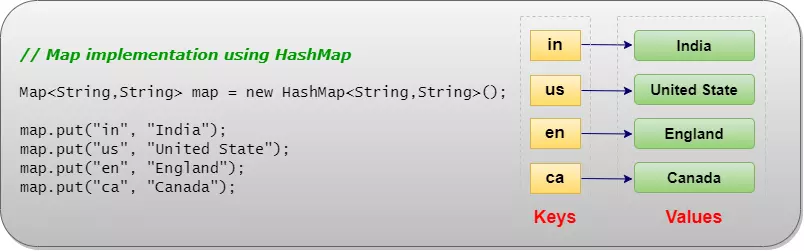
- Unique keys: putting a value for an existing key replaces the old value.
- Duplicate values allowed.
- Fast lookup by key: O(1) for
HashMap, O(log n) forTreeMap. - Order depends on the class: none, insertion order, or sorted by key.
- Collection views:
keySet(),values()andentrySet().
2. Hierarchy and Declaration

public interface Map<K, V>K is the key type and V the value type. Sub-interfaces are SortedMap, NavigableMap and, since Java 21, SequencedMap.
3. Basic Operations
put() adds or replaces, get() reads, remove() deletes. put() returns the previous value for the key, or null if there was none.
import java.util.HashMap;
import java.util.Map;

public class MapBasics {
    public static void main(String[] args) {
        Map<String, Integer> stock = new HashMap<>();

        stock.put("apple", 50);
        stock.put("mango", 20);
        Integer old = stock.put("apple", 45);        // same key: value replaced

        System.out.println("Stock:              " + stock);
        System.out.println("Old apple value:    " + old);
        System.out.println("get(mango):         " + stock.get("mango"));
        System.out.println("get(kiwi):          " + stock.get("kiwi"));
        System.out.println("getOrDefault(kiwi): " + stock.getOrDefault("kiwi", 0));
        System.out.println("containsKey(apple): " + stock.containsKey("apple"));
        System.out.println("containsValue(20):  " + stock.containsValue(20));

        stock.remove("mango");
        System.out.println("After remove:       " + stock + ", size=" + stock.size());
    }
}Stock: {apple=45, mango=20}
Old apple value: 50
get(mango): 20
get(kiwi): null
getOrDefault(kiwi): 0
containsKey(apple): true
containsValue(20): true
After remove: {apple=45}, size=1
get() returns null both when the key is missing and when the key is mapped to null. Use containsKey() or getOrDefault() when the difference matters.4. Iterating Over a Map
A map is not Iterable itself, but its three views are. Use entrySet() when you need both key and value; it avoids a second lookup per key.
import java.util.LinkedHashMap;
import java.util.Map;

public class MapIteration {
    public static void main(String[] args) {
        Map<String, String> capitals = new LinkedHashMap<>();
        capitals.put("India", "New Delhi");
        capitals.put("Japan", "Tokyo");
        capitals.put("Kenya", "Nairobi");

        // 1. entrySet(): key and value together (most common)
        for (Map.Entry<String, String> e : capitals.entrySet()) {
            System.out.println(e.getKey() + " -> " + e.getValue());
        }

        // 2. keySet() and values()
        System.out.println("Keys:   " + capitals.keySet());
        System.out.println("Values: " + capitals.values());

        // 3. forEach with a lambda
        capitals.forEach((country, city) -> System.out.print(city.charAt(0) + " "));
        System.out.println();
    }
}India -> New Delhi Japan -> Tokyo Kenya -> Nairobi Keys: [India, Japan, Kenya] Values: [New Delhi, Tokyo, Nairobi] N T N
| View | Type | Use it to… |
|---|---|---|
keySet() | Set<K> | Loop over keys, or remove entries by key. |
values() | Collection<V> | Loop over values (may contain duplicates). |
entrySet() | Set<Map.Entry<K, V>> | Loop over key–value pairs; change values with entry.setValue(). |
The views are live: removing from them removes entries from the map.
5. Map Implementations
import java.util.*;

public class MapImplementations {
    public static void main(String[] args) {
        String[] keys = {"pear", "apple", "fig", "banana"};

        Map<String, Integer> hash = new HashMap<>();
        Map<String, Integer> linked = new LinkedHashMap<>();
        Map<String, Integer> tree = new TreeMap<>();
        for (String k : keys) {
            hash.put(k, k.length());
            linked.put(k, k.length());
            tree.put(k, k.length());
        }
        System.out.println("HashMap:       " + hash + "   (no guaranteed order)");
        System.out.println("LinkedHashMap: " + linked + "   (insertion order)");
        System.out.println("TreeMap:       " + tree + "   (sorted by key)");
    }
}HashMap: {banana=6, apple=5, pear=4, fig=3} (no guaranteed order)
LinkedHashMap: {pear=4, apple=5, fig=3, banana=6} (insertion order)
TreeMap: {apple=5, banana=6, fig=3, pear=4} (sorted by key)
| Class | Order | get / put | null keys / values | Thread-safe |
|---|---|---|---|---|
| HashMap | None | O(1) | One null key, null values | No |
| LinkedHashMap | Insertion (or access) | O(1) | One null key, null values | No |
| TreeMap | Sorted by key | O(log n) | No null key; null values | No |
| Hashtable | None | O(1) | No nulls | Yes (legacy) |
ConcurrentHashMap | None | O(1) | No nulls | Yes |
| WeakHashMap | None | O(1) | One null key, null values | No |
| IdentityHashMap | None | O(1) | One null key, null values | No |
EnumMap | Enum order | O(1), very fast | No null key | No |
6. Java 8+ Methods: merge, compute and More
Java 8 added default methods that replace common "check, then put" code with one call.
import java.util.Map;
import java.util.TreeMap;

public class MapJava8Methods {
    public static void main(String[] args) {
        Map<String, Integer> votes = new TreeMap<>();

        // merge(): add 1, or start at 1 if the key is new
        for (String v : new String[] {"red", "blue", "red", "green", "red", "blue"}) {
            votes.merge(v, 1, Integer::sum);
        }
        System.out.println("merge counts:      " + votes);

        votes.putIfAbsent("yellow", 0);          // only if missing
        votes.putIfAbsent("red", 100);           // ignored: red exists
        System.out.println("putIfAbsent:       " + votes);

        votes.computeIfPresent("blue", (k, v) -> v * 10);
        votes.compute("green", (k, v) -> v == null ? 1 : v + 5);
        System.out.println("compute*:          " + votes);

        votes.replaceAll((k, v) -> v + 1);
        System.out.println("replaceAll(+1):    " + votes);

        votes.entrySet().removeIf(e -> e.getValue() < 2);
        System.out.println("removeIf(<2):      " + votes);
    }
}merge counts: {blue=2, green=1, red=3}
putIfAbsent: {blue=2, green=1, red=3, yellow=0}
compute*: {blue=20, green=6, red=3, yellow=0}
replaceAll(+1): {blue=21, green=7, red=4, yellow=1}
removeIf(<2): {blue=21, green=7, red=4}
| Method | What it does |
|---|---|
getOrDefault(k, def) | Value for k, or def if absent. |
putIfAbsent(k, v) | Puts only if k has no value. |
merge(k, v, fn) | Puts v if absent; otherwise combines old and new with fn. Ideal for counting. |
computeIfAbsent(k, fn) | Creates a value with fn if absent and returns the value. Ideal for grouping. |
computeIfPresent(k, fn) | Updates the value only if present. |
compute(k, fn) | Calculates a new value from the key and the old value (which may be null). |
replaceAll(fn) | Replaces every value. |
forEach((k, v) -> ...) | Runs an action for each entry. |
If a function passed to merge or one of the compute methods returns null, the entry is removed.
7. Grouping Values with computeIfAbsent()
A very common pattern is a map from a key to a list of values. computeIfAbsent() creates the list the first time a key appears:
import java.util.*;

public class GroupWithMap {
    public static void main(String[] args) {
        List<String> words = List.of("ant", "bee", "cat", "bear", "cow", "ape", "bull");

        // Group words by first letter: computeIfAbsent creates the list on first use
        Map<Character, List<String>> byLetter = new TreeMap<>();
        for (String w : words) {
            byLetter.computeIfAbsent(w.charAt(0), k -> new ArrayList<>()).add(w);
        }
        System.out.println(byLetter);
    }
}{a=[ant, ape], b=[bee, bear, bull], c=[cat, cow]}
8. Immutable Maps: Map.of() and Map.ofEntries()
Java 9 added factory methods for small fixed maps. They reject null keys and values, reject duplicate keys, and cannot be changed.
import java.util.Map;
import java.util.TreeMap;

public class ImmutableMaps {
    public static void main(String[] args) {
        Map<String, Integer> codes = Map.of("IN", 91, "US", 1, "UK", 44);
        System.out.println("Sorted view: " + new TreeMap<>(codes));

        Map<String, String> big = Map.ofEntries(
                Map.entry("GET", "read"),
                Map.entry("POST", "create"),
                Map.entry("DELETE", "remove"));
        System.out.println("POST means " + big.get("POST"));

        try {
            codes.put("FR", 33);
        } catch (UnsupportedOperationException e) {
            System.out.println("Map.of() is unmodifiable");
        }
        try {
            Map.of("A", 1, "A", 2);
        } catch (IllegalArgumentException e) {
            System.out.println("Duplicate key rejected: " + e.getMessage());
        }
    }
}Sorted view: {IN=91, UK=44, US=1}
POST means create
Map.of() is unmodifiable
Duplicate key rejected: duplicate key: A
Map.of() accepts up to 10 key–value pairs; use Map.ofEntries() for more. Map.copyOf(map) (Java 10) makes an immutable copy of an existing map. The iteration order of these maps is unspecified, which is why the example wraps one in a TreeMap for display.
9. Core Methods of the Map Interface
| Method | Description |
|---|---|
V put(K key, V value) | Adds or replaces; returns the old value or null. |
void putAll(Map m) | Copies all entries from another map. |
V get(Object key) | Value for the key, or null. |
V remove(Object key) | Removes the entry; returns its value or null. |
boolean remove(key, value) | Removes only if the key maps to that value. |
V replace(key, value), replace(key, old, new) | Replace only if present (or if it has the expected value). |
boolean containsKey(key), containsValue(value) | Check for a key (fast) or a value (slow, O(n)). |
int size(), boolean isEmpty(), void clear() | Count, check and empty. |
keySet(), values(), entrySet() | Live views of keys, values and entries. |
Map.entry(k, v) | Creates an immutable entry (Java 9). |
10. Choosing Good Keys
- Keys of hash-based maps must implement
equals()andhashCode()consistently. - Keys of a
TreeMapmust beComparable, or you must pass aComparator. - Use immutable keys such as
String,Integer, enums or records. Changing a key's fields after putting it in a map makes the entry impossible to find.
11. Which Map Should You Use?
- HashMap: the default for fast key lookups.
- LinkedHashMap: predictable insertion order, or an LRU cache with access order.
- TreeMap: keys sorted, or nearest-key and range queries.
- ConcurrentHashMap: a map shared between threads.
- EnumMap: keys are enum constants.
- Map.of(): small constant lookup tables.
12. Summary
Mapstores unique keys, each mapped to one value; it does not extendCollection.- Core methods:
put,get,remove,containsKey, plus the viewskeySet,valuesandentrySet. - HashMap is unordered, LinkedHashMap keeps insertion order, TreeMap sorts by key.
merge,compute*andgetOrDefaultmake counting and grouping simple.Map.of()andMap.ofEntries()create immutable maps.
Related Tutorials
- HashMap in Java
- LinkedHashMap in Java
- TreeMap in Java
- Difference between HashMap and TreeMap
- Difference between HashMap and Hashtable
Reference: Java SE 21 API: java.util.Map
Frequently Asked Questions (FAQ)
Q1. What is the Map interface in Java?
Map is an interface in java.util for objects that map unique keys to values. You add pairs with put() and look up values with get(). Main implementations are HashMap, LinkedHashMap and TreeMap.
Q2. Why doesn't Map extend the Collection interface?
A Collection holds single elements, but a Map holds pairs. Methods like add(E) do not fit a map. Instead, Map provides collection views (keySet(), values(), entrySet()) so you can still use collection operations.
Q3. Can a Map have duplicate keys?
No. Putting a value for a key that already exists replaces the old value, and put() returns that old value. Values, on the other hand, can be duplicated.
Q4. What is the best way to iterate over a Map?
Loop over entrySet() when you need keys and values, or use map.forEach((k, v) -> ...). Looping over keySet() and calling get() for each key works but does an extra lookup per entry.
Q5. What is Map.Entry?
A nested interface representing one key–value pair, with getKey(), getValue() and setValue(). The elements of entrySet() are Map.Entry objects, and Map.entry(k, v) creates an immutable one.
Q6. What is the difference between HashMap, LinkedHashMap and TreeMap?
HashMap has no order and O(1) operations. LinkedHashMap keeps insertion (or access) order with O(1) operations. TreeMap keeps keys sorted with O(log n) operations and supports range and nearest-key queries.
Q7. Does Map allow null keys and values?
It depends on the class. HashMap and LinkedHashMap allow one null key and any number of null values. TreeMap allows null values but not a null key (with natural ordering). Hashtable, ConcurrentHashMap and Map.of() allow neither.
Q8. What is the difference between get() and getOrDefault()?
get(k) returns null when the key is missing. getOrDefault(k, def) returns def instead, which avoids null checks and NullPointerException when unboxing.
Q9. How do I count occurrences with a Map?
Map<String, Integer> counts = new HashMap<>();
for (String w : words) {
    counts.merge(w, 1, Integer::sum);
}
With streams: words.stream().collect(Collectors.groupingBy(w -> w, Collectors.counting())).
Q10. What is the difference between putIfAbsent() and computeIfAbsent()?
putIfAbsent(k, v) takes a ready-made value, which is created even if not needed. computeIfAbsent(k, fn) takes a function that is called only when the key is missing, and it returns the existing or new value, which makes it ideal for building lists or caches.
Q11. How do I sort a Map by key?
Copy it into a TreeMap: new TreeMap<>(map). Pass a comparator to the TreeMap constructor for a custom key order.
Q12. How do I sort a Map by value?
map.entrySet().stream()
   .sorted(Map.Entry.comparingByValue(Comparator.reverseOrder()))
   .forEach(e -> System.out.println(e.getKey() + "=" + e.getValue()));
Collect into a LinkedHashMap if you need the sorted result as a map.
Q13. Is HashMap thread-safe?
No. Use ConcurrentHashMap for maps shared between threads. Collections.synchronizedMap() and the legacy Hashtable also work, but they lock the whole map for every operation.
Q14. Why must map keys override equals() and hashCode()?
Hash-based maps find a key by its hash code and then confirm it with equals(). Without consistent overrides, a lookup with an equal but different object fails, and the map may store "duplicate" keys.
Q15. Can I modify a map while iterating over it?
You can change values through entry.setValue() and remove entries through the iterator or entrySet().removeIf(...). Calling map.put() or map.remove() during a for-each loop throws ConcurrentModificationException in most maps.
Q16. What does Map.of() return?
An unmodifiable map with up to 10 pairs. It rejects null keys and values and duplicate keys, and its iteration order is unspecified. Use Map.ofEntries() for more pairs.
Q17. What is the time complexity of containsValue()?
O(n) for all common maps, because values are not indexed; the map checks every entry. containsKey() is O(1) for HashMap and O(log n) for TreeMap.
Q18. What is a SequencedMap in Java 21?
A new interface for maps with a defined order, implemented by LinkedHashMap and TreeMap (through SortedMap). It adds firstEntry(), lastEntry(), pollFirstEntry(), pollLastEntry(), putFirst(), putLast(), reversed() and sequenced views of keys, values and entries.
Q19. How do I convert a Map's keys or values to a List?
List<String> keys = new ArrayList<>(map.keySet());
List<Integer> values = new ArrayList<>(map.values());
Q20. Can a Map value be a collection?
Yes, for example Map<String, List<String>> for grouping. Use computeIfAbsent(key, k -> new ArrayList<>()).add(value) to add to the right list, creating it on first use.