Ternary Operator in Java – Explained with Examples
The ternary operator ?: is a compact way to choose between two values based on a condition. It is called "ternary" because it is the only Java operator that takes three operands: a condition, a value for true, and a value for false. It is also known as the conditional operator.
This tutorial explains its syntax, when it is better than if-else, how nested ternaries work, how Java decides the result type, and a NullPointerException trap that catches many developers.
1. Syntax
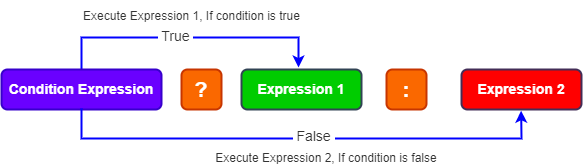
result = condition ? valueIfTrue : valueIfFalse;- The condition is evaluated; it must be a
boolean. - If it is
true, the expression after?is evaluated and becomes the result. - If it is
false, the expression after:is evaluated instead.
Only one of the two value expressions is evaluated, never both.
2. Basic Examples
public class TernaryBasics {
    public static void main(String[] args) {
        int a = 42, b = 17;

        int max = (a > b) ? a : b;                         // pick the larger value
        System.out.println("max = " + max);

        int n = 7;
        System.out.println(n + " is " + (n % 2 == 0 ? "even" : "odd"));

        int stock = 0;
        String label = stock > 0 ? "In stock" : "Sold out";
        System.out.println("label = " + label);

        int items = 1;
        System.out.println(items + " item" + (items == 1 ? "" : "s") + " in your cart");

        // The same logic with if-else takes more lines:
        String status;
        if (stock > 0) {
            status = "In stock";
        } else {
            status = "Sold out";
        }
        System.out.println("status = " + status);
    }
}max = 42 7 is odd label = Sold out 1 item in your cart status = Sold out
The ternary version of the stock label takes one line; the if-else version takes six. Because the ternary operator is an expression, it can be used directly in assignments, method arguments, return statements and string concatenation.
3. Nested Ternary Operators
The false branch can itself be another ternary expression, forming a chain. Formatted one condition per line, a chain can read like a lookup table:
public class NestedTernary {
    static String grade(int marks) {
        return marks >= 85 ? "A"
             : marks >= 70 ? "B"
             : marks >= 55 ? "C"
             : marks >= 40 ? "D"
             : "F";
    }

    public static void main(String[] args) {
        for (int m : new int[] {92, 74, 58, 41, 12}) {
            System.out.println(m + " -> " + grade(m));
        }
    }
}92 -> A 74 -> B 58 -> C 41 -> D 12 -> F
The ternary operator is right-associative, so a ? b : c ? d : e means a ? b : (c ? d : e). Deeply nested or tangled ternaries quickly become hard to read; use if-else or a switch instead.
4. The Result Type and the Null Trap
Both branches must produce a value of a compatible type, and Java converts them to a common type. This leads to two surprises:
public class TernaryTypes {
    public static void main(String[] args) {
        // Both branches are converted to a common type
        System.out.println(true ? 1 : 2.0);         // prints 1.0 (int promoted to double)
        Object o = true ? 1 : "one";                // common type is Object
        System.out.println(o);

        // Trap: mixing int and a null Integer unboxes the null
        Integer missing = null;
        try {
            Integer value = false ? 0 : missing;    // type is int, so missing is unboxed
            System.out.println(value);
        } catch (NullPointerException e) {
            System.out.println("NullPointerException from unboxing a null Integer");
        }

        Integer safe = false ? Integer.valueOf(0) : missing;   // both Integer: no unboxing
        System.out.println("safe = " + safe);
    }
}1.0 1 NullPointerException from unboxing a null Integer safe = null
true ? 1 : 2.0prints1.0, because theintis promoted todoubleto match the other branch.- When one branch is a primitive
intand the other anInteger, the result type isint. If theIntegerisnull, unboxing it throwsNullPointerException, even though the assignment target is anInteger. - Keeping both branches as objects (
Integer.valueOf(0)) avoids the unboxing.
5. Ternary vs if-else
| Ternary operator | if-else statement |
|---|---|
| An expression: produces a value | A statement: performs actions |
| Exactly two choices, each a single expression | Any number of branches and statements |
| Can be used inside assignments, arguments and returns | Cannot be used where a value is expected |
| Best for short, simple choices | Best for complex logic or side effects |
A ternary expression cannot stand alone as a statement: x > 0 ? doA() : doB(); does not compile. Use if-else to choose between actions.
6. Ternary vs Switch Expression
For a choice between more than two values, a modern switch expression is clearer than nested ternaries:
public class TernaryVsSwitch {
    enum Level { LOW, MEDIUM, HIGH }

    public static void main(String[] args) {
        Level level = Level.MEDIUM;

        // Many choices: a switch expression reads better than nested ternaries
        String colour = switch (level) {
            case LOW -> "green";
            case MEDIUM -> "orange";
            case HIGH -> "red";
        };
        System.out.println("colour = " + colour);

        // Two choices: the ternary operator is perfect
        boolean urgent = level == Level.HIGH;
        System.out.println(urgent ? "Notify now" : "Notify later");
    }
}colour = orange Notify later
7. Best Practices
- Use the ternary operator for simple, side-effect-free choices between two values.
- Put parentheses around the condition when it contains operators, for readability.
- Avoid nesting more than one level unless each branch is on its own line and the logic is a simple chain.
- Keep both branches the same type to avoid unexpected promotion or unboxing.
- For null defaults, consider
Objects.requireNonNullElse(value, fallback)orOptional.orElse().
8. Summary
condition ? a : breturnsaif the condition is true, otherwiseb.- It is an expression, so it can be used wherever a value is needed.
- Only one branch is evaluated; the operator is right-associative.
- Both branches are converted to a common type, which can promote numbers or unbox a
null. - Use
if-elsefor actions andswitchfor many choices.
Related Tutorials
Frequently Asked Questions (FAQ)
Q1. What is the ternary operator in Java?
The conditional operator condition ? value1 : value2. It evaluates the condition and returns value1 if it is true, or value2 if it is false.
Q2. Why is it called ternary?
Because it takes three operands: the condition, the true value and the false value. It is Java's only ternary operator.
Q3. Is the ternary operator faster than if-else?
No meaningful difference; both compile to similar bytecode. Choose based on readability.
Q4. Can I use the ternary operator without assigning the result?
Not as a standalone statement: a > b ? x() : y(); does not compile. The result must be used, for example assigned, returned or passed as an argument.
Q5. Can the ternary operator call void methods?
No. Both branches must produce values. Use an if-else statement to choose between void methods.
Q6. Can ternary operators be nested?
Yes, for example a > b ? "greater" : a < b ? "less" : "equal". Keep nesting shallow and format it clearly, or use if-else or switch for complex cases.
Q7. Are both expressions evaluated?
No. Only the branch chosen by the condition is evaluated, so the other branch's method calls or side effects do not happen.
Q8. Why does true ? 1 : 2.0 print 1.0?
When the branches have different numeric types, both are promoted to a common type, here double. So the int 1 becomes 1.0.
Q9. Why can the ternary operator throw NullPointerException?
If one branch is a primitive and the other a wrapper object, the result type is the primitive, so the wrapper is unboxed. Unboxing null throws NullPointerException.
Q10. Can I return a ternary expression from a method?
Yes: return balance >= amount ? "Approved" : "Declined";. This is one of its most common and readable uses.
Q11. What is the associativity of the ternary operator?
Right to left: a ? b : c ? d : e is grouped as a ? b : (c ? d : e).
Q12. Does Java have a null-coalescing operator like ?? or Elvis ?:?
No. Use the ternary operator (x != null ? x : fallback), Objects.requireNonNullElse(x, fallback) or Optional.ofNullable(x).orElse(fallback).
Q13. Can I use the ternary operator inside println?
Yes, but wrap it in parentheses when concatenating: "Result: " + (ok ? "yes" : "no"). Without them, + binds first.
Q14. When should I not use the ternary operator?
When branches contain complex logic or side effects, when there are many conditions, or when the expression no longer fits comfortably on one or two lines.
Q15. Can the condition be a non-boolean value?
No. Unlike C or JavaScript, Java requires a boolean condition. count ? a : b does not compile when count is an int.
Q16. Can I use the ternary operator with different object types?
Yes. The result type becomes their closest common supertype, possibly Object. Assign it to a variable of that type or use var.
Q17. Is the ternary operator the same as a switch expression?
Both are expressions that produce values, but the ternary operator chooses between two values based on a boolean, while a switch expression chooses among many cases based on a value or pattern.
Q18. How do I find the maximum of three numbers with the ternary operator?
int max = a > b ? (a > c ? a : c) : (b > c ? b : c);Math.max(a, Math.max(b, c)) is usually clearer.
Q19. Can the ternary operator be used in lambda expressions?
Yes, it fits naturally in expression lambdas: n -> n % 2 == 0 ? "even" : "odd".
Q20. Can I use the ternary operator to assign a final variable?
Yes, and it is a good reason to use it: final String mode = debug ? "verbose" : "quiet"; assigns the variable exactly once, which an if-else with two assignments makes harder to read.