TreeSet in Java – Complete Guide with Examples
TreeSet is a Set that keeps its elements sorted at all times. Whatever order you add elements in, a TreeSet returns them in ascending order, or in any order you define with a Comparator. It also answers questions such as "what is the smallest value?" or "what is the next value after 35?" quickly.
TreeSet lives in java.util, has been part of the Collections Framework since JDK 1.2, and is backed by a self-balancing red-black tree. This tutorial covers sorting, custom orders, navigation methods and the most common TreeSet pitfall.
1. What Is a TreeSet?
Think of a dictionary. Words are always in alphabetical order, each word appears once, and you can jump to "the first word after table" without reading the whole book. A TreeSet works the same way for any comparable data.
- Sorted: elements are kept in natural order (numbers ascending, strings alphabetically) or in a custom order.
- Unique: elements that compare as equal are stored once.
- O(log n)
add,removeandcontains. - Navigable: methods such as
floor(),ceiling(),headSet()anddescendingSet(). - No
nullwith natural ordering. - Not synchronized, with fail-fast iterators.
2. Class Hierarchy and Declaration
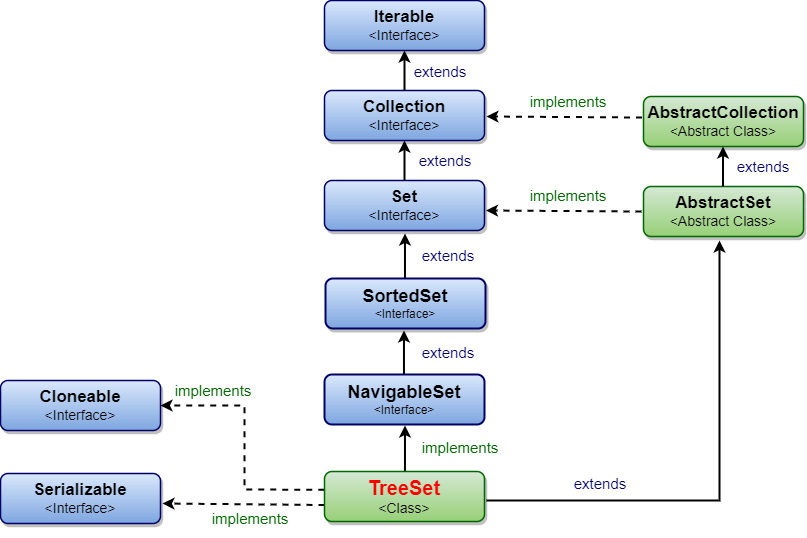
public class TreeSet<E> extends AbstractSet<E>
        implements NavigableSet<E>, Cloneable, java.io.Serializable
NavigableSet extends SortedSet, which extends Set (and, since Java 21, SequencedSet).
3. Your First TreeSet Program
import java.util.List;
import java.util.TreeSet;

public class TreeSetQuickStart {
    public static void main(String[] args) {
        TreeSet<Integer> scores = new TreeSet<>(List.of(72, 45, 98, 61, 72, 30));

        System.out.println("Sorted scores: " + scores);   // duplicates removed, sorted
        System.out.println("Lowest:        " + scores.first());
        System.out.println("Highest:       " + scores.last());

        scores.add(85);
        System.out.println("After add(85): " + scores);   // placed in sorted position
    }
}Sorted scores: [30, 45, 61, 72, 98] Lowest: 30 Highest: 98 After add(85): [30, 45, 61, 72, 85, 98]
The duplicate 72 was dropped, and the new element 85 went straight into its sorted position. There is no need to call a sort method.
4. Constructors
| Constructor | What it does |
|---|---|
TreeSet() | Empty set sorted by natural order (elements must implement Comparable). |
TreeSet(Comparator<? super E> c) | Empty set sorted by the given comparator. |
TreeSet(Collection<? extends E> c) | Set with the elements of c, in natural order. |
TreeSet(SortedSet<E> s) | Set with the same elements and the same ordering as s. |
5. Custom Order with a Comparator
Pass a Comparator to the constructor to sort in reverse, by length, ignoring case, or by any rule you like.
import java.util.Comparator;
import java.util.List;
import java.util.TreeSet;

public class TreeSetComparators {
    public static void main(String[] args) {
        List<String> words = List.of("pear", "Apple", "fig", "banana", "apple", "kiwi");

        System.out.println("Natural:          " + new TreeSet<>(words));

        TreeSet<String> reverse = new TreeSet<>(Comparator.reverseOrder());
        reverse.addAll(words);
        System.out.println("Reverse:          " + reverse);

        TreeSet<String> byLength = new TreeSet<>(
                Comparator.comparingInt(String::length).thenComparing(Comparator.naturalOrder()));
        byLength.addAll(words);
        System.out.println("By length:        " + byLength);

        TreeSet<String> ignoreCase = new TreeSet<>(String.CASE_INSENSITIVE_ORDER);
        ignoreCase.addAll(words);
        System.out.println("Case-insensitive: " + ignoreCase + "  <- 'apple' treated as duplicate");
    }
}Natural: [Apple, apple, banana, fig, kiwi, pear] Reverse: [pear, kiwi, fig, banana, apple, Apple] By length: [fig, kiwi, pear, Apple, apple, banana] Case-insensitive: [Apple, banana, fig, kiwi, pear] <- 'apple' treated as duplicate
Two details stand out:
- In natural order, uppercase letters come before lowercase (
"Apple"before"apple"), because strings compare by character code. - With
CASE_INSENSITIVE_ORDER,"apple"disappeared. The comparator said it equals"Apple", and a TreeSet trusts the comparator, notequals(), to detect duplicates.
6. Navigation Methods
Because the elements are sorted, a TreeSet can find neighbours and ranges in O(log n) time:
import java.util.List;
import java.util.TreeSet;

public class TreeSetNavigation {
    public static void main(String[] args) {
        TreeSet<Integer> n = new TreeSet<>(List.of(10, 20, 30, 40, 50));

        System.out.println("lower(30):   " + n.lower(30));     // strictly less
        System.out.println("floor(30):   " + n.floor(30));     // less or equal
        System.out.println("floor(35):   " + n.floor(35));
        System.out.println("ceiling(35): " + n.ceiling(35));   // greater or equal
        System.out.println("higher(50):  " + n.higher(50));    // strictly greater -> none

        System.out.println("headSet(30):        " + n.headSet(30));          // < 30
        System.out.println("tailSet(30):        " + n.tailSet(30));          // >= 30
        System.out.println("subSet(20, 40):     " + n.subSet(20, 40));       // 20 <= x < 40
        System.out.println("subSet(20,t,40,t):  " + n.subSet(20, true, 40, true));
        System.out.println("descendingSet():    " + n.descendingSet());

        System.out.println("pollFirst(): " + n.pollFirst() + ", pollLast(): " + n.pollLast() + " -> " + n);
    }
}lower(30): 20 floor(30): 30 floor(35): 30 ceiling(35): 40 higher(50): null headSet(30): [10, 20] tailSet(30): [30, 40, 50] subSet(20, 40): [20, 30] subSet(20,t,40,t): [20, 30, 40] descendingSet(): [50, 40, 30, 20, 10] pollFirst(): 10, pollLast(): 50 -> [20, 30, 40]
| Method | Returns |
|---|---|
first(), last() | Smallest and largest element (exception if empty). |
lower(e) | Greatest element strictly less than e, or null. |
floor(e) | Greatest element less than or equal to e, or null. |
ceiling(e) | Smallest element greater than or equal to e, or null. |
higher(e) | Smallest element strictly greater than e, or null. |
headSet(to), tailSet(from), subSet(from, to) | Range views; from is included and to excluded by default. |
pollFirst(), pollLast() | Remove and return the smallest or largest element, or null. |
descendingSet(), descendingIterator() | Reverse-order view and iterator. |
headSet() are backed by the original set. Adding to the original inside the range shows up in the view, and adding to the view outside its range throws IllegalArgumentException.7. Storing Your Own Objects
A TreeSet must be able to compare elements. Either the class implements Comparable (its natural order), or you pass a Comparator. Otherwise the first comparison throws ClassCastException.
import java.util.Comparator;
import java.util.TreeSet;

public class TreeSetCustomObjects {

    // Natural order defined by Comparable: by roll number
    record Student(int roll, String name) implements Comparable<Student> {
        public int compareTo(Student other) { return Integer.compare(roll, other.roll); }
    }

    static class Plain { }   // not Comparable

    public static void main(String[] args) {
        TreeSet<Student> byRoll = new TreeSet<>();
        byRoll.add(new Student(3, "Meera"));
        byRoll.add(new Student(1, "Asha"));
        byRoll.add(new Student(2, "Ravi"));
        System.out.println("By roll: " + byRoll);

        TreeSet<Student> byName = new TreeSet<>(Comparator.comparing(Student::name));
        byName.addAll(byRoll);
        System.out.println("By name: " + byName.stream().map(Student::name).toList());

        try {
            TreeSet<Plain> bad = new TreeSet<>();
            bad.add(new Plain());
        } catch (ClassCastException e) {
            System.out.println("Not Comparable -> ClassCastException");
        }
    }
}By roll: [Student[roll=1, name=Asha], Student[roll=2, name=Ravi], Student[roll=3, name=Meera]] By name: [Asha, Meera, Ravi] Not Comparable -> ClassCastException
8. The Most Common Pitfall: Comparator Ties
A TreeSet treats any two elements whose comparison returns 0 as duplicates. If your comparator looks at only one field, different objects that share that field silently disappear:
import java.util.Comparator;
import java.util.TreeSet;

public class ComparatorPitfall {
    record Employee(String name, int salary) { }

    public static void main(String[] args) {
        // WRONG: two employees with the same salary compare as 0 = "duplicate"
        TreeSet<Employee> wrong = new TreeSet<>(Comparator.comparingInt(Employee::salary));
        wrong.add(new Employee("Asha", 50000));
        wrong.add(new Employee("Ravi", 50000));
        System.out.println("Salary only:        " + wrong.size() + " employee(s)");

        // RIGHT: break ties with another field
        TreeSet<Employee> right = new TreeSet<>(
                Comparator.comparingInt(Employee::salary).thenComparing(Employee::name));
        right.add(new Employee("Asha", 50000));
        right.add(new Employee("Ravi", 50000));
        System.out.println("Salary, then name:  " + right.size() + " employee(s)");
    }
}Salary only: 1 employee(s) Salary, then name: 2 employee(s)
Always break ties with thenComparing() using fields that identify the object uniquely. Ideally the comparator is consistent with equals: it returns 0 exactly when equals() returns true.
9. How TreeSet Works Internally
A TreeSet is a thin wrapper around a TreeMap: each element is stored as a key, with a dummy value. A TreeMap is a red-black tree, a binary search tree that rebalances itself after every insert and delete.
- Every node's left subtree holds smaller elements and its right subtree holds larger ones.
- Searching starts at the root and goes left or right at each step, so it takes about log₂(n) comparisons: around 20 for a million elements.
- Rebalancing (rotations and recolouring) keeps the tree height at most about 2 log₂(n), so performance never degrades to O(n), even for sorted input.
- Iteration does an in-order walk of the tree, which visits elements in sorted order.
10. Practical Example: Next Available Time Slot
ceiling() makes "find the next one after X" problems trivial: appointment slots, price brackets, version ranges or leaderboard positions.
import java.time.LocalTime;
import java.util.TreeSet;

public class NextAvailableSlot {
    public static void main(String[] args) {
        TreeSet<LocalTime> freeSlots = new TreeSet<>();
        freeSlots.add(LocalTime.of(9, 0));
        freeSlots.add(LocalTime.of(11, 30));
        freeSlots.add(LocalTime.of(14, 0));
        freeSlots.add(LocalTime.of(16, 15));

        for (LocalTime now : new LocalTime[] {LocalTime.of(8, 0), LocalTime.of(12, 0), LocalTime.of(17, 0)}) {
            LocalTime next = freeSlots.ceiling(now);
            System.out.println("At " + now + " next free slot: " + (next == null ? "none today" : next));
        }
    }
}At 08:00 next free slot: 09:00 At 12:00 next free slot: 14:00 At 17:00 next free slot: none today
11. Time Complexity
| Operation | TreeSet | HashSet |
|---|---|---|
add, remove, contains | O(log n) | O(1) average |
first, last, floor, ceiling | O(log n) | Not available |
| Iterate all in sorted order | O(n) | O(n log n) (needs a sort) |
Range query (subSet) | O(log n) to create the view | O(n) |
12. TreeSet vs HashSet vs LinkedHashSet
| Feature | TreeSet | HashSet | LinkedHashSet |
|---|---|---|---|
| Order | Sorted | None | Insertion |
| Duplicate check | compareTo() / Comparator | hashCode() + equals() | hashCode() + equals() |
| Speed | O(log n) | O(1) | O(1) |
null | Not allowed | One | One |
| Navigation methods | Yes | No | No |
| Backed by | TreeMap | HashMap | LinkedHashMap |
13. Thread Safety
TreeSet is not synchronized. For a sorted set shared between threads, use ConcurrentSkipListSet, which offers the same navigation methods without locking the whole set. Alternatively, wrap it with Collections.synchronizedSortedSet(new TreeSet<>()).
14. Common Mistakes
- Adding objects that are not
Comparablewithout a comparator:ClassCastException. - Adding
null:NullPointerException. - A comparator that returns 0 for different objects: elements silently lost.
- Changing a field used for sorting while the element is in the set: the tree becomes inconsistent.
- Calling
first()on an empty set:NoSuchElementException; usepollFirst()or checkisEmpty(). - Using TreeSet just to remove duplicates when order does not matter; HashSet is faster.
15. Summary
- TreeSet stores unique elements in sorted order using a red-black tree (via TreeMap).
- Operations are O(log n); it does not allow
null. - Ordering comes from
Comparableor aComparator, which also decides what counts as a duplicate. - Navigation methods (
floor,ceiling,headSet,subSet…) make range and nearest-value queries easy. - Use
ConcurrentSkipListSetfor a thread-safe sorted set.
Related Tutorials
- SortedSet in Java
- NavigableSet in Java
- HashSet in Java
- TreeMap in Java
- Difference between LinkedHashSet and TreeSet
Reference: Java SE 21 API: java.util.TreeSet
Frequently Asked Questions (FAQ)
Q1. What is a TreeSet in Java?
TreeSet is a class in java.util that implements NavigableSet. It stores unique elements in sorted order, either natural order or a custom Comparator, using a red-black tree, with O(log n) basic operations.
Q2. How does TreeSet keep elements sorted?
It is backed by a TreeMap, which is a self-balancing binary search tree (a red-black tree). Each new element is placed by comparing it with existing elements, and the tree rebalances so lookups stay O(log n).
Q3. Does TreeSet allow null?
No, not with natural ordering: adding null throws NullPointerException, because null cannot be compared. A custom comparator that handles null, such as Comparator.nullsFirst(...), can allow it, but this is rarely a good idea.
Q4. How does TreeSet detect duplicates?
With compareTo() or the comparator, not equals(). If the comparison returns 0, the new element is considered a duplicate and is not added.
Q5. What is the difference between TreeSet and HashSet?
TreeSet keeps elements sorted, offers navigation methods, is O(log n) and forbids null. HashSet has no order, is O(1) on average, and allows one null. Use HashSet unless you need sorting or range queries.
Q6. How do I sort a TreeSet in descending order?
TreeSet<Integer> desc = new TreeSet<>(Comparator.reverseOrder());
// or a reversed view of an existing set
NavigableSet<Integer> view = set.descendingSet();
Q7. What is the difference between floor() and lower()?
floor(e) returns the greatest element less than or equal to e. lower(e) returns the greatest element strictly less than e. Both return null if no such element exists.
Q8. What is the difference between ceiling() and higher()?
ceiling(e) returns the smallest element greater than or equal to e; higher(e) returns the smallest element strictly greater than e.
Q9. Why did I get a ClassCastException when adding to a TreeSet?
The element's class does not implement Comparable, and you did not provide a Comparator. Implement Comparable in the class, or create the set with new TreeSet<>(comparator).
Q10. Why are some of my objects missing from a TreeSet?
Your comparator returns 0 for objects that are actually different, for example when it compares only by salary. Add tie-breakers with thenComparing() so that only truly equal objects compare as 0.
Q11. What is the time complexity of TreeSet operations?
add, remove, contains, first, last, floor, ceiling, lower and higher are all O(log n). Iterating over all elements is O(n).
Q12. Are headSet(), tailSet() and subSet() copies?
No, they are views backed by the original TreeSet. Changes in either one are visible in the other, as long as they fall within the view's range. Wrap a view in new TreeSet<>(view) to get an independent copy.
Q13. Is TreeSet thread-safe?
No. Use ConcurrentSkipListSet for a concurrent sorted set, or Collections.synchronizedSortedSet(new TreeSet<>()) with manual locking during iteration.
Q14. How do I get the first and last elements of a TreeSet?
Use first() and last(), which throw NoSuchElementException on an empty set, or pollFirst()/pollLast() to remove and return them (returning null when empty).
Q15. Can TreeSet store strings in case-insensitive order?
Yes: new TreeSet<>(String.CASE_INSENSITIVE_ORDER). Be aware that strings differing only in case then count as duplicates, so only the first one added is kept.
Q16. What is the difference between TreeSet and TreeMap?
A TreeSet stores sorted single elements; a TreeMap stores sorted key–value pairs. TreeSet is implemented on top of TreeMap, using its elements as the map's keys.
Q17. What is a red-black tree?
A binary search tree in which every node is coloured red or black, following rules that keep the tree roughly balanced. After each insert or delete, a few rotations and recolourings restore the rules, guaranteeing O(log n) height.
Q18. Should a TreeSet comparator be consistent with equals()?
Ideally, yes: it should return 0 exactly when equals() returns true. If not, the TreeSet still works by its own rules, but it can disagree with other sets about which elements are duplicates, which surprises readers of your code.
Q19. How do I convert a TreeSet to a List?
List<Integer> sortedList = new ArrayList<>(treeSet);The list keeps the TreeSet's sorted order.
Q20. When should I use a TreeSet?
When you need unique elements in sorted order, or quick answers to range and nearest-value questions: leaderboards, time slots, price bands, dictionary-style lookups and "top N" lists.