Jagged Array in Java – Explained with Examples
A jagged array (also called a ragged array) is a two-dimensional array whose rows have different lengths. It is possible because Java's 2D arrays are really arrays of arrays, and each row is a separate array object with its own size.
Jagged arrays save memory and model naturally uneven data: a different number of orders per customer, students per class, or values per row of Pascal's triangle. This tutorial shows how to create them, loop over them safely, and avoid their pitfalls.
1. What Is a Jagged Array?
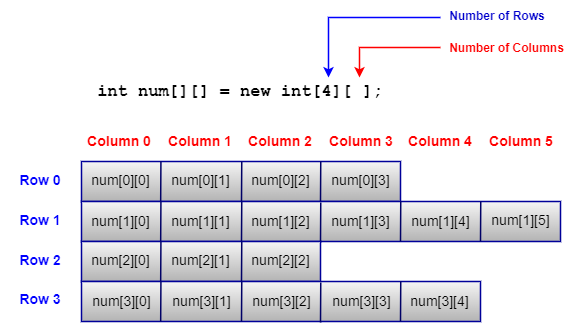
In a regular (rectangular) 2D array every row has the same number of columns. In a jagged array the outer array holds references to rows of any length:
Rectangular int[3][4]      Jagged int[3][]
[ 0 0 0 0 ]                [ 120 90 ]
[ 0 0 0 0 ]                [ 75 60 110 95 ]
[ 0 0 0 0 ]                [ 200 ]
2. Creating Jagged Arrays
Give only the number of rows (new int[3][]) and create each row separately, or write the rows directly in an initializer:
import java.util.Arrays;

public class JaggedBasics {
    public static void main(String[] args) {
        // Way 1: create the rows one by one
        int[][] weeklySales = new int[3][];       // 3 rows, columns not fixed yet
        weeklySales[0] = new int[] {120, 90};
        weeklySales[1] = new int[] {75, 60, 110, 95};
        weeklySales[2] = new int[] {200};

        // Way 2: initialise directly with rows of different lengths
        String[][] teams = {
                {"Asha", "Ravi", "Meera"},
                {"John"},
                {"Kiran", "Anil"}
        };

        for (int r = 0; r < weeklySales.length; r++) {
            System.out.println("store " + r + " (" + weeklySales[r].length + " values): " + Arrays.toString(weeklySales[r]));
        }
        System.out.println(Arrays.deepToString(teams));
    }
}store 0 (2 values): [120, 90] store 1 (4 values): [75, 60, 110, 95] store 2 (1 values): [200] [[Asha, Ravi, Meera], [John], [Kiran, Anil]]
- Only the first dimension must be given when creating the array.
- Always use
array[r].lengthfor the size of rowr; never assume a fixed column count. Arrays.deepToString()prints any nested array, jagged or not.
3. Example: Pascal's Triangle
Pascal's triangle is a classic jagged structure: row r has r + 1 values, and each inner value is the sum of the two values above it.
public class PascalTriangle {
    public static void main(String[] args) {
        int rows = 6;
        int[][] pascal = new int[rows][];
        for (int r = 0; r < rows; r++) {
            pascal[r] = new int[r + 1];                  // row r has r + 1 values
            pascal[r][0] = pascal[r][r] = 1;
            for (int c = 1; c < r; c++) {
                pascal[r][c] = pascal[r - 1][c - 1] + pascal[r - 1][c];
            }
        }

        for (int[] row : pascal) {
            StringBuilder line = new StringBuilder(" ".repeat((rows - row.length) * 2));
            for (int v : row) line.append(String.format("%4d", v));
            System.out.println(line);
        }
    }
} 1
1 1
1 2 1
1 3 3 1
1 4 6 4 1
1 5 10 10 5 1
4. Pitfalls and Safe Looping
Two errors are typical with jagged arrays: using a row that was never created, and using an index that exists in one row but not in another.
public class JaggedPitfalls {
    public static void main(String[] args) {
        int[][] data = new int[3][];
        data[0] = new int[] {1, 2, 3};
        data[2] = new int[] {4};

        // Pitfall 1: a row that was never created is null
        try {
            System.out.println(data[1].length);
        } catch (NullPointerException e) {
            System.out.println("data[1] is null: NullPointerException");
        }

        // Pitfall 2: assuming every row has the same length
        try {
            System.out.println(data[2][1]);
        } catch (ArrayIndexOutOfBoundsException e) {
            System.out.println("data[2][1]: " + e.getMessage());
        }

        // Safe loop: check for null and use each row's own length
        int total = 0;
        for (int[] row : data) {
            if (row == null) continue;
            for (int v : row) total += v;
        }
        System.out.println("total = " + total);
    }
}data[1] is null: NullPointerException data[2][1]: Index 1 out of bounds for length 1 total = 10
Loop with each row's own length, and skip or initialise null rows before use.
5. When to Use Jagged Arrays
- Uneven data: monthly days (28–31), seats per row in a theatre, orders per customer.
- Triangular data: Pascal's triangle, lower-triangular matrices, distance tables.
- Saving memory: a rectangular array sized for the longest row wastes space in all the shorter ones.
If rows need to grow or shrink, a List<List<T>> is more flexible. For rectangular grids, a regular 2D array is simpler.
6. Jagged vs Rectangular Arrays
| Feature | Rectangular | Jagged |
|---|---|---|
| Row lengths | All equal | Can differ |
| Creation | new int[3][4] | new int[3][] plus each row |
| Memory | May waste space for uneven data | Exactly what each row needs |
| Column count | arr[0].length for every row | arr[r].length per row |
| Risk | Low | null rows and index errors |
7. Summary
- A jagged array is a 2D array with rows of different lengths.
- Create it with
new type[rows][]and assign each row, or with an initializer. - Use
arr[r].lengthfor each row, and check fornullrows. - It suits uneven or triangular data and saves memory.
Related Tutorials
Frequently Asked Questions (FAQ)
Q1. What is a jagged array in Java?
A multidimensional array whose rows have different lengths, for example a 2D array where the first row has 2 elements and the second has 4.
Q2. Why is it called jagged or ragged?
Because when you draw the rows, their right edges do not line up, giving an uneven, jagged outline.
Q3. How do I declare a jagged array?
int[][] arr = new int[3][]; then arr[0] = new int[2];, arr[1] = new int[5]; and so on, or use an initializer like int[][] arr = {{1, 2}, {3, 4, 5}};.
Q4. How do I find the length of each row?
Use arr[r].length for row r. arr.length gives the number of rows.
Q5. Does Java support true multidimensional arrays?
No. Java implements them as arrays of arrays, which is exactly why jagged arrays are possible. Languages like C# offer both rectangular and jagged arrays as separate types.
Q6. What is the default value of a row in a jagged array?
null, until you assign a row array to it. Accessing arr[r].length or arr[r][c] on a null row throws NullPointerException.
Q7. How do I loop over a jagged array?
Use nested loops with each row's own length: for (int r = 0; r < arr.length; r++) for (int c = 0; c < arr[r].length; c++), or nested for-each loops.
Q8. What are the advantages of jagged arrays?
They use memory only for the elements each row needs and model uneven data naturally.
Q9. What are the disadvantages?
Code must handle varying row lengths and possible null rows, which adds checks and potential for index errors.
Q10. Can a jagged array be three-dimensional?
Yes. Each level of an array of arrays can have different lengths, so 3D jagged arrays are possible, though rarely needed.
Q11. How do I print a jagged array?
System.out.println(Arrays.deepToString(arr)); prints all rows with their actual lengths.
Q12. Can I change the length of a row later?
You cannot resize an existing row, but you can replace it with a new array of a different length: arr[1] = Arrays.copyOf(arr[1], 6);.
Q13. Is a jagged array faster than a rectangular one?
Access speed is the same, because both are arrays of row arrays. Jagged arrays may use less memory.
Q14. How is a jagged array different from List<List<Integer>>?
A jagged array has fixed row lengths once created and can store primitives. A list of lists lets rows grow and shrink but stores boxed objects.
Q15. Can I create a jagged array of strings?
Yes, any element type works: String[][] teams = {{"Asha", "Ravi"}, {"John"}};.
Q16. How do I sum all elements in a jagged array?
Loop over rows and their elements, skipping null rows, or use streams: Arrays.stream(arr).flatMapToInt(Arrays::stream).sum() (when no row is null).
Q17. How do I copy a jagged array?
Copy each row: Arrays.stream(arr).map(int[]::clone).toArray(int[][]::new). Cloning only the outer array would share the rows.
Q18. What is a real-world example of a jagged array?
Storing the days of each month in a year (28 to 31 values per row), seats per row in a theatre, or a list of exam scores for classes of different sizes.
Q19. Why does new int[][3] not compile?
When creating a multidimensional array, the leftmost dimension must be given. You can omit later dimensions, but not the first.
Q20. Can rows in a jagged array have length 0?
Yes. A row can be an empty array (new int[0]), which is different from a null row and safe to loop over.