Methods in Java – Syntax, Types and Examples
A method is a named block of code that performs a task. You write it once and call it whenever you need that task done, which keeps programs short, readable and easy to change. In Java, every method belongs to a class, and the program itself starts from a method: main.
This tutorial covers how to declare and call methods, parameters and return values, how Java passes arguments, overloading, variable-length arguments, static and instance methods, and recursion.
1. What Is a Method?
Think of a method as a recipe: it has a name ("make tea"), takes ingredients (parameters), follows steps (the body), and may produce a result (the return value). Once written, anyone can follow the recipe by calling its name.
Benefits of methods:
- Reuse: write logic once, call it from many places.
- Readability: a well-named method explains what the code does.
- Maintainability: fix a bug in one place.
- Testing: small methods are easy to test on their own.
2. Method Syntax
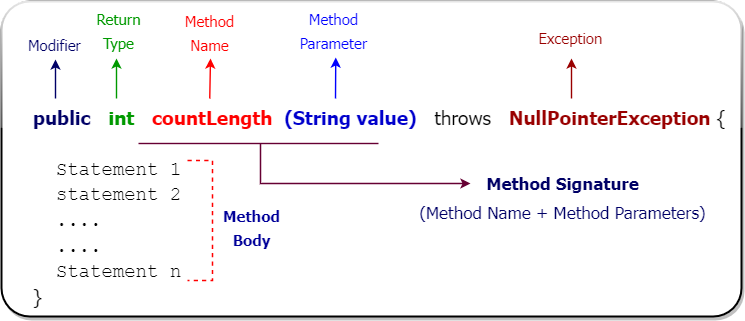
accessModifier [static] returnType methodName(parameterList) [throws Exceptions] {
    // method body
    return value;   // if returnType is not void
}

public static int square(int number) {
    return number * number;
}| Part | Meaning |
|---|---|
| Access modifier | Who can call it: public, protected, package-private or private. |
static (optional) | Belongs to the class rather than an object. |
| Return type | Type of the value returned, or void for none. |
| Name | A verb in camelCase, such as calculateTotal. |
| Parameter list | Inputs with their types, in parentheses; may be empty. |
| Body | The statements that do the work. |
The method's signature is its name plus its parameter types, for example square(int). The return type is not part of the signature.
3. Defining and Calling Methods
public class MethodBasics {
    // A method that takes two parameters and returns a value
    static double area(double length, double width) {
        return length * width;
    }

    // A method that returns nothing (void)
    static void printReceipt(String item, double amount) {
        System.out.println(item + ": Rs. " + amount);
    }

    // A method with no parameters
    static String greeting() {
        return "Thank you for shopping!";
    }

    public static void main(String[] args) {
        double room = area(4.5, 3.0);          // call and store the result
        printReceipt("Floor tiles for " + room + " sq m", room * 650);
        System.out.println(greeting());
    }
}Floor tiles for 13.5 sq m: Rs. 8775.0 Thank you for shopping!
When you call a method, Java evaluates the arguments, copies them into the parameters, runs the body, and returns to the caller, together with a value if the method has one. return also ends the method immediately.
4. How Arguments Are Passed: Always by Value
Java always passes a copy of each argument. For primitives, that is a copy of the value. For objects, it is a copy of the reference, so the method can change the object, but it cannot make the caller's variable point to a different object.
public class PassByValue {
    static class Wallet { int balance; Wallet(int b) { balance = b; } }

    static void tryToChange(int amount) {
        amount = 999;                 // changes only the local copy
    }

    static void spend(Wallet w) {
        w.balance -= 100;             // changes the object the reference points to
    }

    static void replace(Wallet w) {
        w = new Wallet(5000);         // changes only the local copy of the reference
    }

    public static void main(String[] args) {
        int amount = 10;
        tryToChange(amount);
        System.out.println("amount after tryToChange: " + amount);

        Wallet wallet = new Wallet(500);
        spend(wallet);
        System.out.println("balance after spend:      " + wallet.balance);

        replace(wallet);
        System.out.println("balance after replace:    " + wallet.balance);
    }
}amount after tryToChange: 10 balance after spend: 400 balance after replace: 400
5. Method Overloading
Several methods in a class can share a name if their parameter lists differ (in number, type or order). Java picks the right one at compile time from the arguments you pass.
public class Overloading {
    // Same name, different parameter lists
    static int add(int a, int b)          { return a + b; }
    static int add(int a, int b, int c)   { return a + b + c; }
    static double add(double a, double b) { return a + b; }
    static String add(String a, String b) { return a + b; }

    public static void main(String[] args) {
        System.out.println(add(2, 3));
        System.out.println(add(2, 3, 4));
        System.out.println(add(2.5, 1.25));
        System.out.println(add("Java", "21"));
    }
}5 9 3.75 Java21
Changing only the return type is not enough to overload a method. See Method Overloading in Java.
6. Variable-Length Arguments (Varargs)
Adding ... after a parameter type lets callers pass any number of arguments, which the method receives as an array:
public class VarargsDemo {
    // Accepts any number of int arguments (received as an array)
    static int sum(int... numbers) {
        int total = 0;
        for (int n : numbers) total += n;
        return total;
    }

    static String join(String separator, String... parts) {   // varargs must come last
        return String.join(separator, parts);
    }

    public static void main(String[] args) {
        System.out.println(sum());
        System.out.println(sum(5));
        System.out.println(sum(1, 2, 3, 4, 5));
        System.out.println(join(" | ", "red", "green", "blue"));
    }
}0 5 15 red | green | blue
A method can have only one varargs parameter, and it must be the last one. More in Varargs in Java.
7. Static Methods vs Instance Methods
public class InstanceMethods {
    private int count;                       // state of each object

    void increment() { count++; }            // instance method: uses the object's state
    int getCount() { return count; }

    static int max(int a, int b) {           // static method: no object needed
        return a > b ? a : b;
    }

    public static void main(String[] args) {
        InstanceMethods clicksA = new InstanceMethods();
        InstanceMethods clicksB = new InstanceMethods();
        clicksA.increment();
        clicksA.increment();
        clicksB.increment();

        System.out.println("A=" + clicksA.getCount() + ", B=" + clicksB.getCount());
        System.out.println("max = " + InstanceMethods.max(clicksA.getCount(), clicksB.getCount()));
    }
}A=2, B=1 max = 2
| Instance method | Static method |
|---|---|
Called on an object: clicksA.increment() | Called on the class: Math.max(a, b) |
Can use instance fields and this | Cannot use instance fields or this directly |
| Can be overridden | Cannot be overridden (only hidden) |
| Use for behaviour that depends on an object's state | Use for utilities and factory methods |
8. Recursive Methods
A method that calls itself is recursive. Every recursive method needs a base case that stops the recursion; otherwise it keeps calling itself until the stack runs out and a StackOverflowError is thrown.
public class RecursionDemo {
    // A method that calls itself: n! = n * (n - 1)!
    static long factorial(int n) {
        if (n <= 1) return 1;          // base case stops the recursion
        return n * factorial(n - 1);
    }

    static int sumDigits(int n) {
        return n < 10 ? n : n % 10 + sumDigits(n / 10);
    }

    public static void main(String[] args) {
        System.out.println("5! = " + factorial(5));
        System.out.println("20! = " + factorial(20));
        System.out.println("sum of digits of 98765 = " + sumDigits(98765));
    }
}5! = 120 20! = 2432902008176640000 sum of digits of 98765 = 35
Recursion is elegant for problems that are naturally self-similar (trees, file systems, divide-and-conquer algorithms). For simple counting, a loop is usually faster and uses less memory.
9. Kinds of Methods
- Predefined methods from the Java library:
System.out.println(),Math.sqrt(),String.length(). - User-defined methods that you write yourself.
- Getters and setters that read and update private fields.
- Abstract methods without a body, implemented by subclasses.
- Default methods in interfaces (Java 8+).
main, the entry point of an application.
10. The main Method
public static void main(String[] args) {
    // args holds command-line arguments: java App one two -> args = ["one", "two"]
}
It is public so the JVM can call it, static so no object is needed, and void because it returns nothing. Newer Java versions also allow simpler instance main() methods in single-file programs.
11. Best Practices
- Give each method one clear job, and keep it short.
- Name methods with verbs:
calculateTax(),sendEmail(),isValid(). - Keep parameter lists short; group related values into an object if there are many.
- Validate parameters and fail early with clear exceptions.
- Avoid changing objects passed as arguments unless that is the method's obvious purpose.
- Return empty collections instead of
null.
12. Summary
- A method has a modifier, return type, name, parameters and body; its signature is name plus parameter types.
- Java passes all arguments by value, including copies of object references.
- Overloading lets methods share a name with different parameter lists.
- Varargs accept any number of arguments of one type.
- Static methods belong to the class; instance methods work with an object's state.
- Recursive methods call themselves and must have a base case.
Related Tutorials
Reference: dev.java: Defining Methods
Frequently Asked Questions (FAQ)
Q1. What is a method in Java?
A method is a named block of code inside a class that performs a specific task. It can take parameters, may return a value, and runs only when it is called.
Q2. What is the difference between a parameter and an argument?
A parameter is the variable listed in the method declaration (int number). An argument is the actual value passed when calling the method (square(5)).
Q3. Is Java pass-by-value or pass-by-reference?
Always pass-by-value. For objects, the value passed is a copy of the reference, so a method can modify the object but cannot replace the caller's reference.
Q4. What does void mean?
void means the method does not return a value. It can still use return; on its own to exit early.
Q5. Can a method return more than one value?
Not directly. Return an object that groups the values, such as a record (record MinMax(int min, int max)), an array or a collection.
Q6. What is method overloading?
Defining several methods with the same name but different parameter lists in the same class. The compiler chooses which one to call based on the arguments.
Q7. Can methods be overloaded by return type only?
No. The parameter lists must differ. Two methods with the same name and parameters but different return types cause a compile error.
Q8. What is the difference between static and instance methods?
Instance methods are called on an object and can use its fields. Static methods belong to the class, are called with the class name, and cannot access instance fields or this directly.
Q9. Can a static method call an instance method?
Only through an object reference: new Counter().increment(). It cannot call an instance method directly because there is no current object.
Q10. What is a method signature?
The method name together with the number, types and order of its parameters, for example add(int, int). Return type, modifiers and exceptions are not part of it.
Q11. What are varargs?
Variable-length arguments, declared with Type... name. Callers can pass zero or more values, which the method receives as an array. It must be the last parameter.
Q12. What is recursion?
A method calling itself to solve a smaller version of the same problem. It needs a base case to stop, or it eventually throws StackOverflowError.
Q13. What causes StackOverflowError?
Too many nested method calls, almost always from recursion without a correct base case. Each call uses stack space, and the thread's stack eventually runs out.
Q14. Can a method be declared inside another method?
No, Java does not support nested methods. You can declare a local class or a lambda inside a method instead.
Q15. Why is the main method static?
So the JVM can call it without creating an object of the class first. It is the program's starting point.
Q16. Can I have more than one main method?
Yes. Each class can have its own main, and you choose which class to run. You can also overload main with other parameter lists, but the JVM only starts the standard one.
Q17. What is a return statement?
return ends a method and, for non-void methods, sends a value back to the caller. Every path through a non-void method must return a value or throw an exception.
Q18. What is the difference between a method and a constructor?
A constructor has the class's name, no return type, and runs only when an object is created. A method has its own name and return type and can be called any number of times.
Q19. What are getter and setter methods?
Methods that read (getName()) and update (setName(...)) a private field. They keep fields encapsulated and allow validation when values change.
Q20. How many parameters can a Java method have?
Technically up to 255 slots, but good design keeps it to a few. If a method needs many inputs, group them into an object or use a builder.