Difference Between ArrayList and Vector in Java
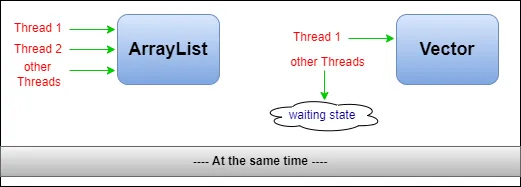
ArrayList and Vector are both resizable-array implementations of List: they keep insertion order, allow duplicates and nulls, and give O(1) access by index. The key difference is that Vector synchronizes every method, while ArrayList does not. Vector is a legacy class from Java 1.0; ArrayList (Java 1.2) is its modern, faster replacement.
1. Comparison Table
| Aspect | ArrayList | Vector |
|---|---|---|
| Synchronization | Not synchronized | All public methods synchronized |
| Performance | Faster (no locking) | Slower in single-threaded code |
| Growth when full | About 50% (10 → 15) | Doubles (10 → 20), or by a fixed capacityIncrement |
| Introduced | Java 1.2 (Collections Framework) | Java 1.0 (legacy, retrofitted to List) |
| Legacy methods | None | addElement, elementAt, firstElement, capacity()… |
| Traversal | Iterator, ListIterator | Also Enumeration |
| Iterator behaviour | Fail-fast | Iterator fail-fast; Enumeration not |
| Subclass | – | Stack extends Vector |
| Recommended? | Yes | No; use alternatives |
2. Capacity Growth and Legacy API
import java.util.*;

public class GrowthAndApi {
    public static void main(String[] args) {
        Vector<Integer> v = new Vector<>();          // default capacity 10, doubles when full
        for (int i = 0; i < 11; i++) v.add(i);
        System.out.println("Vector capacity after 11 adds: " + v.capacity());

        Vector<Integer> custom = new Vector<>(4, 3);   // capacityIncrement = 3
        for (int i = 0; i < 5; i++) custom.add(i);
        System.out.println("Vector(4, 3) capacity after 5 adds: " + custom.capacity());
        // ArrayList grows by ~50% (10 -> 15) and has no capacity() method

        // Legacy Vector API alongside the List API
        v.addElement(99);
        System.out.println("elementAt(1) = " + v.elementAt(1) + ", firstElement = " + v.firstElement()
                           + ", lastElement = " + v.lastElement());
        Enumeration<Integer> e = v.elements();
        StringBuilder sb = new StringBuilder();
        while (e.hasMoreElements()) sb.append(e.nextElement()).append(' ');
        System.out.println("Enumeration: " + sb.toString().trim());

        List<Integer> list = new ArrayList<>(v);          // both are Lists
        System.out.println("ArrayList copy size = " + list.size());
    }
}Vector capacity after 11 adds: 20 Vector(4, 3) capacity after 5 adds: 7 elementAt(1) = 1, firstElement = 0, lastElement = 99 Enumeration: 0 1 2 3 4 5 6 7 8 9 10 99 ArrayList copy size = 12
Doubling wastes more memory for large vectors; ArrayList's 50% growth is a better balance. Vector also exposes its capacity and old method names alongside the standard List methods.
3. Thread Safety
Two threads add 10,000 elements each to the same list:
import java.util.*;
import java.util.concurrent.CopyOnWriteArrayList;

public class ThreadSafety {
    static int fill(List<Integer> list) throws InterruptedException {
        Runnable task = () -> { for (int i = 0; i < 10_000; i++) list.add(i); };
        Thread a = new Thread(task), b = new Thread(task);
        a.start(); b.start(); a.join(); b.join();
        return list.size();
    }

    public static void main(String[] args) throws InterruptedException {
        System.out.println("Vector                      : " + fill(new Vector<>()));
        System.out.println("synchronizedList(ArrayList) : " + fill(Collections.synchronizedList(new ArrayList<>())));
        System.out.println("CopyOnWriteArrayList        : " + fill(new CopyOnWriteArrayList<>()));
        int unsafe;
        try { unsafe = fill(new ArrayList<>()); } catch (Exception e) { unsafe = -1; }
        System.out.println("plain ArrayList             : " + unsafe + " (often less than 20000, or an exception)");
    }
}Vector : 20000 synchronizedList(ArrayList) : 20000 CopyOnWriteArrayList : 20000 plain ArrayList : 10061 (often less than 20000, or an exception)
An unsynchronized ArrayList loses updates or even throws ArrayIndexOutOfBoundsException when shared. But Vector's per-method locking is not enough for compound actions such as "check if absent, then add", and the locking slows down code that is not shared at all. Modern alternatives are better:
Collections.synchronizedList(new ArrayList<>()): same guarantees asVector; lock on the list when iterating.CopyOnWriteArrayList: excellent for lists read far more often than written (such as listener lists).- Concurrent queues (
ConcurrentLinkedQueue,BlockingQueue) for producer-consumer work.
4. Which Should You Use?
- Use
ArrayListfor normal, single-threaded or thread-confined lists. - Use
CopyOnWriteArrayListor a synchronized wrapper when a list is shared between threads. - Use
ArrayDequeinstead ofStack. - Keep
Vectoronly for legacy APIs that require it.
5. Summary
- Both are dynamic-array lists with O(1) index access.
Vectoris synchronized and slower;ArrayListis unsynchronized and faster.Vectordoubles its capacity;ArrayListgrows by about 50%.Vectoris legacy: preferArrayList, or concurrent collections for shared lists.
Related Tutorials
Frequently Asked Questions (FAQ)
Q1. What is the main difference between ArrayList and Vector?
Vector is synchronized (thread-safe per method) and ArrayList is not, which makes ArrayList faster.
Q2. Is Vector deprecated?
No, but it is a legacy class. New code should use ArrayList or concurrent collections.
Q3. How does capacity grow in each?
ArrayList grows by about 50%; Vector doubles, unless a capacityIncrement is given.
Q4. What is the default capacity of each?
10 for both. ArrayList allocates it lazily on the first add.
Q5. Is Vector fully thread-safe?
Individual methods are, but compound actions and iteration still need external synchronization.
Q6. How do I make an ArrayList thread-safe?
Use Collections.synchronizedList(new ArrayList<>()) or CopyOnWriteArrayList.
Q7. Can Vector use Enumeration?
Yes, via elements(). It also supports Iterator and ListIterator.
Q8. Are their iterators fail-fast?
Both lists' iterators are fail-fast and throw ConcurrentModificationException; Vector's Enumeration is not fail-fast.
Q9. Which is faster?
ArrayList, because it does not acquire locks on every call.
Q10. Do both allow null and duplicates?
Yes.
Q11. Why is Stack not recommended?
Stack extends Vector, inheriting synchronization overhead and list methods that break stack behaviour. Use ArrayDeque.
Q12. Can I set the capacity increment of an ArrayList?
No. You can only pre-size it with a constructor or ensureCapacity.
Q13. Which interfaces do they implement?
Both implement List, RandomAccess, Cloneable and Serializable.
Q14. What is CopyOnWriteArrayList?
A thread-safe list that copies its array on each write, so reads and iteration need no locks. Ideal for read-mostly data.
Q15. Does Vector's synchronization guarantee consistent iteration?
No. Another thread may modify it during iteration. Synchronize on the vector while iterating.
Q16. Can I convert a Vector to an ArrayList?
Yes: new ArrayList<>(vector).
Q17. Why was ArrayList introduced if Vector existed?
The Collections Framework (Java 1.2) introduced unsynchronized implementations for better performance, leaving synchronization to the caller when needed.
Q18. Is Vector slower even with one thread?
Slightly. The JVM optimises uncontended locks, but there is still overhead compared with ArrayList.
Q19. Do Vector and ArrayList have the same time complexity?
Yes: O(1) get and amortised O(1) append, O(n) insertion or removal in the middle.
Q20. Is this asked in interviews?
Yes. Mention synchronization, growth rate, legacy status and modern alternatives.